TDL: ToDo List
- By
A simple in-game todo list and task checklist for WoW Forever. Create, edit and check off your own goals.
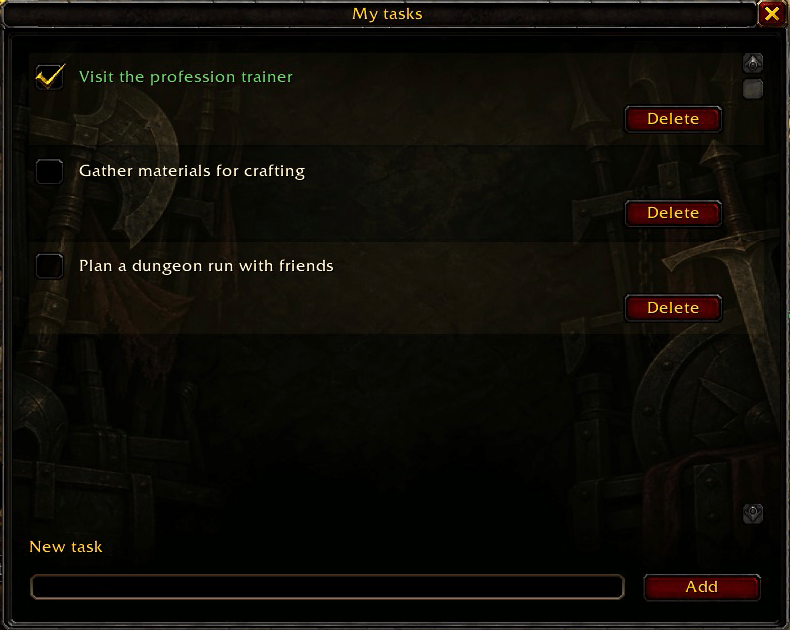
Actual in-game capture of the updated TDL interface with generic example tasks, including a completed task. Personal tasks and other game UI are excluded.
Description
TDL adds a simple in-game checklist to World of Warcraft: Forever. Write down your own goals so you can keep track of what you want to do next without leaving the game.
Use it to remember a profession trainer visit, materials to gather, items to buy, or a dungeon you want to run. Tasks are written and checked off manually.
Features
- Create, edit and delete tasks as your plans change. Deleting a task asks for confirmation.
- Mark tasks as complete with a checkbox, and uncheck them if you need to do them again.
- Keep longer lists organised in one continuous scrolling list with an always-visible scrollbar.
- Read long task text by clicking a truncated task to expand or collapse it. Double-click any task to edit it directly.
- Open or hide the list from the minimap, or use
/tdlor/todo. The window opens on login or UI reload when unfinished tasks exist. - Move the window by dragging it. Hover over the minimap icon for control tips; left-drag the icon to reposition it around the minimap.
- Use a separate list for each character, stored through the game's SavedVariables system.
How to use
Left-click the minimap icon, type in the New task field and press Add or Enter. Double-click a task to edit it inline; Enter adds a line. Edits save when focus leaves the field, when you close the window, reload the UI or log out. Escape finishes editing. Blank or over-limit edits preserve the saved text. Delete remains below each task. Close the window with the X, Escape when not editing, or the minimap icon. No keybind setup or other addon is required.
Languages
TDL automatically follows your client language. It includes English, Spanish (Spain and Latin America), French, German, Italian, Portuguese, Russian, Korean, Simplified Chinese and Traditional Chinese. English is used when a translation is unavailable.
Compatibility
This release targets WoW Forever 1.60.1, interface 16001, with build 70009 as the current development reference. Compatibility with Retail or Classic Era is not claimed. Earlier beta build 69913 showed failures restoring SavedVariables after reload, logout or restart. Persistence in build 70009 still needs validation; the historical limitation is not considered fixed.
Manual installation and feedback
Place the TDL folder in World of Warcraft/_classic_beta_/Interface/AddOns/, so that AddOns/TDL/TDL.toc exists. Restart the game and enable TDL. It works independently.
Report an issue · Source code · Compatibility notes
Include your game build and reproduction steps, and remove personal data before sharing screenshots or logs.
TDL: ToDo List Team