TBCA Reputable (TBC Anniversary) - Liteweight Reputation Tracker
- By
The ultimate lightweight reputation tracker for TBC Anniversary: Favorites, Auto-Switching, Session Stats, and Chat Alerts.

Discord_SN7wrKVwIC.png
Discord_RQKAoEjQVl.png
Discord_qKAfLvxG9i.png
Description
TBCA Reputable (TBC Anniversary)
Summary (One-Liner)
The ultimate lightweight reputation tracker for TBC Anniversary: Favorites, Auto-Switching, Session Stats, and Chat Alerts.
Description
TBCA Reputable is a feature-rich reputation tracker designed specifically for WoW Classic: TBC Anniversary. It eliminates the need to constantly check your reputation pane by providing smart auto-switching, detailed chat alerts, and a convenient "Favorites" dashboard.
Features
- 🎯 Smart Auto-Switch: Automatically changes your experience bar to track the faction you just gained reputation with (unless you are already Exalted).
- ⭐ Favorites System:
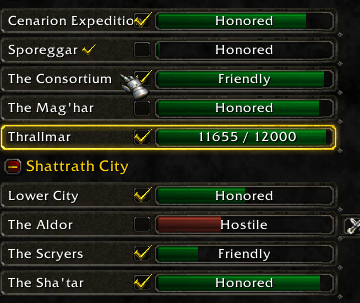
- Check the box next to any faction in your Reputation list to mark it as a Favorite.
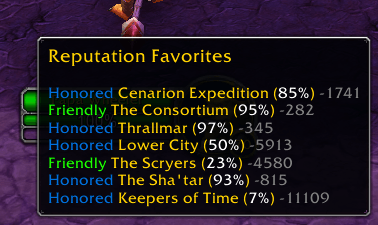
- Quick Dashboard: Hover over the Character Info / Micro Menu button (bottom right) to see a summary of all your favorite factions.
- 📈 Advanced Tracking:
- Real-time Stats: Shows your current Rank, Percentage, and exact value.
- Session Gain: Tracks how much reputation you've earned since logging in (e.g.,
+150). - Remaining: Displays exactly how much reputation is needed to reach the next standing (e.g.,
2150 remaining).
- 💬 Enhanced Chat: Upon gaining reputation, prints a detailed report:
[Faction]: 1500/3000 (Friendly) - 1500 Remaining.
Usage
Managing Favorites
- Open your Reputation Tab (press
Uor open Character Info > Reputation). - Click the checkbox to the left of any faction bar to add/remove it from favorites.
Viewing Favorites
Hover over the Character Info button (the head icon) in your main menu bar. A tooltip will appear above it listing your tracked factions.
Slash Commands
/rep fav <Faction Name>- Add or remove a faction from favorites by name./rep list- Print a list of your current favorites to the chat window.
Installation
- Download the zip file.
- Extract the
TBCA_Reputationfolder into yourInterface\AddOnsdirectory. - Reload your UI (
/reload).
Created by Unforvegan Dreamscythe-US
The TBCA Reputable (TBC Anniversary) - Liteweight Reputation Tracker Team


Owner