TargetForge
- By
Lightweight WoW Classic Era addon for saved target lists, quick targeting, raid marking, Active Targets portraits, and mouseover auto-marking.
SnÃmek obrazovky 2026-04-12 095458.png
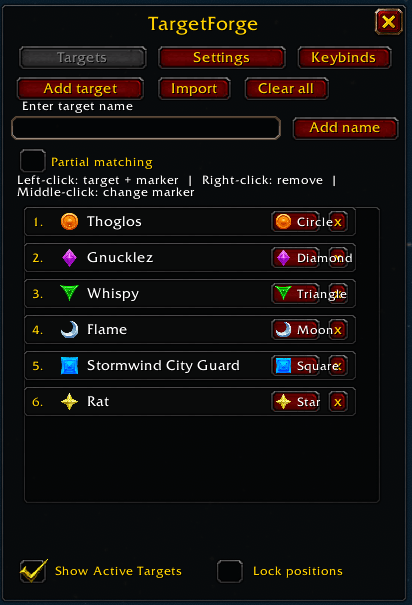
targetforge-new-menu.png
Description
WOW FOREVER BETA ADDON
TargetForge
TargetForge is a lightweight addon for World of Warcraft Forever Beta, designed to help you quickly find, target, and mark mobs from your saved target list.
How does TargetForge work?
Save the mobs you are looking for, assign raid markers, and use TargetForge to target them quickly.
Recommended: Assign a single key to Cycle Targets. Press it repeatedly to cycle through your saved mobs. Each press attempts to find the next saved target and apply its assigned raid marker.
Keybindings do not add mobs to your list and are not shortcuts for marking any currently selected mob.
Main Features
- Save mobs to a reusable target list
- Target saved mobs by name
- Assign and cycle through all eight raid markers
- Single-key target cycling
- Individual keybindings for each raid marker
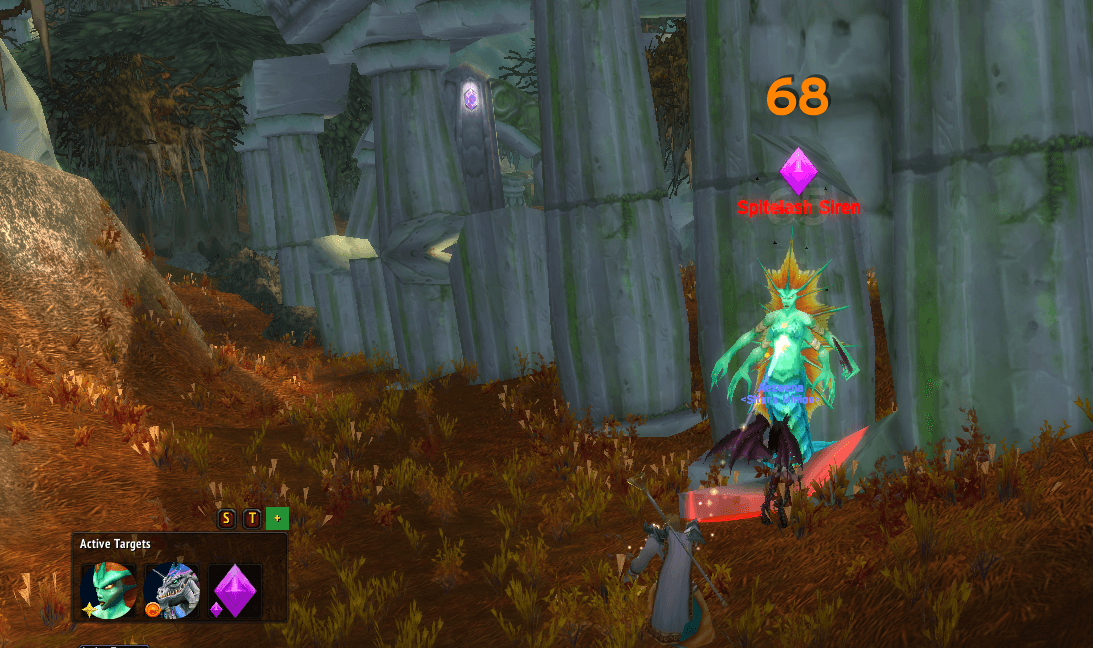
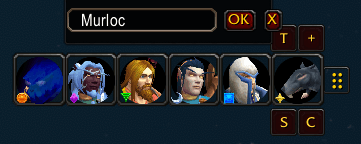
- Compact Active Targets window
- Live and session-cached target portraits
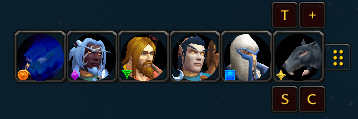
- Raid marker overlays on target portraits
- Add your current target or enter a name manually
- Optional partial-name matching
- Import multiple target names at once
- Optional protection of existing raid markers
- Raid marker cleanup tools
- Configurable window layouts and icon sizes
- Movable windows with position locking
- Blizzard-style minimap button
- Per-character target lists and settings
Getting Started
- Open TargetForge using /tf or the minimap button.
- Select a mob and click Add target, or enter its name manually.
- Repeat for any other mobs you want to find.
- Choose a raid marker for each saved mob.
- Open the Keybinds tab.
- Assign a keyboard shortcut to Cycle Targets.
- Close the window and use your shortcut while playing.
Keybindings Explained
TargetForge offers two types of keybindings. Both work with targets that have already been added to your TargetForge list.
1. Cycle Targets (Recommended)
This is the easiest way to use TargetForge. You only need one key.
- Open Keybinds in TargetForge.
- Find Cycle Targets.
- Click Set key.
- Press the keyboard shortcut you want to use.
- Save at least one mob in your target list.
- Press the shortcut repeatedly to cycle through the list.
Example
Your saved list contains:
- Wolf — Star
- Bear — Orange Circle
- Boar — Skull
You assign F to Cycle Targets.
Press F to try the Wolf, press it again to try the Bear, then again for the Boar. The cycle then returns to the beginning. When a matching mob can be targeted, TargetForge attempts to apply its assigned marker.
If a mob cannot be found or targeted, continue pressing the key to move through your saved list. TargetForge does not automatically scan the world or discover mobs that are outside normal targeting range.
2. Individual Raid Marker Keybindings
Alternatively, you can assign a different key to each of the eight standard WoW raid markers:
- Star
- Orange Circle
- Purple Diamond
- Green Triangle
- Moon
- Square
- Cross
- Skull
For example, if your saved Wolf has the Star marker and your saved Bear has the Circle marker:
- Press your Star key to target the saved Wolf.
- Press your Circle key to target the saved Bear.
The keybinding looks for the saved target assigned to that marker. It does not simply place that marker on whichever mob you currently have selected.
For most players, one Cycle Targets keybinding is simpler and more convenient than eight separate marker keys.
Active Targets Window
TargetForge includes a compact Active Targets window showing your saved targets as clickable icons. These can display target portraits and assigned raid marker overlays.
- Left-click: Target the saved mob and attempt to apply its marker.
- Right-click: Remove the saved target and release its marker.
- Middle-click: Change the assigned marker.
You can adjust the window size, icon sizes, marker overlay size, growth direction, and position.
Raid Marker Management
Assign markers to saved targets and optionally enable Respect existing markers to preserve markers already placed on units.
TargetForge also includes a cleanup button for clearing all eight raid markers. This action is available outside combat only.
Designed For
- Rare mob hunting
- Repeated farming routes
- Dungeon target priorities
- Quickly reacquiring important mobs
- Players who prefer keyboard-driven targeting
Compatibility
Game: World of Warcraft Forever Beta
Interface: 16001
Addon version: 1.0.7-forever-beta
TargetForge is developed for WoW Forever Beta. Compatibility with other WoW clients is not guaranteed. Secure targeting and protected UI operations follow the restrictions of the game client.
Notes
- Saved targets and settings are stored per character.
- Targets must be added to your list before keybindings can target them.
- Normal WoW targeting limitations still apply.
- Protected UI changes are restricted during combat.
- Active Targets portraits may use live or session-cached data.
TargetForge Team