promotional bannermobile promotional banner

Tank Mitigation Lab

A mitigation calculator that uses live stats, planned cooldowns, and benchmark boss hits to compare tank survival setups.
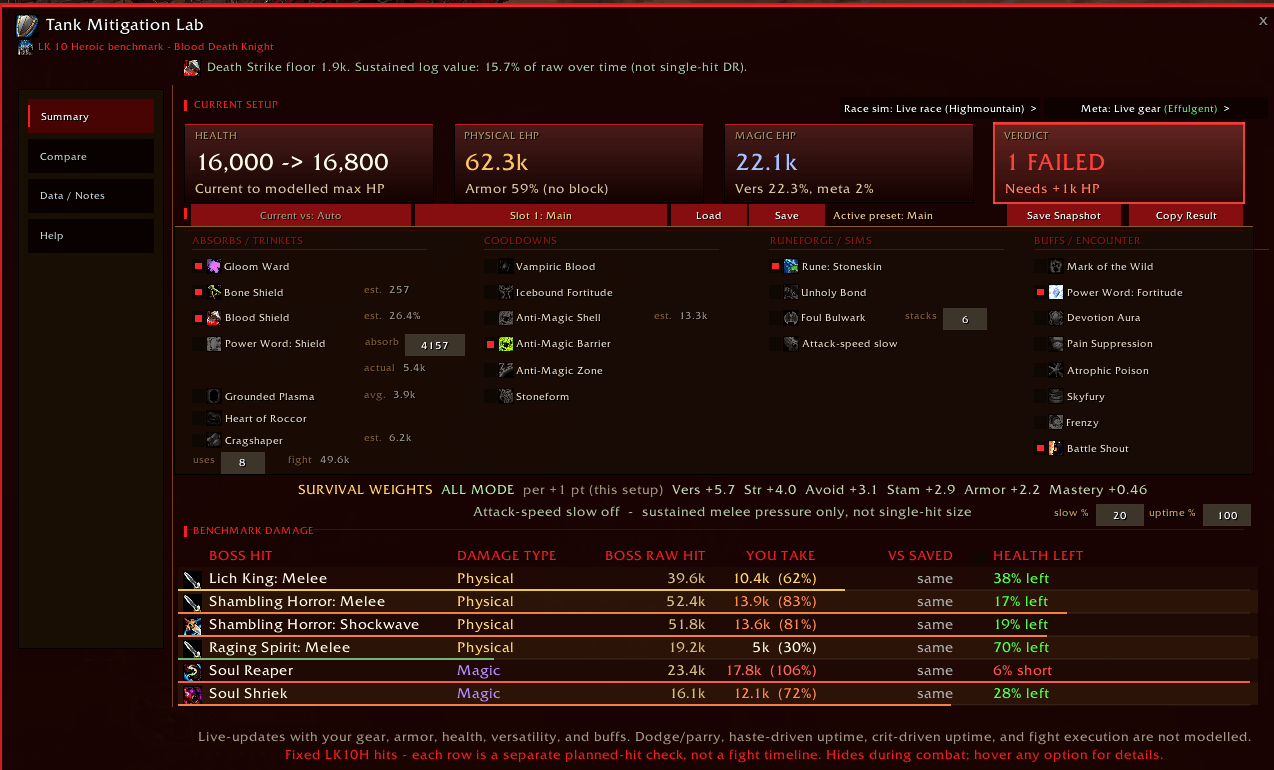
Screenshot 2026-06-29 023047.png

Screenshot 2026-06-29 023047.png

Screenshot 2026-06-29 023101.png

Screenshot 2026-06-29 023101.png

Description

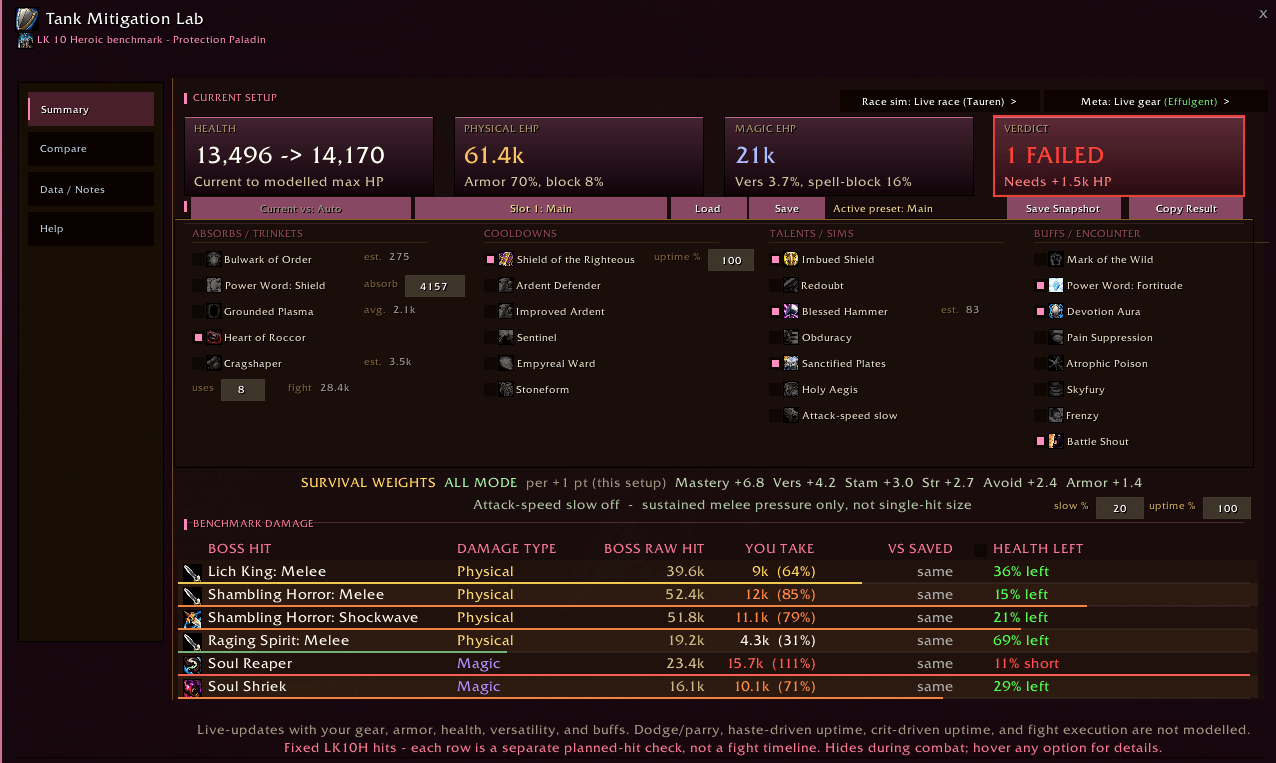
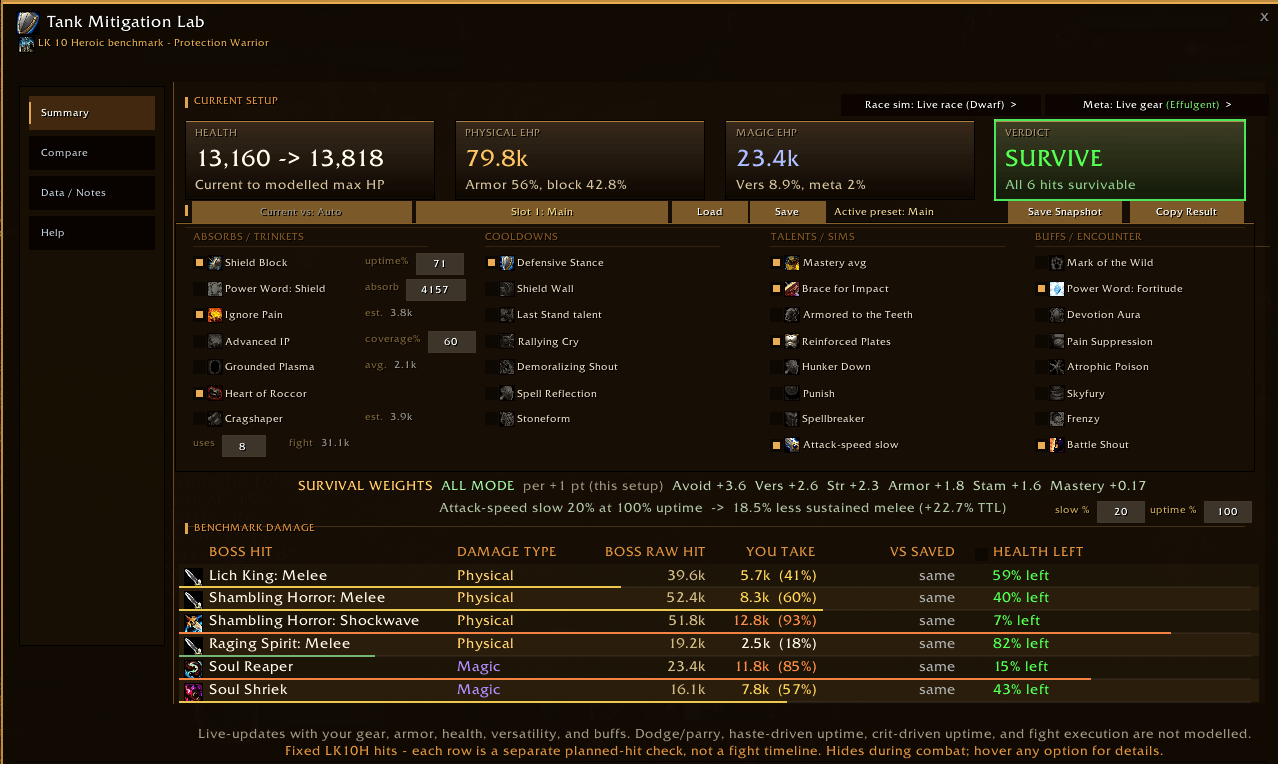
Tank Mitigation Lab is a pre-pull mitigation calculator for Protection Warriors. It helps you compare gear, consumables, racials, absorbs, cooldown plans, Shield Block uptime, and mastery estimates against a fixed Lich King 10-player Heroic benchmark damage profile.

The addon answers a practical tanking question:

If this benchmark boss hit lands on my current setup, how much damage do I take, and do I survive?

This is not a combat helper. Tank Mitigation Lab hides and stops updating in combat. It is intended for preparation before a pull.

Current Scope

Version 1.0.0 supports Protection Warrior.

The current benchmark profile is based on hard-hitting level-scaled Lich King 10-player Heroic tank mechanics. The goal is to provide a consistent damage profile for comparing tank setups.

If one setup takes less modeled damage than another under the same benchmark, that setup is generally tankier against similar incoming damage patterns.

Main Features

  • Live HP, armor, versatility, block, and Ignore Pain tracking
  • Physical and magic damage modeling
  • Shield Block uptime input
  • Ignore Pain absorb modeling
  • Power Word: Shield absorb input
  • Defensive Stance detection
  • Shield Wall toggle
  • Demoralizing Shout toggle
  • Spell Reflection magic reduction toggle
  • Stoneform physical reduction toggle
  • Last Stand talent toggle
  • Shambling Horror Enrage toggle
  • Optional Mastery average estimate
  • Required-to-survive display mode
  • Save Snapshot comparison mode
  • Race simulation for Live race, Dwarf, and Highmountain
  • Minimap button
  • Automatic combat safety: hides and stops updating in combat

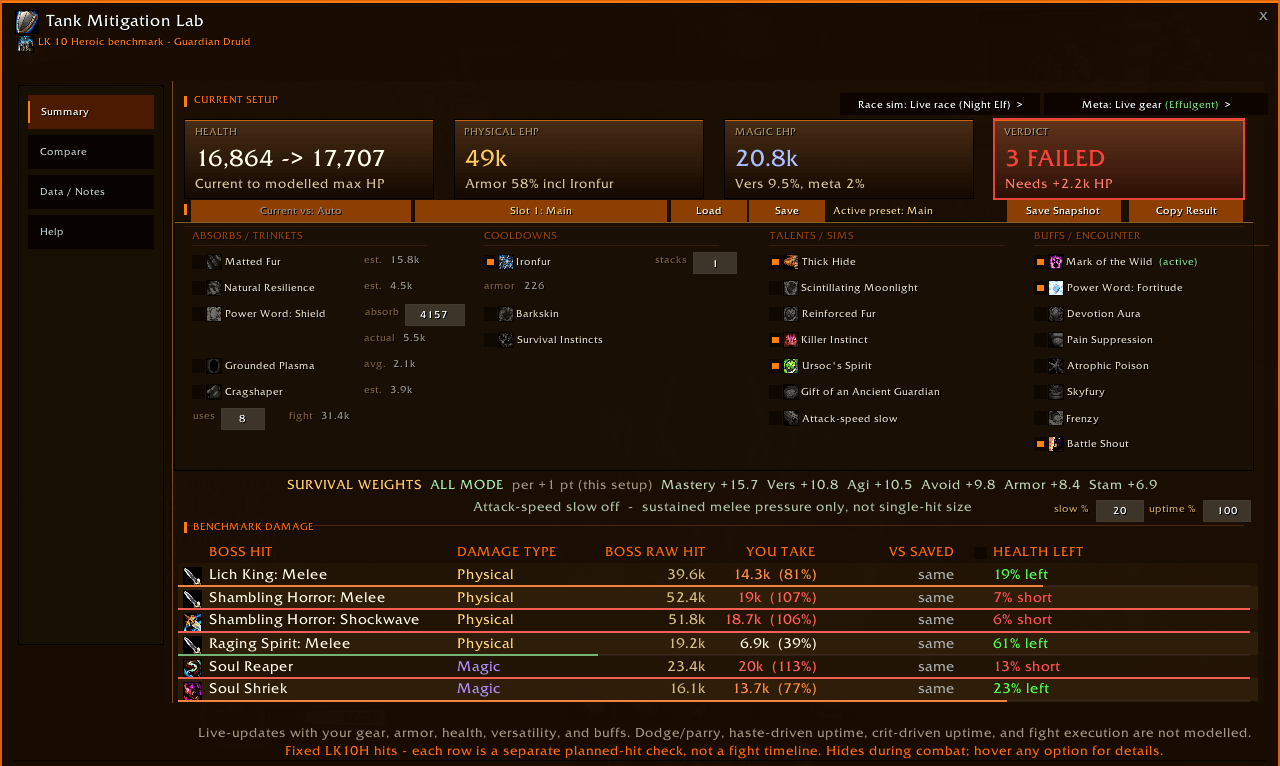
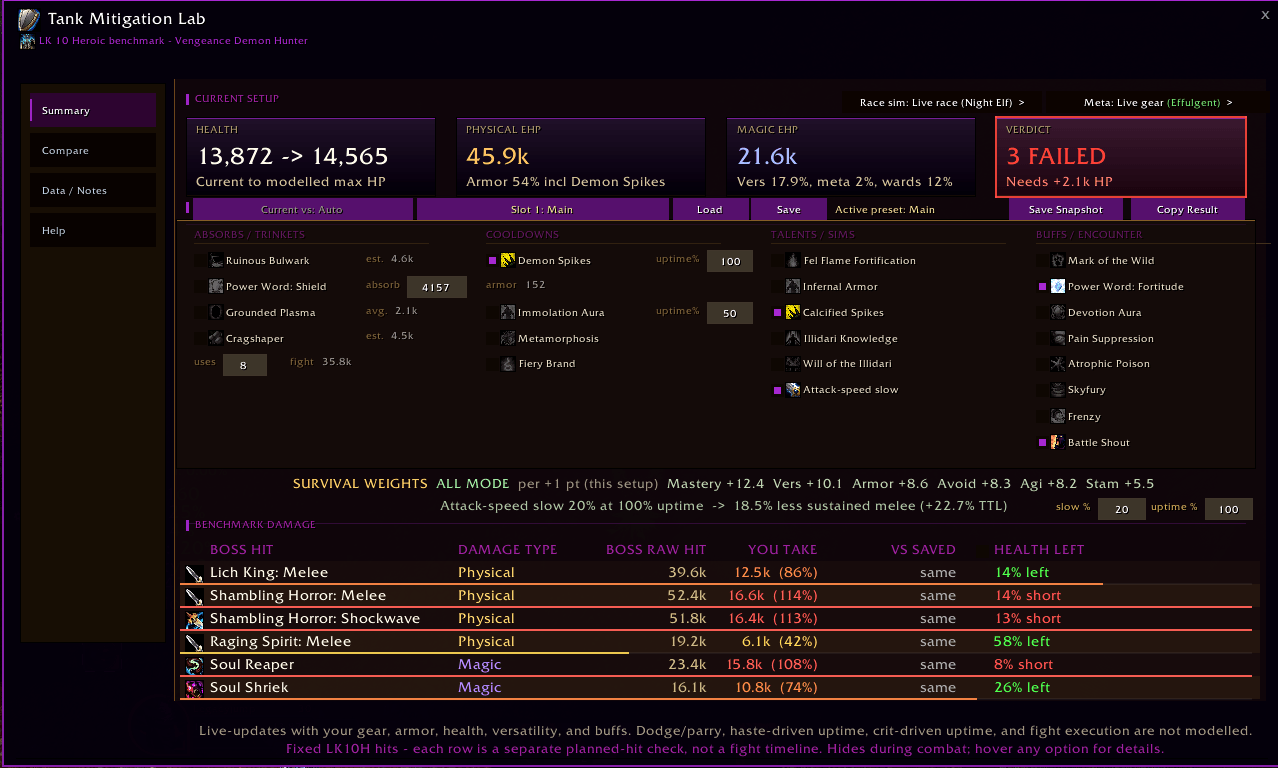
What The Table Shows

Each row represents a benchmark tank threat.

Current rows:

  • Lich King Auto Attack
  • Shambling Horror Auto Attack
  • Shambling Shockwave
  • Raging Spirit Auto Attack
  • Soul Reaper
  • Soul Shriek

Columns:

  • Threat: the boss ability or attack being modeled
  • Type: Physical or Magic
  • Raw: benchmark hit before your mitigation
  • Taken: modeled damage after your selected mitigation
  • VS SAVED: percent difference from your saved snapshot
  • Health Left: HP remaining after the modeled hit
  • Need To Live: optional mode showing how much extra HP is needed for failed rows

How Damage Is Calculated

Tank Mitigation Lab starts with a raw benchmark hit, then applies your current defensive setup.

For physical damage, the model applies:

  • Raw benchmark hit
  • Reduced by armor
  • Reduced by versatility
  • Reduced by the Protection Warrior defensive profile
  • Reduced by Shield Block if selected and the hit is blockable
  • Reduced by selected cooldowns or racials
  • Reduced by selected absorbs
  • Final result is the modeled damage taken

For magic damage, the model applies:

  • Raw benchmark hit
  • Reduced by versatility
  • Reduced by the Protection Warrior defensive profile
  • Reduced by selected magic-relevant cooldowns
  • Reduced by selected absorbs
  • Final result is the modeled damage taken

Armor and block only affect physical damage. Shield Block only affects blockable physical rows. Magic rows are not reduced by armor or Shield Block.

Live Stat Updates

The addon updates automatically while out of combat when relevant stats change.

It reads or reflects:

  • Maximum health
  • Armor
  • Versatility damage reduction
  • Current block value
  • Ignore Pain tooltip absorb value
  • Defensive Stance aura state
  • Gear changes
  • Buffs that change HP, armor, versatility, or block

This means swapping gear, applying a consumable, changing buffs, or changing stance should update the model before combat.

The Defensive Stance checkbox represents the measured Protection Warrior defensive profile used by the model.

It is not just a plain tooltip copy. It represents the expected defensive layer from a Protection Warrior tanking profile, then combines with your live armor, versatility, block, cooldowns, and absorbs.

The addon also checks for Fight Through the Flames where relevant for the magic component.

Shield Block is controlled by an uptime input.

Examples:

  • 50 means Shield Block is modeled as active for 50% of relevant blockable physical hits.
  • 60 means Shield Block is modeled as active for 60% of relevant blockable physical hits.
  • 100 means Shield Block is modeled as active for all relevant blockable physical hits.

The addon uses your live block value from the character sheet.

Shield Block affects:

  • Lich King Auto Attack
  • Shambling Horror Auto Attack
  • Raging Spirit Auto Attack

Shield Block does not affect:

  • Shambling Shockwave
  • Soul Reaper
  • Soul Shriek

Ignore Pain uses your current tooltip absorb amount when possible.

If your Ignore Pain tooltip changes because of gear, attack power, buffs, or other effects, the addon should update the value while out of combat.

The Ignore Pain toggle models the selected absorb amount against incoming hits. It is still a planned-value model: it cannot know your exact future rage spending, timing, or whether Ignore Pain will already be partially consumed during a real fight.

Power Word: Shield is manually entered because the absorb amount depends on the priest casting it.

Use the absorb value from your priest's tooltip or a known in-game value.

The addon treats PW:S as an external absorb pool applied to the modeled hit.

Cooldown And Racial Toggles

Models Shield Wall as a 40% damage reduction.

Models Demoralizing Shout as a 20% damage reduction from affected enemies.

Models the magic damage reduction portion of Spell Reflection. It affects magic rows, such as Soul Reaper and Soul Shriek, when selected.

Models Dwarf Stoneform as a physical damage reduction. It only applies where Stoneform is valid for the selected race mode.

Models the Last Stand talent interaction with Shield Wall by increasing the modeled health pool when both the Last Stand talent and Shield Wall are selected.

The race selector lets you compare:

  • Live race
  • Dwarf
  • Highmountain

Current race effects modeled:

  • Dwarf enables Stoneform modeling.
  • Highmountain adds the baseline versatility racial used by the model.
  • Live race uses your current character race where possible.

The Shambling Enrage toggle changes the Shambling Horror Auto Attack row to the enraged benchmark value.

Use this if you want to test whether your setup survives an enraged Shambling Horror hit.

Mastery average is optional because it is not guaranteed survival.

Protection Warrior mastery can cause blocks to become critical blocks. Critical blocks reduce more damage, but they are RNG.

When Mastery avg is enabled:

  • It only affects blockable physical rows.
  • It only applies while Shield Block is selected.
  • It uses your live block value.
  • It uses your live critical block chance where possible.
  • It estimates average damage taken, not guaranteed damage taken.

This is useful for gear comparison, but it should not be treated the same as guaranteed mitigation like armor, stamina, versatility, or a selected cooldown.

Save Snapshot stores your current modeled setup.

The saved setup includes your current stats, selected toggles, absorbs, Shield Block uptime, race mode, and other model inputs.

After saving, the VS SAVED column compares your current setup against the saved snapshot.

Examples:

  • 3.0% less means your current setup takes 3.0% less modeled damage for that row.
  • 2.5% more means your current setup takes 2.5% more modeled damage for that row.

This is useful for comparing:

  • Gear pieces
  • Consumables
  • Race options
  • Cooldown plans
  • Shield Block uptime assumptions
  • Absorb assumptions
  • Mastery average on/off

Required to survive changes the final column.

Instead of showing health left, failed rows show how much extra HP would be required to survive that benchmark hit.

This is useful when comparing stamina, enchants, consumables, or cooldown combinations.

What The Addon Does Not Model

Tank Mitigation Lab is intentionally deterministic. It does not try to simulate a full Protection Warrior rotation.

It does not directly model:

  • Haste-driven rage generation
  • Crit/parry RNG
  • Full rotation quality
  • Rage waste
  • Multiple mobs increasing rage income
  • Bloodlust
  • Power Infusion
  • Trinket proc timing
  • Weapon proc timing
  • Healer reaction time
  • Movement or downtime
  • Fight execution mistakes

Instead, the addon lets you enter planned results, such as Shield Block uptime and absorb amounts, then calculates survival from those values.

Best Stats To Compare

The tool is most reliable for comparing defensive stats that directly affect the model:

  • Stamina
  • Armor
  • Versatility
  • Block value
  • Mastery average during planned Shield Block
  • Ignore Pain amount
  • Absorbs
  • Cooldown coverage

Haste and crit can still be valuable in real gameplay, but their defensive value depends heavily on rotation, resources, RNG, encounter timing, and execution. Because of that, they are not directly modeled as guaranteed mitigation.

Tank Mitigation Lab is a pre-pull tool.

When combat starts, the addon hides and stops updating. This keeps the model focused on preparation.

Slash Commands

  • /tml
  • /tankmitigationlab
  • /tml snapshot
  • /tml sb 0-100
  • /tml ip absorb
  • /tml pws absorb
  • /tml race live
  • /tml race dwarf
  • /tml race highmountain
  • /tml reset
  • /tml help

Recommended Use

  1. Open the addon before combat.
  2. Equip the gear you want to test.
  3. Apply relevant buffs or consumables.
  4. Set your expected Shield Block uptime.
  5. Toggle planned cooldowns or absorbs.
  6. Save a snapshot.
  7. Change gear, buffs, or toggles.
  8. Compare the VS SAVED column and Health Left results.

Lower modeled damage taken means the setup is tankier for that benchmark row.

The Tank Mitigation Lab Team

profile avatar
  • 4
    Projects
  • 13
    Downloads

I make addons for niche low level projects, soloing and general QoL

More from TheDruidMan

  • Compact Stats HUD project image

    Compact Stats HUD

    • 3
    • Addons

    A tiny, movable HUD that shows your live character stats — and keeps showing them in combat, where most stat readouts go dark.

    • 3
    • June 27, 2026
    • Addons
    • +1
  • ResistanceRestored project image

    ResistanceRestored

    • 3
    • Addons

    A simple panel that shows your resistance for every magic school and how much spell damage it actually reduces, for any target level.

    • 3
    • June 26, 2026
    • Addons
    • +2
  • BossStats project image

    BossStats

    • 5
    • Addons

    Shows old raid boss armor, physical damage reduction, and the best armor-reduction tools to strip bosses to zero armor.

    • 5
    • June 25, 2026
    • Addons
    • +1
  • Compact Stats HUD project image

    Compact Stats HUD

    • 3
    • Addons

    A tiny, movable HUD that shows your live character stats — and keeps showing them in combat, where most stat readouts go dark.

    • 3
    • June 27, 2026
    • Addons
    • +1
  • ResistanceRestored project image

    ResistanceRestored

    • 3
    • Addons

    A simple panel that shows your resistance for every magic school and how much spell damage it actually reduces, for any target level.

    • 3
    • June 26, 2026
    • Addons
    • +2
  • BossStats project image

    BossStats

    • 5
    • Addons

    Shows old raid boss armor, physical damage reduction, and the best armor-reduction tools to strip bosses to zero armor.

    • 5
    • June 25, 2026
    • Addons
    • +1