Compact Stats HUD
- By
A tiny, movable HUD that shows your live character stats — and keeps showing them in combat, where most stat readouts go dark.
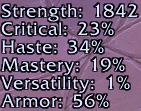
Screenshot 2026-06-28 171842.png
Description
A small, clean on-screen HUD that displays your live character stats and updates in real time. Pick exactly which stats you want, drag it where you like, and forget about it.
Why it's different
On modern clients, a lot of stat displays stop updating the moment you enter combat — the game hides many values during a fight. Compact Stats HUD reads your stats through character-sheet APIs that keep working in combat, so your numbers stay live mid-fight instead of freezing or blanking out. That's the whole point: see your real stats exactly when they matter most.
Stats it shows
- Primary — Strength, Agility or Intellect, chosen automatically from your spec
- Critical Strike %
- Haste %
- Mastery %
- Versatility %
- Armor — shown as actual damage-reduction %, the same number your character sheet uses
- Speed — current movement speed %
Every stat can be turned on or off independently, and the HUD resizes to fit only what you've enabled.
Options
Open Esc → Options → AddOns → Compact Stats HUD (or type /statshud) and tick the stats you want. Changes apply instantly.
Moving it
The HUD is locked by default so you never drag it by accident.
/statshud unlock(or untick Lock HUD position in options)- Drag it with the left mouse button
/statshud lockwhen you're done
Slash commands
/statshud— open the options/statshud unlock/lock— move or lock the HUD/statshud reset— restore the default position/statshud toggle <stat>— show/hide one stat (e.g./statshud toggle speed)
A note on Speed
Movement speed is a protected value in combat, so it's the one stat that can't update mid-fight — during combat it holds your last out-of-combat reading. The other six stats update live throughout the fight.
The Compact Stats HUD Team