TalentTreeDiff
Compares your current talent build against a pasted export string and highlights the differences directly on the talent tree — no respeccing required.
TalentTreeDiff
Compare your current talent build against any talent export string — and see exactly what's different, highlighted directly on the real talent tree. No respeccing required.
The problem
You're looking at a build guide (Wowhead, Raidbots, a streamer's stream, whatever) and want to know what's different from your current setup. Until now the only way was to actually respec, compare by memory, and respec back.
What TalentTreeDiff does
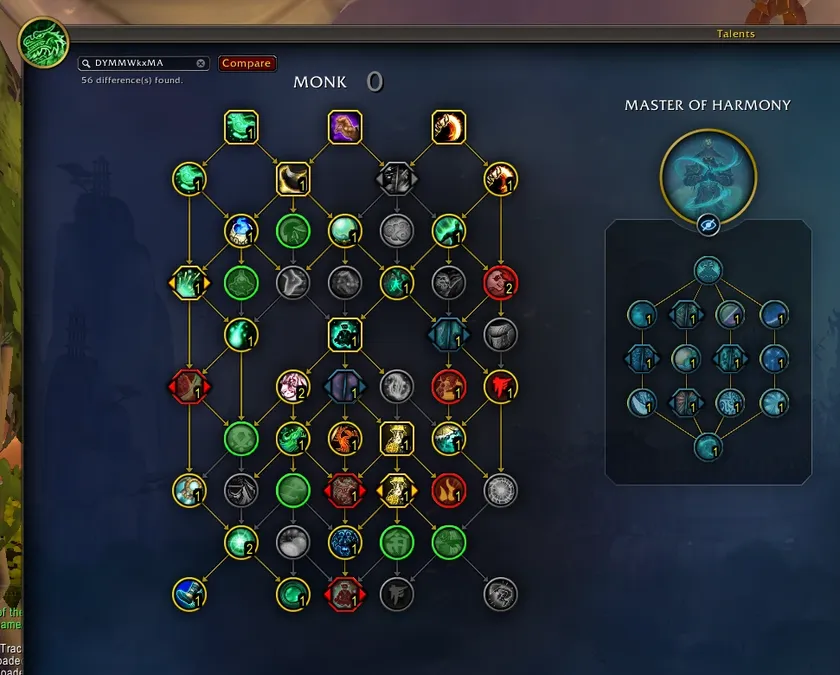
- Paste any talent export string into the small search-style box that appears in the top-left of the real Talents window.
- Click Compare (or press Enter).
- The talent icons light up right where your build differs from the pasted one:
- Green = a point the compared build has that you don't
- Red = a point you have that the compared build doesn't
- Yellow = same rank, but a different choice (including Hero Talent tree differences)
- Your own build is never touched. TalentTreeDiff only reads data — it never applies, saves, or spends anything.
- Clear the box (or click the built-in X) to remove the highlights.
There's also a standalone comparison window (/talenttreediff or /td) with a text list of differences, useful if you want a summary instead of (or alongside) the tree overlay.
How it works
TalentTreeDiff decodes the talent export string format itself, using the same bit-stream utility Blizzard's own UI uses to generate these strings (ExportUtil). It never calls any protected/combat-restricted function, creates no temporary loadouts, and never opens or modifies anything about your character — it's a pure read-only comparison tool.
Commands
/talenttreediffor/td— opens the standalone comparison window
Notes
- Works for any class/spec — nothing is hardcoded per class.
- Handles multi-rank "tiered" talents (different effect per rank) as well as simple two-option choice talents and Hero Talent tree selection.
- Built for the current (Midnight) talent tree system.
The TalentTreeDiff Team