Forever News
Read WoW Forever patch notes and hotfixes in-game: filter by class, search, copy text, and see the key changes at a glance.
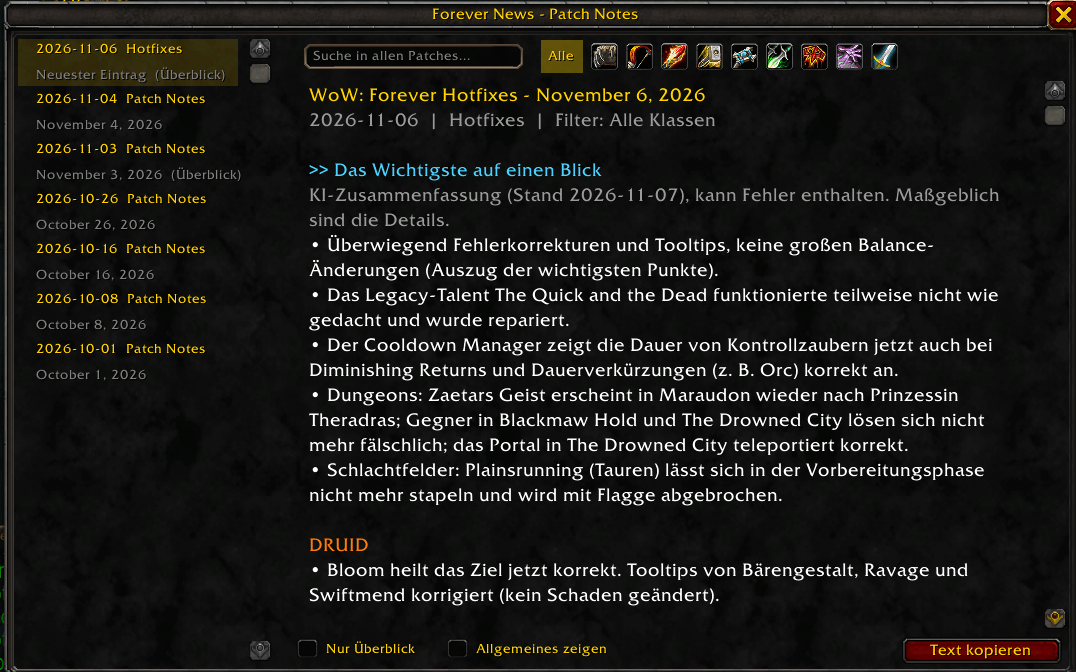
forever-news-overview.png
Description
Forever News
Read the patch notes and hotfixes for World of Warcraft: Forever right inside the game. No need to alt-tab to a website.
Features
- All patch notes and hotfixes in one window, newest first, with an unread marker and a minimap button
- Filter by class (or show everything), including the talent trees
- Search across all patches
- "At a glance" overview with the key changes per patch and per class (written with AI help, so always check the full notes for details)
- Copy any text with Ctrl+C using the copy view
- Colour-coded changes: increases, reductions and removals stand out
How to use
Type /fnews or click the minimap button. Pick a class icon at the top to filter, or leave it on "All". Use the search box to look up a spell, talent or ability across all patches.
Notes
- The notes come from Blizzard's official patch notes and hotfix posts. New notes arrive with addon updates.
- This is a fan-made addon. It is not affiliated with or endorsed by Blizzard Entertainment.
- Built for WoW: Forever (interface 16001).
Forever News Team