allclear.png
copperoremined.png
bagsearching.png
Description
T3chs Farm Bar Part of the T3chnological QoL Series
T3chs Farm Bar is a lightweight, customizable tracking matrix built to help you monitor your farming goals, item counts, and gold progress in real-time—without cluttering your screen!
Whether you’re farming Enchanting dusts, Mining ores, or chasing ultra-rare mount drops like Ashes of A'lar, T3chs Farm Bar keeps your objectives organized and right at your fingertips.
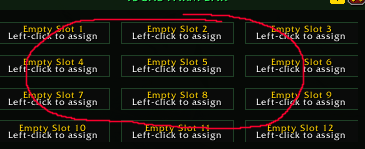
🌟 Key Features12-Slot Item Tracker Grid: Track up to 12 items simultaneously with clean, dynamic visual progress bars.
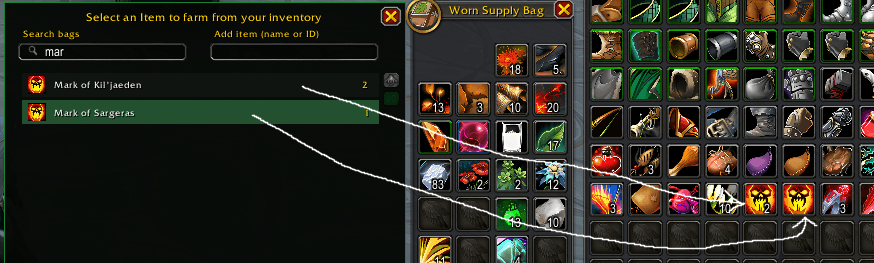
Smart Bag & Reagent Scanning: Automatically scans your standard inventory and Reagent Bags for items.
Item Search & ID Resolver: Can't find an item in your bags? Simply paste the item name or Wowhead Item ID into the search picker to track items you don't even own yet (like rare mounts or future craftables)!
Built-in Gold Tracking: Switch over to the Gold tab to track raw gold farming goals. Set your target, watch your progress, and see exactly how much you have left to earn.
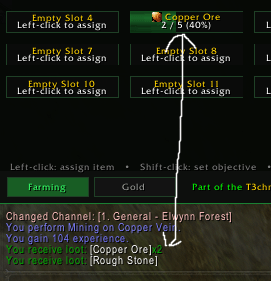
Objective Completion & Bonus Loot Alerts: Set target goals (e.g., target 5 Copper Ore when you only have 1). Once you hit your target, get a clean completion notification! Exceed your goal? Earn bonus loot alerts!
Runs Silently in the Background: Even when the main window is hidden, T3chs Farm Bar actively tracks item gains, gold, and objective progress behind the scenes.
Per-Character Profiles: Seamlessly switches profiles per character. Farm dusts on your Enchanter, ores on your Miner, and mounts on your main!
🐮 Quick Toggle & Positioning
Interactive Toggle Button: Click the Cow Button to instantly show or hide the main panel.
Fully Movable & Lockable: Drag both the main frame and the toggle button anywhere on your screen, then lock them in place so they never shift during combat.
🎮 How to Use / ControlsActionControl
Assign ItemLeft-Click any grid slot to open the inventory & item search picker.Set Objective TargetShift + Left-Click a slot to set a numerical target goal (e.g., 100).Clear SlotRight-Click or Ctrl + Left-Click a slot to wipe it clean.Move Frame / ButtonUnlock the frame using the lock icon in the top right, then drag to reposition.
🐛 Feedback & Future Updates
This addon is maintained! As with any new release, there may be minor bugs, edge cases, or slight visual oversights. If you encounter any issues or have ideas for QoL improvements, feel free to drop a comment or report a bug. Updates, optimizations, and fixes will be rolled out when availble!
Note: Designed with performance in mind—zero heavy library dependencies and minimal memory footprint!
T3chsFarmBar Team