SVCleaner
- By
A SavedVariables and temporary data manager for World of Warcraft. Find your addons' data, compare your characters, and prepare your cleanup. An in-game addon to explore. A local companion to back up and apply changes.
Your data. A clearer interface.
A SavedVariables and temporary data manager for World of Warcraft.
Find your addons' data, compare your characters, and prepare your cleanup.
An in-game addon to explore. A local companion to back up and apply changes.


Get started · Features · Comparison · Compatibility · Commands
Getting started
01 Choose your WoW versionRun Choose your client in the WoW version selector. The inventory and backups belong to that client folder. |
02 Find your dataBrowse files by addon, account, and character. Search for a variable, inspect its contents, and identify files with no matching installed addon. In WoW, type |
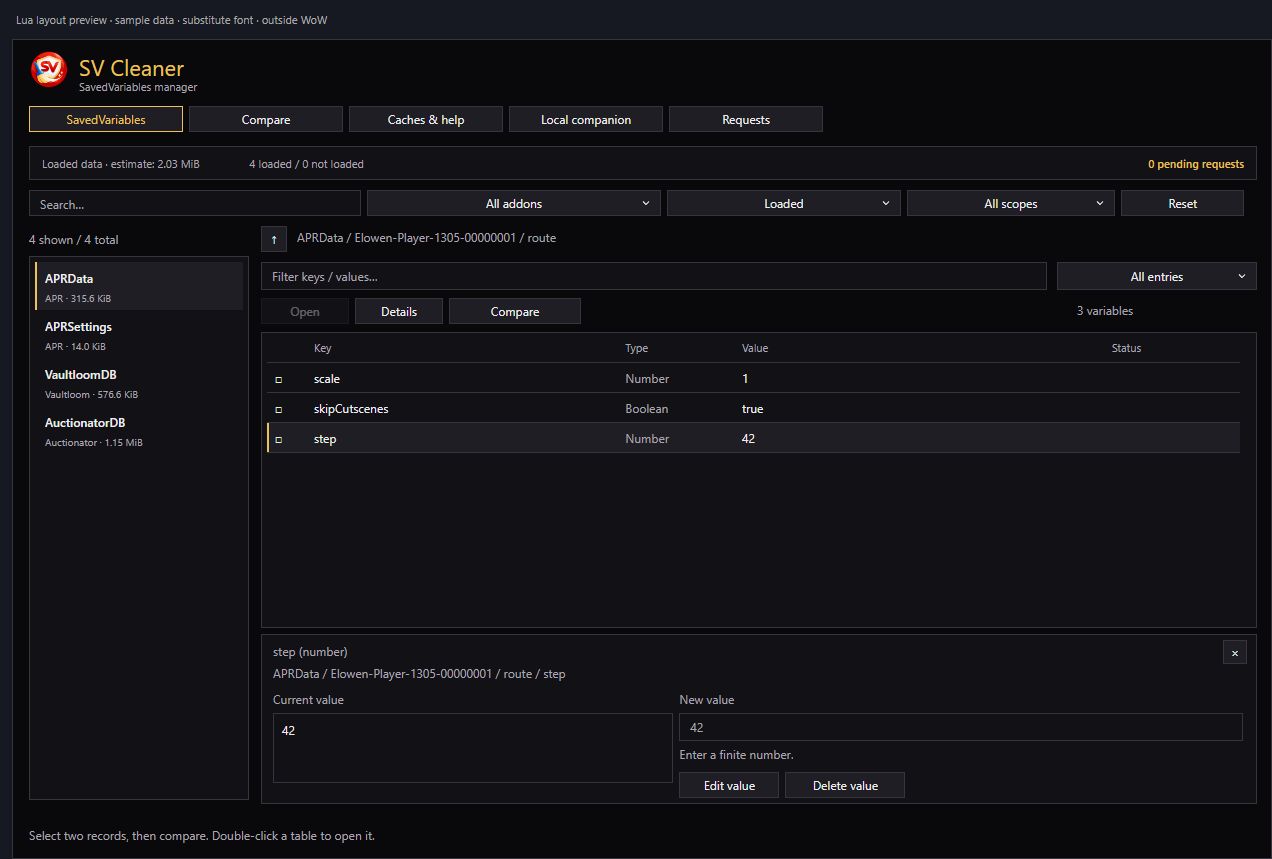
03 Prepare your changesEdit a value, compare two characters, or select several files for deletion. Review the before and after values. The grid aligns keys, types, values, and status. Identity fields remain protected. |
04 Back up and applyClose all WoW clients, then apply the pending changes in the companion. Original files are backed up before any writes. Use the history to inspect a transaction, measure its changes, or prepare a restore. |
Note The addon prepares requests; the companion applies them to files while WoW is closed. To retrieve requests prepared in game, log out, close WoW, then import the in-game requests in the companion.
Installation
WoW addon
Install SV Cleaner directly from CurseForge or Wago.
Local companion
With Python 3.10 or newer, double-click Lancer-SVCleaner.cmd, or specify your game client folder:
python companion/app.py --wow "D:\Jeux\World of Warcraft\_retail_"
The companion uses Python's standard library, listens on 127.0.0.1, and opens your browser. Your data stays on your PC. Press Ctrl+C in its console to stop the server and discard pending changes that have not been applied.
The companion interface is currently in French. The steps below describe its actions in English.
To try the interface with isolated sample data:
python companion/app.py --demo

Features
🔎 Inventory and exploration
|
✏️ Editing and cleanup
|
👥 Characters and profiles
|
📊 Storage and maintenance
|
Both interfaces offer light and dark themes. The addon window can be moved and resized; menus close on outside clicks or Escape. The window closes when you enter combat.
In game and on disk
| Function | In-game addon | Local companion |
|---|---|---|
| Explore variables | Accessible data from loaded addons | Files in the selected WoW client folder |
| Inspect other characters | Character blocks in loaded account-wide variables | Character folders and account-wide variables |
| Edit, delete, or copy | Prepare requests | Back up and apply file changes |
| Identify orphaned files | — | Match files against installed addons |
| Measure storage | Bounded estimates of loaded data | Actual bytes, charts, and history |
| Maintain caches | Command and settings guidance | Rename a cache folder with restore support |
A disabled but installed addon is still installed. A file declared by another addon is marked as linked / needs review. Blizzard data and SV Cleaner's own data are protected.
Characters and comparison
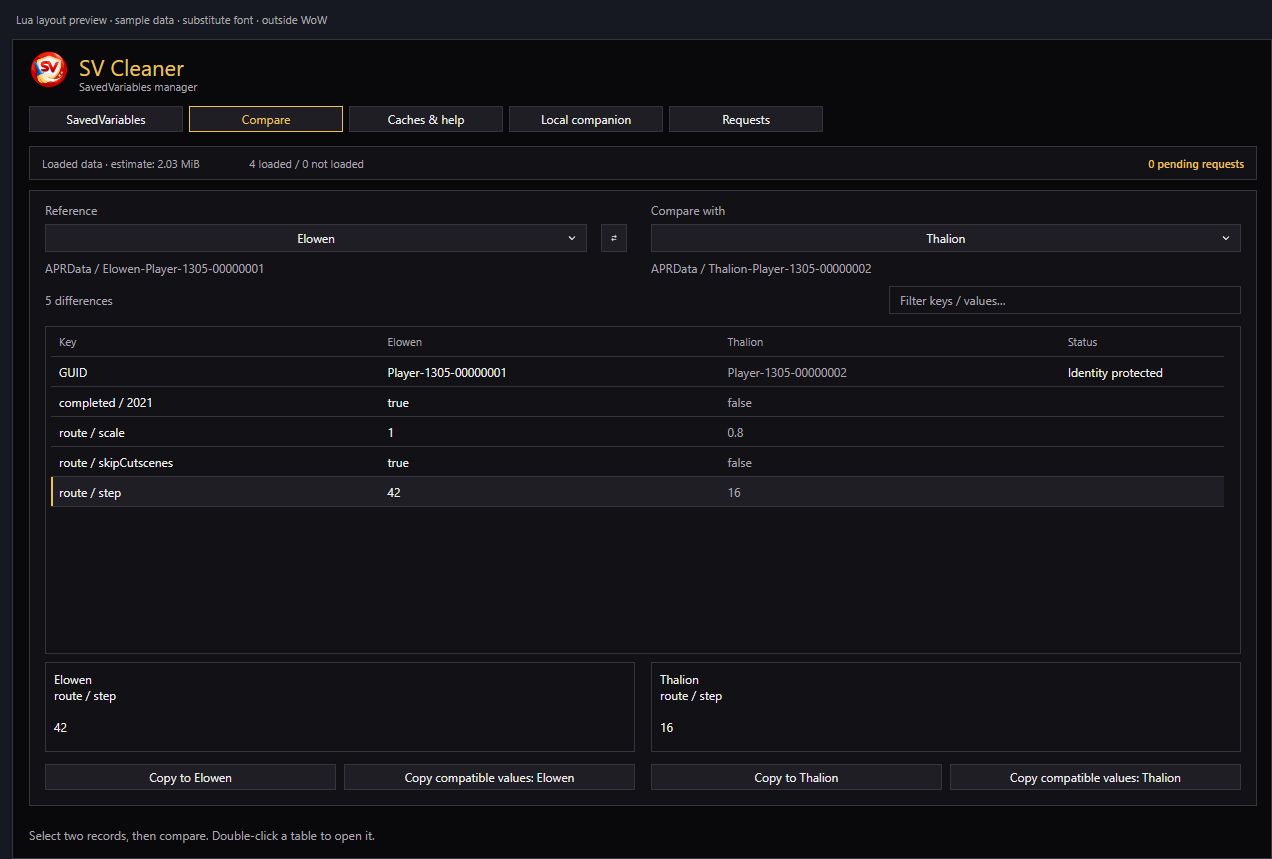
In the addon, open a variable such as APRData, check two entries, then click Compare. Column headers show character or profile names; each row aligns a key and its two values. Select a difference to inspect it and use Copy to [character].
In the companion, select the addon, account, and two characters or profiles in the comparison view. You can also compare compatible per-character files belonging to the same account.
Copies preserve destination keys and the parent identifier. They operate on existing values of the same type. GUIDs, IDs, and identity fields, missing keys, and incompatible types remain visible but cannot be copied through these actions.
“Not observed” does not mean “deleted character.” The registry only knows characters encountered since installation, and an old WTF folder may remain. Review these clues before cleaning up.
Data grid and comparison previews
These previews use the Lua layout with sample data and a substitute font. They are rendered outside the game.

Backups and applying changes
- Prepare changes in the addon or companion.
- Close WoW after logging out; import in-game requests when needed.
- Review the pending changes, then choose Back up and apply.
- Open the history to find original files or restore a transaction compatible with the current file contents.
Original files and the journal are stored in data/<installation>/<transaction>. The companion checks file contents before writing; a restore refuses to overwrite data that has changed in the meantime.
Data removed from active files is different from physical disk space freed: retained backups still occupy storage. Resetting a cache does not guarantee better FPS or latency.
Compatibility and languages
The shipped TOCs declare the following client families:
| Family | Dedicated TOC |
|---|---|
| Retail | SVCleaner_Mainline.toc |
| Classic Era / Hardcore | SVCleaner_Vanilla.toc |
| TBC / Anniversary | SVCleaner_TBC.toc |
| Wrath / Titan | SVCleaner_Wrath.toc |
| Cataclysm | SVCleaner_Cata.toc |
| Mists of Pandaria | SVCleaner_Mists.toc |
| Forever / Camelot | SVCleaner_Camelot.toc |
PTR and beta clients use their corresponding declared interfaces. The companion identifies the client family from the installation metadata; ambiguous clients remain marked as uncertain. Automated checks do not replace testing in each exact game client.
The addon follows WoW's language: English, French, German, European and Latin American Spanish, Italian, Brazilian Portuguese, Russian, Korean, Simplified Chinese, and Traditional Chinese. The enGB and ptPT aliases use the enUS and ptBR catalogs respectively. The local companion is in French.

Commands
| Command | Action |
|---|---|
/svc or /svcleaner |
Open or close the in-game interface |
python companion/app.py --wow "…" |
Open the companion for the specified game client folder |
python companion/app.py --demo |
Try the companion with sample data |
License
Copyright (c) 2026 Neogeekmo. SV Cleaner's original code, documentation, and artwork, including the addon and local companion, are distributed under the MIT License. You may use, modify, and redistribute them, including commercially, provided you retain the copyright and license notice. The software is provided without warranty, subject to applicable law. See the MIT license text.
The project notices explain third-party rights, Blizzard trademarks, and precautions for SavedVariables cleanup. Blizzard's UI Add-On Development Policy applies separately and requires free addon distribution and publicly accessible addon code. SV Cleaner is an independent project and is not endorsed by Blizzard Entertainment.
Credits
Neogeekmo — project author.
SV Cleaner
Readable data. Reviewable changes.
Back to top ↑
SVCleaner Team

Owner