promotional bannermobile promotional banner

SubAutoBuy

Keeps your reagents and supplies topped up. Set how many you want to carry and it buys the rest at any vendor. Works on Forever and TBC Anniversary.
SubAutoBuy-how-it-works.png

SubAutoBuy-how-it-works.png

Description

SubAutoBuy

Out of Ankhs again? Forgot your runes before the dungeon? Tell SubAutoBuy how many of each item you want in your bags. Every time you open a vendor that sells it, it buys what is missing.

What you get

  • Your class reagents are already on the list. Runes, candles, seeds, symbols, Ankhs, poison supplies, ammo. They start switched off. Set an amount to turn one on.
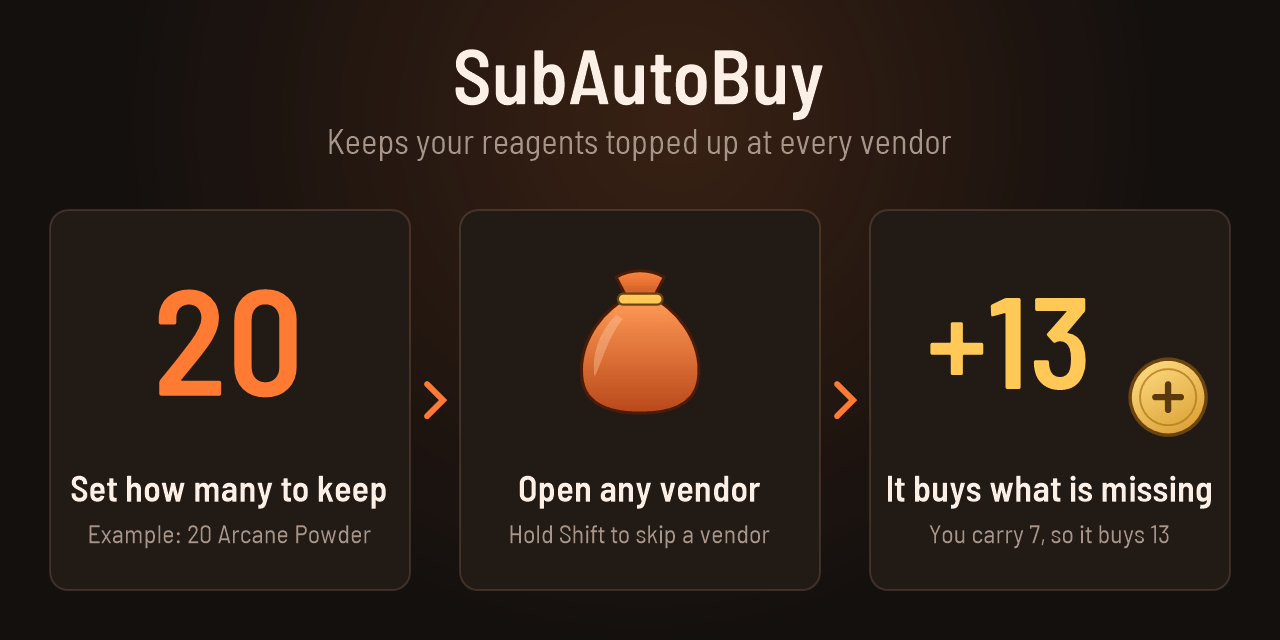
  • Keep at least. Set the number you want to carry. You want 20 and carry 7, so it buys 13.
  • Add any item. Type part of its name, Alt-click it in the vendor window, Shift-click a link into the box, or type the item ID from a database site. You see the name and icon before it is saved.
  • Buy once. For a rare recipe on a limited-stock vendor. It buys one and then turns itself off, so you never buy it twice.
  • Any vendor. An item is bought wherever it is sold. Limited-stock items are bought when they are in stock.

Safe by default

  • Hold Shift while you open a vendor to skip that vendor.
  • Set a gold limit per visit.
  • It stops when your bags are full.
  • One chat line tells you what it bought and what it cost.
  • It only works in vendor windows.

Lists

Each character has its own shopping list. Items seen at vendors are shared by all your characters, so typing a name finds more over time.

Looks

Pick a theme in the options. "My class" is the default and uses your class color. There are also Arcane, Ember, Fel, Frost and Synth, one theme per class, and Plain if you like the grey ElvUI look.

Good to know

  • The game only knows the names of items it has seen. For anything you have never come across, use the item ID.

SubAutoBuy Team

profile avatar
  • 9
    Projects
  • 38.7K
    Downloads

More from enshadowed_View all

  • SubGriefers project image

    SubGriefers

    Keep your own notes on players you had a bad time with, and get a quiet heads-up when one of them joins your group or whispers you.

    • 10
    • November 7, 2026
  • Water Dispenser Reborn project image

    Water Dispenser Reborn

    Water Dispenser, Auto fills trade windows with class specific settings for conjured items like water, food and healthstones automatically.

    • 637
    • November 7, 2026
  • LootTrackerSupreme project image

    LootTrackerSupreme

    Loot window panel that shows collectively all the loot from the "loot" chat window for convenience when pooling with friends.

    • 108
    • November 7, 2026
  • YaYeetDelete project image

    YaYeetDelete

    Addon that allows you to define lists of items to delete in the options and then previews them on the screen for lazy people to click and delete.

    • 168
    • November 7, 2026
  • SubGriefers project image

    SubGriefers

    Keep your own notes on players you had a bad time with, and get a quiet heads-up when one of them joins your group or whispers you.

    • 10
    • November 7, 2026
  • Water Dispenser Reborn project image

    Water Dispenser Reborn

    Water Dispenser, Auto fills trade windows with class specific settings for conjured items like water, food and healthstones automatically.

    • 637
    • November 7, 2026
  • LootTrackerSupreme project image

    LootTrackerSupreme

    Loot window panel that shows collectively all the loot from the "loot" chat window for convenience when pooling with friends.

    • 108
    • November 7, 2026
  • YaYeetDelete project image

    YaYeetDelete

    Addon that allows you to define lists of items to delete in the options and then previews them on the screen for lazy people to click and delete.

    • 168
    • November 7, 2026