Stat_Targets
- By
Blizzard-styled secondary stat target bars, class stat reference, custom colors, and slot item levels for Midnight.
Description
# StatTargets
**StatTargets** replaces the default secondary stats list in the Character panel with clean, Blizzard-styled progress bars showing your exact stat targets, caps, and diminishing returns for **World of Warcraft: Midnight (12.0.7)**.
---
### Features
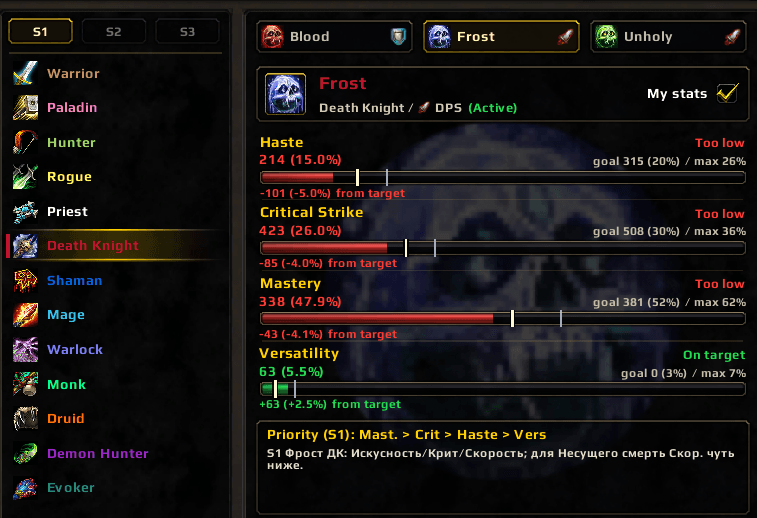
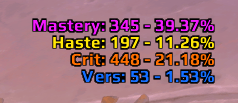
* **Blizzard-Styled Stat Bars:** Visual progress bars for Haste, Critical Strike, Mastery, and Versatility with clear target and maximum markers, rating-to-goal deltas, and tertiary stats.
* **4-State Color Indicator:** Instantly see where each stat stands — *Too low* (red), *Almost there* (yellow, within 3% of target), *On target* (green), and *Over cap* (blue).
* **Full Color Customization:** Click the **Colors** button (or type `/st colors`) to customize every state color, bar background, and target/max markers with live preview.
* **All 13 Classes & Specs Reference (`/st all`):** Side panel attached to the Character frame with role icons, stat priorities, spec notes, diminishing returns thresholds (DR 10% / 20% / 30%), and live **"My stats"** comparison.
* **Custom Targets per Spec & Season:** Right-click any stat bar to override target and maximum percentages for any specialization.
* **Midnight Season Presets:** Built-in season switcher (`S1` active, `S2` and `S3` ready for future patches).
* **Equipment Item Levels:** Crisp quality-colored item levels displayed directly on Character and Inspect equipment slots (`/st ilvl`).
* **Midnight 12.0+ Safe:** Full protection against WoW 12.0+ Secret Values in combat and instances.
* **Localization:** Supports English (`enUS`), Russian (`ruRU` — *Кап стат*), German (`deDE`), and French (`frFR`).
### Slash Commands
* `/st` — toggle stat target bars on/off
* `/st all` — open the 13-class stat reference browser
* `/st colors` — open the bar color customization window
* `/st ilvl` — toggle item levels on equipment slots
* `/st s1` / `s2` / `s3` — switch active Midnight season
* `/st reset` — reset custom limits for your current specialization
---
# Кап стат (RU)
**Кап стат (StatTargets)** заменяет стандартный список усилений в окне персонажа на наглядные полоски в стиле Blizzard с целями характеристик, отметками максимума и расчётом диминишинга для **World of Warcraft: Midnight (12.0.7)**.
### Возможности
* **Полоски характеристик в стиле Blizzard:** отображение Скорости, Крита, Искусности и Универсальности с отметками цели и капа, разницей до цели в рейтинге/процентах и строкой третичных статов.
* **4-цветная индикация:** *Слишком мало* (красный), *Чуть не хватает* (жёлтый, до 3% до цели), *В норме* (зелёный) и *Сверх капа* (синий).
* **Настройка любых цветов:** кнопка **«Цвета»** (или `/st colors`) открывает палитру Blizzard с предпросмотром на лету для всех статусов, фона полоски и отметок цели/максимума.
* **Справочник всех 13 классов (`/st all`):** выдвижная панель со значками ролей (Танк / Лекарь / Боец), приоритетами статов, порогами DR (10% / 20% / 30%) и сравнением **«Мои статы»**.
* **Свои лимиты для каждого спека:** ПКМ по любой полоске позволяет задать собственные цель и максимум для выбранной специализации и сезона.
* **Уровень предметов на слотах:** отображение уровня экипировки цветом редкости в окне персонажа и при осмотре других игроков (`/st ilvl`).
* **Поддержка 4 языков:** русский, английский, немецкий и французский.
### Команды
* `/st` — включить или отключить полоски характеристик
* `/st all` — открыть справочник характеристик по всем классам
* `/st colors` (или `/st цвета`) — открыть настройку цветов полосок
* `/st ilvl` (или `/st илвл`) — показать/скрыть уровень предметов на слотах
* `/st s1` / `s2` / `s3` — переключить сезон Midnight
* `/st reset` (или `/st сброс`) — сбросить свои цели для текущего спека
Stat_Targets Team