ChatBarDeck
- By
ChatBarDeck is a lightweight, customizable quick-switch bar for World of Warcraft chat channels with 9 button styles, message flash alerts, and flexible layout controls.
Description
# ChatBarDeck
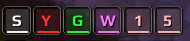
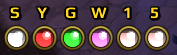
**ChatBarDeck** is a lightweight, customizable quick-switch bar for World of Warcraft chat channels. Switch between active channels with a single click without losing the text you are already typing.
---
## Features
* **One-Click Channel Switching:** Instant access to Say, Yell, Party, Instance, Raid, Raid Warning, Guild, Officer, Whisper (auto-replies to your last whisper target), and numbered server channels (`/1`, `/2`, etc.). Buttons appear dynamically based on your current group, raid, or guild status.
* **9 Button Styles:** Standard, Blizzard, Blizzard 2, Round, Orbs, Orbs (Dark), Diamond, Infinity Stones, and Dark.
* **Incoming Message Alerts:** Soft single-pulse glow on the channel button whenever a new message arrives (ignores your own messages and can be toggled off).
* **Flexible Layout:** Switch between Horizontal and Vertical orientation, reverse button direction (Left-to-Right / Right-to-Left or Top-to-Bottom / Bottom-to-Top), and toggle the panel background on or off.
* **Channel Labels & Sizing:** Place channel labels inside the button or outside (Above/Below or Left/Right), adjust independent label scale (`50%–200%`), bar scale (`50%–200%`), and button spacing (`-5 px` to `+10 px`).
* **Native Configuration Menu:** Right-click any button or the bar frame to open the built-in Blizzard context menu — no bloated config windows.
* **11 Languages Supported:** English, Russian, German, French, Spanish (EU & MX), Italian, Portuguese (BR), Korean, Simplified Chinese, and Traditional Chinese.
---
## Controls & Commands
* **Left-Click:** Switch chat channel (preserves typed text)
* **Left-Click + Drag:** Move the bar (`Shift + Left-Click` when locked)
* **Right-Click:** Open settings menu
**Slash commands (`/cdeck` or `/chatdeck`):**
* `/cdeck lock` — lock or unlock bar position
* `/cdeck bg` — toggle panel background
* `/cdeck style <name>` — change button style (`blizzard`, `blizz`, `blizz2`, `round`, `orbs`, `orbs_dark`, `diamond`, `infinity`, `dark`)
* `/cdeck text` — change channel label position (`inside`, `top`, `bottom`, `left`, `right`)
* `/cdeck textscale <50-200>` — set channel label scale
* `/cdeck flash` — toggle message flash alerts
* `/cdeck vertical` — toggle vertical / horizontal layout
* `/cdeck dir` — reverse button direction
* `/cdeck scale <50-200>` — set bar scale
* `/cdeck spacing <-5..10>` — set spacing between buttons
* `/cdeck reset` — reset all settings to default
---
# Панель каналов чата (ChatBarDeck)
**ChatBarDeck (Панель каналов чата)** — лёгкая и гибко настраиваемая панель быстрого переключения каналов чата для World of Warcraft. Переключайте каналы одним кликом без потери уже набранного текста.
## Основные возможности
* **Мгновенное переключение каналов:** Сказать, Крик, Группа, Подземелье, Рейд, Объявление рейду, Гильдия, Офицеры, Шёпот (ответ последнему собеседнику) и номерные каналы сервера (`/1`, `/2` и т.д.). Кнопки показываются динамически в зависимости от группы, рейда или гильдии.
* **9 стилей кнопок:** Стандарт, Blizzard, Blizzard 2, Круглые, Орбисы, Орбисы (тёмные), Ромбики, Камни бесконечности и Тёмный.
* **Подсветка новых сообщений:** Плавное однократное свечение кнопки при входящем сообщении в канале (игнорирует собственные сообщения, отключается в меню).
* **Гибкая настройка панели:** Горизонтальный или вертикальный режим, смена направления кнопок (слева направо / справа налево или сверху вниз / снизу вверх), скрытие фона и фиксация позиции (`Shift + ЛКМ` для переноса при фиксации).
* **Настройка подписей и размеров:** Вынос названий каналов за пределы кнопок (сверху/снизу или слева/справа), отдельный масштаб названий (`50%–200%`), масштаб самой панели (`50%–200%`) и расстояние между кнопками (`от -5 до +10 px`).
* **Нативное меню по ПКМ:** Все настройки доступны через стандартное контекстное меню Blizzard — без лишней нагрузки на интерфейс.
* **Поддержка 11 языков**, включая полную русскую локализацию.
ChatBarDeck Team