
Sszorak Map Helper
- By
A small helper for Sszorak in Venomous Abyss. The fight asks you to place something opposite something you can see. This does that one bit of arithmetic for you, so you can call it out without having to work it out.
Sszorak Map Helper
A small helper for Sszorak in Venomous Abyss. Here's how it'll make you hate Sszorak less:
- Clicking an icon on the map shows the opposite readout for calls (see tornado, click the icon!). After selecting 3 icons, it hides all the irrelevant ones to make it clear where to go.

- Right click any marker to change what it shows.
- Share your marker layout with the rest of the raid. Their maps will update to reflect what your layout is set to.
Type /sszmap to bring up the options panel: 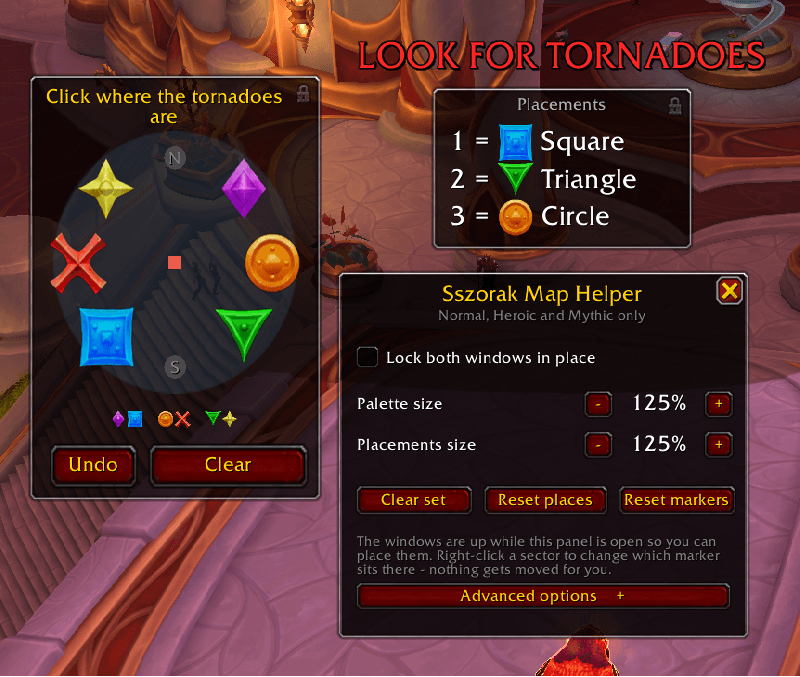
Using it
- Pre-place the markers in the raid as they appear in the
/sszmappreview. - See a tornado? Click the icon that matches what you see! You can click them in order if you like, clicking the 1 tornado icon first, then the one with 2 tornadoes, and so on.
- The Placements window lists them in call order,
1 = Star,2 = Triangle, big enough to read without looking away from the fight. - Undo drops the last one, Clear restarts the set. It also clears itself at the start and end of every pull, and after each amp phase is over.
Features
- Click what you see, get what to call. The room is drawn as its eight sectors, north up, with the dead north and south pair greyed out. Click the sector a tornado is in and it records the marker opposite it.
- Warnings timed to the fight. A red tornado warning when there is something to find, and an amber Damage Amp warning five seconds before each amp.
- The set clears itself once the winds are done with.
- Right click on any icon to change what appears there.
- Both windows drag where you like, remember the spot, scale independently and carry their own padlock.
- Advanced options to reword either warning, hide them entirely, or change any of the four timings around each amp.
Acknowledgments
A huge thanks to the raid leads and testers at the discord.gg/gfgpug for all the testing and feature requests! Wouldn't have released this without you all :)
Licence
MIT. Do what you like with it. See LICENSE for the full text.
Sszorak Map Helper Team
