Squirrel Love
- By
A self-advancing macro and TomTom waypoints that help you finish the "To All the Squirrels…" critter achievements and Pest Control.
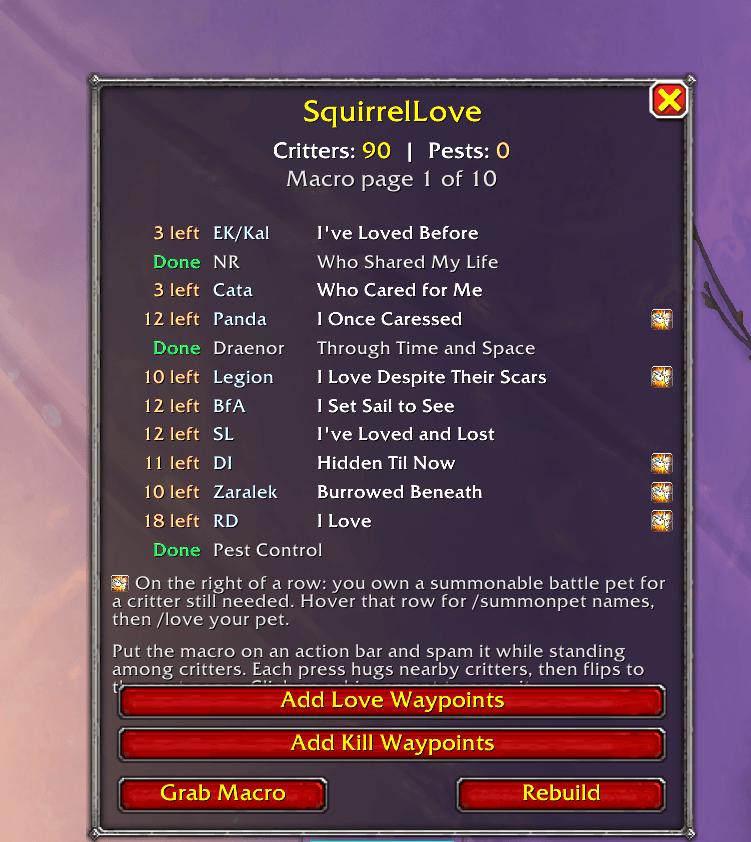
Squirrel Love helps you love all the critters of the world with a spammable macro and waypoints
Description
SquirrelLove
Finish the entire "To All the Squirrels…" critter achievement line and Pest Control without spreadsheets, guesswork, or tabbing out to Wowhead.
SquirrelLove tracks which critters you still need, builds a smart macro that targets and /loves them, and drops TomTom waypoints for every location. Press one key near a pack of critters — the macro hugs what you need, skips what you've already done, and automatically advances to the next batch.
Download: CurseForge · GitHub
Features
- Live progress tracking — reads achievement criteria from the game, so completed achievements and already-loved critters are skipped automatically.
- Self-advancing macro — creates a macro named
SquirrelLovewith/tarlines for critters you still need. Macros cap at 255 characters, so the list is split into pages; each press hugs nearby critters, then flips to the next page. When everything's done, the macro becomes a harmless no-op. - Progress window — lists all achievements with completion status; click any row to open it in the Achievement panel.
- TomTom waypoints — one button drops 100+ critter-hunt waypoints into TomTom, plus Pest Control kill waypoints.
- Minimap button — left-click toggles the window, right-click hides the button.
Achievements covered
| Achievement | Region |
|---|---|
| To All the Squirrels I've Loved Before | Eastern Kingdoms / Kalimdor |
| To All the Squirrels Who Shared My Life | Northrend |
| To All the Squirrels Who Cared for Me | Cataclysm |
| To All the Squirrels I Once Caressed | Pandaria |
| To All the Squirrels Through Time and Space | Draenor |
| To All the Squirrels I Love Despite Their Scars | Legion |
| To All the Squirrels I Set Sail to See | Battle for Azeroth |
| To All the Squirrels I've Loved and Lost | Shadowlands |
| To All the Squirrels Hidden Til Now | Dragon Isles |
| To All the Squirrels Burrowed Beneath | Zaralek Cavern |
| To All the Slimes I Love | The Ringing Deeps |
| Pest Control | Various (kill pests) |
Every critter name is read live from in-game criteria, so the addon always reflects your real progress — even after Blizzard adds new critters.
Requirements
- Retail World of Warcraft.
- TomTom (optional) — required only for the waypoint buttons.
Installation
- Extract SquirrelLove into
World of Warcraft\_retail_\Interface\AddOns\. /reload. You'll see[SquirrelLove] loadedin chat.
Enable Load out of date AddOns if the Interface number lags a patch.
Commands
| Command | Action |
|---|---|
/sqlove or /sl |
Toggle the window |
/sqlove grab |
Put the macro on your cursor |
/sqlove rebuild |
Recheck progress and rebuild the macro |
/sqlove way |
Load the TomTom critter waypoints |
/sqlove killway |
Load Pest Control kill waypoints (TomTom) |
/sqlove minimap |
Show / hide the minimap button |
/sqlove status |
Print how many critters remain |
/sqlove debug |
Print internal state (for support) |
Usage
- Open the window with
/sqloveor the minimap button. - Click Grab Macro and drop it on an action bar.
- Stand near critters and press the key — each press hugs what you still need and advances to the next page.
- Use Add TomTom Waypoints to load critter locations (clear later with
/way reset all).
Source & Issues
- Source: https://github.com/CernalGhost/SquirrelLove
- Bugs / requests: GitHub Issues on the same repository.
License
Released under the MIT License.
Squirrel Love Team