Mythic Hand Holding
- By
One click per party-chat callout — interrupts, boss mechanics, and dungeon tips for Mythic Hand Holding.
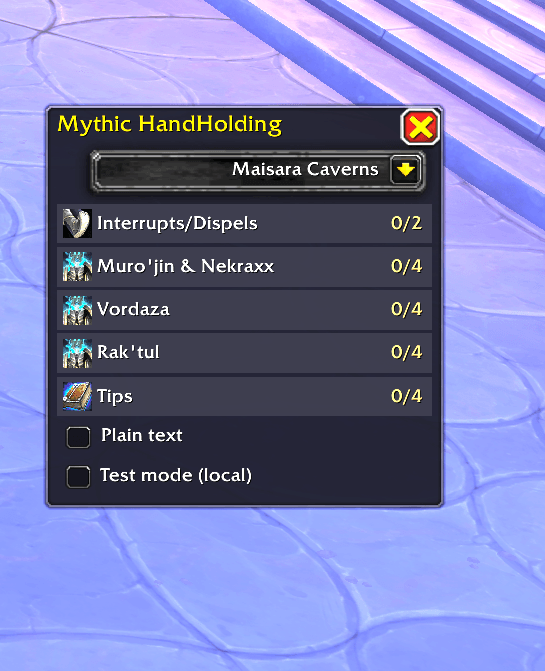
Easy to click buttons to announce boss mechanics.
Description
Mythic Hand Holding
A World of Warcraft retail addon for Midnight Season 1 Mythic+. One compact window, one click per party-chat callout — interrupts, boss mechanics, and dungeon tips.
Author: CernalGhost
Slash command: /mhh or /mythichandholding
What it does
- Movable panel (~224px wide) with a dungeon dropdown (eight tracked instances).
- Section buttons for Interrupts/Dispels, each boss, and Tips.
- Each click sends one line to party or instance chat (user-initiated secure macro — required in M+).
- Multi-line sections cycle on repeated clicks; badge shows
0/N…N/N. - Auto-selects the dungeon when you zone into a tracked instance and can pop the window open.
- Minimap button (default hidden until you use
/mhhor zone in); draggable around the rim.
Install
- Copy the
MythicHandHoldingfolder to
World of Warcraft\_retail_\Interface\AddOns\MythicHandHolding\ /reload/mhh ping— should print version
Enable Load out of date AddOns if the Interface number lags a patch.
Usage
| Command | Action |
|---|---|
/mhh |
Toggle window |
/mhh ping |
Version / alive check |
/mhh test |
Local echo only (no party chat) |
/mhh plain |
Toggle spell/boss hyperlinks in chat |
/mhh debug |
Verbose macro dump on click |
/mhh auto |
Re-detect instance and switch dungeon |
/mhh minimap |
Show/hide minimap button |
/mhh reset |
Recenter window |
Multi-line sections: click until the badge completes a full cycle (tooltip lists lines).
Options (in-window)
- Test Mode — echo locally, no broadcast
- Plain Text — no spell/journal links (default on; safest for live)
- Debug — diagnostic messages in chat
Contributing
Bug reports, feature ideas, and pull requests are welcome. See CONTRIBUTING.md.
Mythic Hand Holding Team