SpikeSpotter
- By
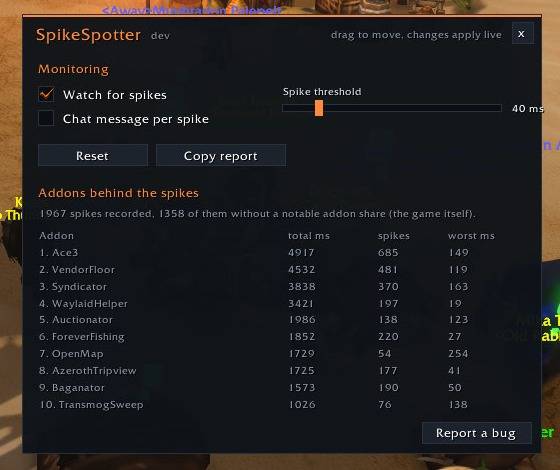
Finds the addons behind short FPS drops in WoW Forever and ranks them, using the game's own addon profiler.
spikespotter-ingame.jpg
Description
Find the addon behind the stutter. Short FPS drops when you kill, loot or pull? SpikeSpotter asks the game's own addon profiler which addons used those frames and ranks them, with a copyable report.
Website and live demo: https://bencepo.github.io/spikespotter/
What it does
- Catches the stutter. A frame that takes much longer than usual counts as a spike; loading screens are left out.
- Ranking of the culprits. Every addon in a spike, with total time, count and its worst frame.
- Game or addon? Spikes without a notable addon share count as the game's own: then disabling addons will not help.
- Context. The game events just before each spike, so you see when an addon gets expensive.
- Copy report. Ranking and the last 100 spikes as text for a bug report or forum post.
- Off when you are done. One switch stops all measuring; then it costs nothing.
How to use
/spikeor the addon menu at the minimap opens the window.- Click Reset, play a few minutes the way the stutter happens, read the ranking. Disable the top addon and test again.
Good to know
- SpikeSpotter only names addons that used the spike frames. Whether that addon is broken or just busy, its author has to judge.
Feedback and bug reports
Found a bug or have an idea? Open an issue on GitHub or leave a comment. Every report gets read.
More from Bencepo
All addons, live demos and guides: https://bencepo.github.io
Like the addons? Support them on Ko-fi: https://ko-fi.com/bencepo
AI disclosure
The code was written with the help of an AI assistant (Claude). Bencepo designed the features, tests everything in game and maintains the addon.
SpikeSpotter Team