TrinketDock
- By
Two buttons for your trinkets and a flyout to swap them; in combat the swap waits until combat ends.
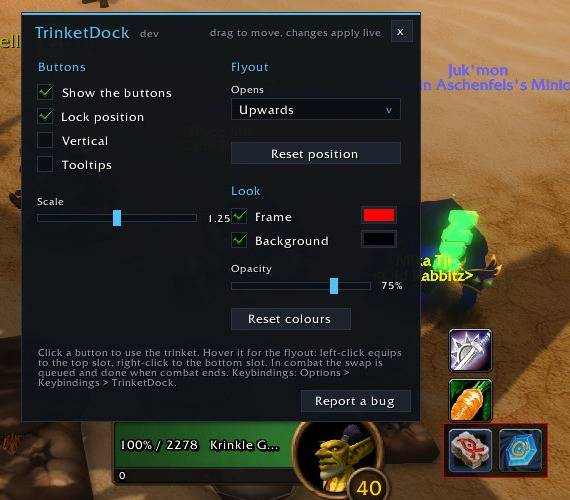
trinketdock-ingame.jpg
Description
A light trinket menu. Two buttons for your trinkets and a flyout to swap them. In combat the swap is queued and done the moment combat ends. Nothing runs in the background.
Website and live demo: https://bencepo.github.io/trinketdock/
What it does
- Two use buttons. Top and bottom trinket with cooldowns. Click or bind a key.
- Flyout to swap. Hover a button: left-click a trinket for the top slot, right-click for the bottom slot.
- Queue in combat. Trinkets cannot be swapped in combat, so the swap waits and happens when combat ends.
- Light. Bags are read only when the flyout opens. Made as a slim replacement for ItemRack's trinket menu.
- Your layout. Side by side or stacked, flyout up or down, any scale, lock. Frame and background in colours of your choice, opacity from 0 to 100 %.
How to use
/tdockor the addon menu at the minimap opens the settings.- Shift-drag a button to move the dock. Keybindings: Options > Keybindings > TrinketDock.
Good to know
- No work when you loot, none when combat starts or ends.
Feedback and bug reports
Found a bug or have an idea? Open an issue on GitHub or leave a comment. Every report gets read.
More from Bencepo
All addons, live demos and guides: https://bencepo.github.io
Like the addons? Support them on Ko-fi: https://ko-fi.com/bencepo
AI disclosure
The code was written with the help of an AI assistant (Claude). Bencepo designed the features, tests everything in game and maintains the addon.
TrinketDock Team