Spellbar - Personal Cooldown Manager with progress bar
- By
Plan your cooldowns on a fight timeline and get told what to press next, before the moment arrives.
Screenshot 2026-08-28 122946.png
Screenshot 2026-08-28 123009d.png
Description
Spellbar
Plan your own cooldowns against a fight clock.
BigWigs tells you what the boss is about to do. SpellBar tells you what you are supposed to do.
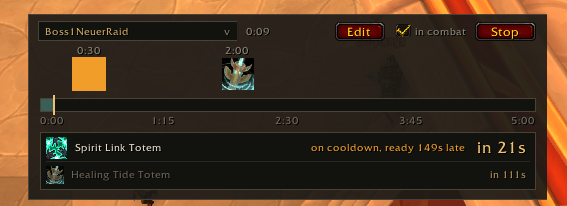
Build a list of spells with the times you want to press them, then run it as a timeline. A playhead sweeps the bar, your icons sit at their planned moments, and the next two spells are always spelled out underneath with a countdown.
No more keeping the raid leader's cooldown plan in your head or on a second monitor.
What it does
- Timeline bar — every planned cast placed on a bar scaled to the fight length, with a moving playhead and a running clock.
- Next two spells, always visible — name, icon and countdown for the cue you are on and the one after it, so a tight pair never surprises you.
- Cooldown warning — if a planned spell will still be on cooldown when its moment arrives, SpellBar says so in advance and marks the icon, so you can re-plan instead of pressing a dark button. Charges are handled properly.
- Starts itself — tick "in combat" and the timeline starts on your next pull, preferring the real encounter start when there is one.
- Clear alerts — the countdown turns red at 5 seconds, the icon flashes at 3, and used cues grey out.
- Multiple rotations — one per boss, per spec, per anything. Tag them, switch between them from a dropdown on the bar itself.
- Share them — export any rotation as a string, paste it in Discord, your teammates import it. Importing never overwrites what you already have.
- Stays out of the way — a minimap button and a close button on the bar, so you never have to touch a slash command if you would rather not.
Quick start
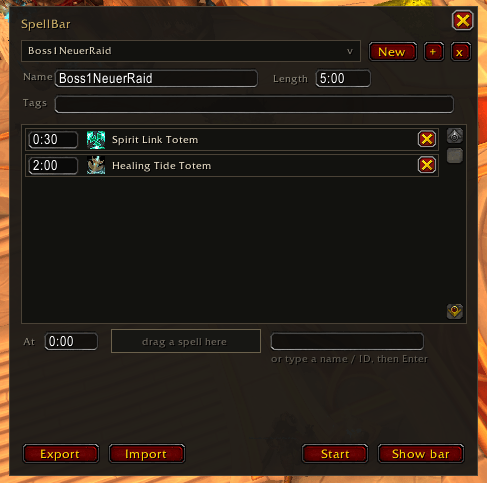
- Click the minimap button to bring up the bar, then press Edit on it.
- Set a name and the fight Length (
5:00or300both work). - Type a time in the At box, then drag a spell onto the drop target — or just type its name.
- Press Start, or tick in combat and pull.
Drag the bar wherever you want it. Edits save when you click away; no save button.
Commands
| Command | |
|---|---|
/sb |
Show or hide the bar |
/sb edit |
Open the editor |
/sb start / /sb stop |
Run the active rotation |
/sb lock |
Lock the bar in place |
/sb minimap |
Show or hide the minimap button |
/sb help |
Everything above |
Notes
Retail only. No dependencies, no embedded libraries — just Lua against the Blizzard API. Rotations are saved account-wide, so every character can use them.
Bug reports and feature requests are welcome on the issue tracker.
Spellbar - Personal Cooldown Manager with progress bar Team