Screenshot.png

Screenshot 2026-08-18 155019.png
Screenshot 2026-08-18 155053.png
Description
SimpleFrame
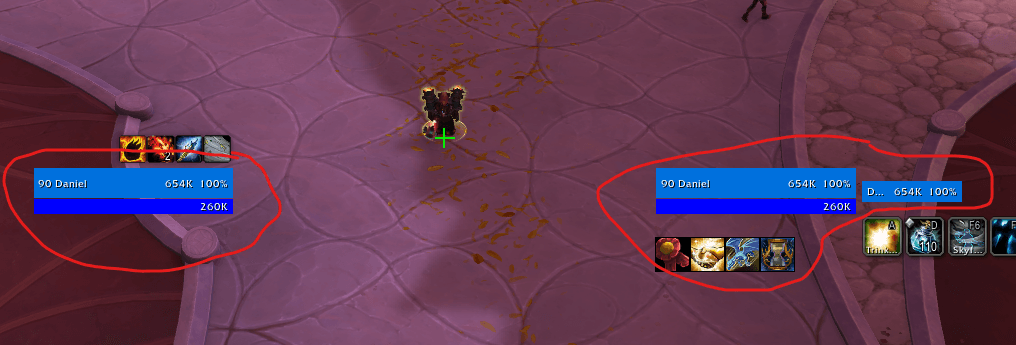
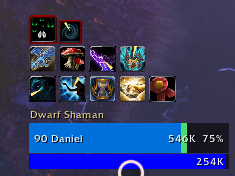
Minimal player and target unit frames for World of Warcraft retail.
Flat health and power bars, a cast bar, a target-of-target bar, and buff/debuff icons on the target — with the option to hide Blizzard's frames entirely. No libraries, no media files, no dependencies.
Requires: WoW retail 12.x (Midnight), Interface 120100.
Install
- Download the repository as a ZIP, or clone it.
- Put the
SimpleFramefolder intoWorld of Warcraft/_retail_/Interface/AddOns/. - Restart the game, or
/reloadif it is already running.
The folder must be named exactly SimpleFrame, matching SimpleFrame.toc — WoW
locates an addon by that pairing. If you used GitHub's Download ZIP, the
archive contains a SimpleFrame-main wrapper folder; move the inner folder out
and rename it, otherwise the addon will not appear in the addon list.
Your settings and frame positions are stored in
WTF/Account/<ACCOUNT>/SavedVariables/SimpleFrame.lua, outside the addon
folder, so updating is a straight overwrite.
Features
- Player frame — health bar, power bar, name and level, health text, cast bar, and a small red combat indicator above the top-right corner.
- Target frame — the same, plus aura icons with cooldown swipe, stack counts and dispel-colored borders.
- Target of target — a small health bar to the right of the target frame.
- Flat bars — solid single-color fills, no gradient, no border art.
- Class-colored health for players, reaction-colored for NPCs; grey when dead or disconnected.
- Blizzard's frames are left alone until you explicitly opt in to hiding them.
Aura layout
The rows swap depending on who you are looking at, so the auras you care about are always the ones on top:
| Target | Above the frame | Below the frame |
|---|---|---|
| Hostile | All buffs | Only the debuffs you applied |
| Friendly | All debuffs (what you would dispel) | All buffs |
Usage
| Command | Effect |
|---|---|
/sf |
Open the settings panel (also under Options → AddOns → SimpleFrame) |
/sf unlock |
Show green drag boxes; drag to reposition |
/sf lock |
Save positions and hide the drag boxes |
/sf reset |
Restore the default positions |
Left-click a frame to target the unit, right-click for the unit menu.
While unlocked, dimmed placeholder icons show where the aura rows will sit, so
you can position against the full footprint even with nothing targeted. The drag
boxes swallow clicks, so targeting resumes once you /sf lock.
Settings
Options → AddOns → SimpleFrame, or /sf.
| Group | Settings |
|---|---|
| Frames | Player frame, target frame, target of target, cast bars, target auras, combat indicator, class colored health |
| Size | Frame width, health bar height, power bar height, scale, health text (none / value / percent / both) |
| Auras | Aura icon size, auras per row |
| Default Blizzard frames | Hide Blizzard player frame, hide Blizzard target frame |
Frame positions are set by dragging, not in the panel.
Notes
- Hiding the Blizzard frames is off by default. Turning it back off
requires a
/reload— the frames are unregistered and reparented to a hidden holder, which cannot be cleanly undone at runtime. - Anything touching secure frames is deferred while you are in combat and
applied as soon as you leave it.
/sf unlockrefuses outright in combat. - Target-of-target polls every 0.2s, because the
targettargetunit token does not fireUNIT_*events.
Midnight secret values
WoW 12.0 hides combat-relevant numbers behind secret values. Addon code may
hand them to a widget (StatusBar:SetValue, FontString:SetFormattedText,
AbbreviateNumbers) but any Lua comparison, arithmetic, string.format, or
table lookup keyed on one raises an error. Secrets.lua holds the guards. The
practical consequences:
- Health and power bars are always accurate — values go to the status bar untouched.
- Health percentage comes from
UnitHealthPercent, which evaluates the ratio engine-side. - Aura enumeration is refused in restricted contexts (in combat, and in Mythic+ even out of combat). The target aura icons disappear until the restriction lifts. This is a client limitation, not a bug in the addon.
- Cooldown swipes and stack counts are dropped for any aura whose timings come back secret; the icon still shows.
If you are extending this addon, read Secrets.lua first — it is the shortest
path to not reintroducing these errors.
Layout
| File | Contents |
|---|---|
Secrets.lua |
Secret-value guards; loaded first |
Core.lua |
Saved variables, defaults, lifecycle events, drag mode, slash commands |
UnitFrame.lua |
Secure unit button factory: bars, texts, cast bar, layout |
Auras.lua |
Target buff/debuff icon grid and drag placeholders |
Blizzard.lua |
Opt-in hiding of the default frames |
Options.lua |
Settings panel registration |
License
Not yet specified. Add one before publishing if you want others to reuse or redistribute this.
Simple Frame Team