Speedrun & Optimized Routes by DistillNote
- By
Speedrun and optimized leveling routes for WoW Forever, step by step, from level 1 or from your level and quest log.
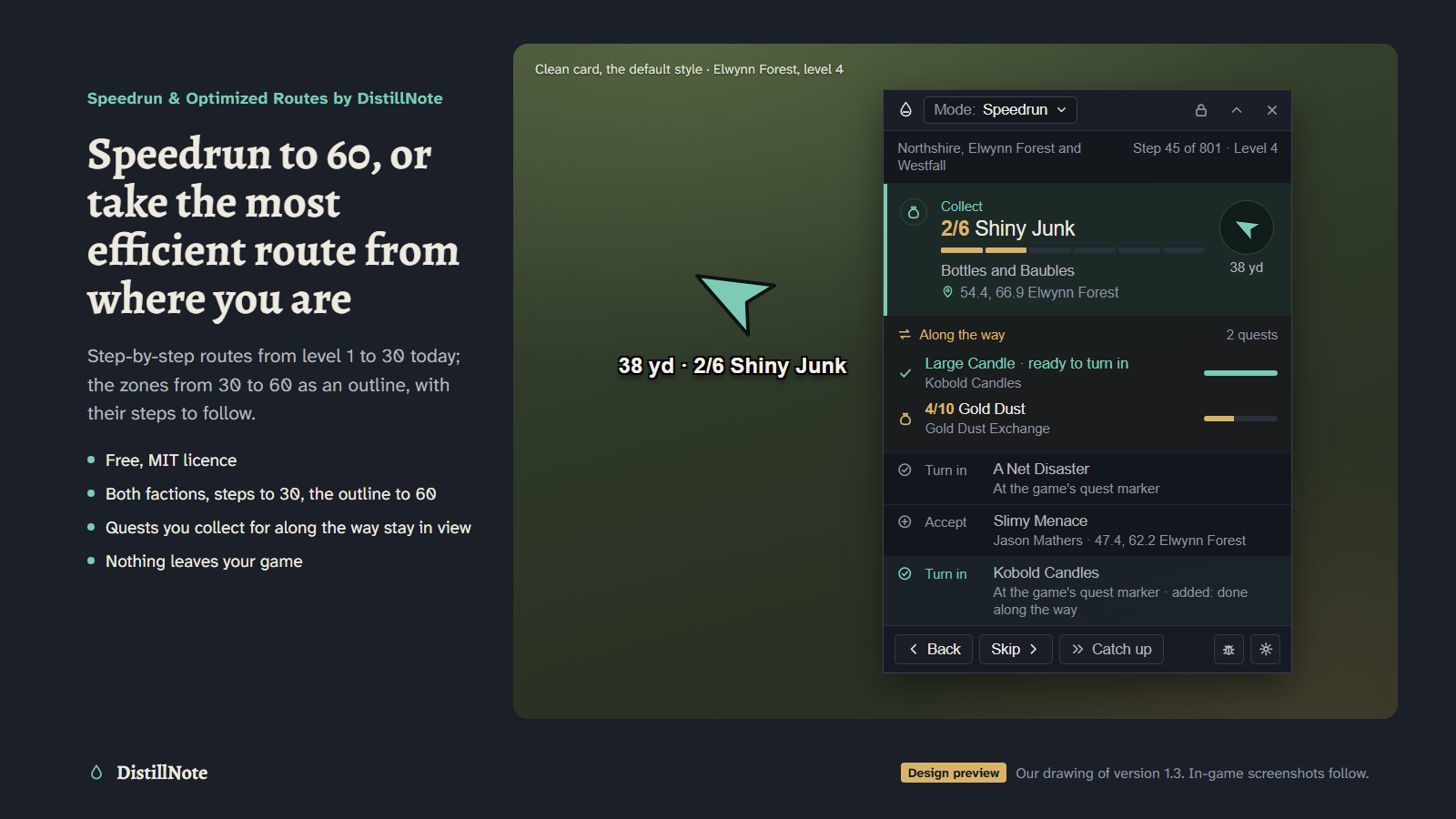
Step-by-step routes from level 1 to 30 today; the zones from 30 to 60 as an outline, with their steps to follow. Shown in Clean card, the default style, with two quests carried along the way.
Description
Speedrun & Optimized Routes by DistillNote
Leveling routes for WoW Forever, step by step, for both factions. Use it to speedrun from level 1, or to pick up our route from your character's level and quest log.
Every step comes from quest data: which quests your faction, race and class can take, where they start, the level they need and what comes before them. In your start area, the route takes the quests in the order that keeps your travel short: a town's quests all at once, their objectives in one trip out, the turn-ins when you're back. After it, at about level 10, the route follows our route: chapters at set levels, each with the quests to take and the order to accept, do and turn them in. The levels and the order are our recommendation, not yet measured in play (see "Recording" below), so expect a step to be off now and then, and skip it.
How to use it
- Install the addon with the CurseForge app, or unpack the zip into your game client's AddOns folder.
- Log in and choose your window style; each new character sees this choice once. The step window opens with the first step for your character.
/dnrouteor the minimap button shows or hides it; drag it where you like. If the addon doesn't know your race, the window asks where your character started. - Follow the arrow to the step's coordinates, on steps our quest data has a place for. A turn-in points to where the quest is handed in, and its line says where that place comes from and when: "Quest database, read 24 Nov", or "Tested in our own run, 24 Nov" for a place only our own play has shown so far. For a quest in your log, a turn-in step or an objective with no place in our data follows the game's own quest marker instead, where your game shows one. Click the current step to focus its quest, as a click on its objective in the game's quest tracker does: the tracker and the map highlight it. While your quest log says a quest isn't complete, its turn-in step shows its first unfinished objective instead. Steps tick themselves as you accept quests, finish objectives, turn in and level up. Skip passes any step for this session: a quest's step, a "Go to" step (the route goes on as if you were there), or a "Reach level" step that waits before the other continent (the route goes on across); Back takes the last skip back. The Target button, which you can place anywhere on screen, targets the quest giver, the creature a kill objective asks for, or the creature that carries an item you collect, and shows its picture. Pressed again out of combat, it passes dead mobs and mobs tagged by players outside your group, and picks the nearest living one the game lets it tell (with enemy nameplates on); in combat the game only lets it drop a dead target. On a collect step the arrow points to that creature where our quest data places it, often to the area near a named rare's spawn; that's about 1 in 4 of the routes' collect steps that have no place of their own. A Use button beside it finds the quest's item in your bags and uses it; unlocked, drag it anywhere, and it keeps its place for that character (
/dnroute reset useputs it back). Both update after combat. A step shows "Kill" only for a kill: an objective the game counts like one, such as a delivery, shows "Do". When you die, the arrow points to your corpse until you're alive again. A quest a chapter of our route takes is offered in that chapter, even when it's grey at your level. Any other quest that's grey at your level (10 levels above the quest's own level) is left out unless a later quest in its chain needs it; your class's own quests are never left out as grey. A quest that needs a higher level than yours is never the next step: it waits in the list with "From level N".
Your window, your way
On your first login a setup screen asks how the steps should show. Stops is the default, and it starts as Pocket: one small card with your current step (the quest, the place on one line and the arrow in a dial with the yards) and one quiet line naming your next stop, or a note when there is one. Point at it and the stops open below it, the next stop first, then fold when the mouse leaves (near the bottom of the screen they open above it, the next stop still closest to your step); the small round button keeps them open until you click it again. In a town, or at a quest giver with several steps, they open by themselves until you walk off. Open, it's a round, quiet window with your current step in a card, the quests you're doing along the way, then the next stops. Steps that come one after another at one place are one numbered card, with the quest giver and the coordinates on top and a line per step: its icon, the quest and its count. Steps with no place in our quest data are under "In the field", turn-ins whose place we don't know under "Report back". It lists 3 stops; "3 more stops" opens the rest, and "Stops shown" in the settings (or /dnroute stops 1 to 8) sets how many. The round ⋯ button at the top holds Dungeons, the settings, Report a bug, the lock, "Keep the stops open" (the stops always open, without Pocket) and hiding the window. In combat the window fades to a third and lets your clicks and the mouse wheel through to the game, and in a dungeon or raid it hides, with the arrow and the Target and Use buttons, until you're outside again; /dnroute shows it inside. Both work in every window style, and each of these is a setting under "When the window shows more". HUD strip is one strip at the top of the screen, next to the minimap, with the arrow in a dial and the step on one line; click it for the next steps, the buttons and the chapter. Field guide is a larger panel with the chapter in view, a large arrow dial and the next steps as a timeline. Every step shows its kind (Accept, Kill, Collect, Do, Turn in) and, for an objective, the live count from your quest log. The HUD strip and the Field guide list the next 5 steps; "Steps shown" in the settings (or /dnroute steps 1 to 10) sets how many. The mouse wheel anywhere over the window shows the steps further on; the bar at the list's edge shows where you are, and you can drag it, click above or below it for a page, or click its arrows for one step. "Back to next step" (in Stops, "Back to next stop") brings the list back. The list keeps its height while you scroll, and the window stays inside the screen, showing fewer steps rather than running off the bottom. In every style the arrow is its own frame: drag it next to your character, make it bigger or smaller, or hide it. The lock keeps the window and the arrow in place, and clicks then go through the arrow to the game. The settings page in the game's options under AddOns (or /dnroute settings, or a right-click on the minimap button) changes the style, the window size, the background and the arrow, and puts everything back where it started. The next steps that have a place also show as numbered pins on the minimap and the world map, with the same numbers as the window's list; choose how many (or none) in the settings. A step at the game's own quest marker shows its number beside the game's quest button, and the numbers never catch a click, so the game's button stays visible and clickable.
The minimap button shows the DistillNote drop with a small flag, so you can tell it from our other addons' buttons. When another addon has loaded the standard minimap button library, the addon uses it, so minimap button collectors can gather the button.
Report a bug
Report a bug in the window (in Stops, under the ⋯ button), or /dnroute bug, opens a box with the addon's debug text already selected. Press Ctrl+C and paste it, with what happened, in a comment on this page; the box gives you the page's address to copy. The text names no character or realm, and nothing is sent from the game.
One route, in chapters
The route works out your next steps from your character's level, the quests it has finished and the quests in its log, again after every quest. It takes them in our route's own order, in your start area as in every chapter: a town's quests together, done in one trip out, handed in together. Where you stand only sets where the route starts in that order: when you log in, and after a loading screen, a flight or a long jump (a hearthstone, a teleport or a spirit healer: more than 300 yards at once, our number). Walking never changes it, and steps you left open behind that place come after the rest of the area. It follows our chapters in order from the one that fits you best (see The routes), and takes the quests in your log where they're on that route: a quest a chapter from there on takes waits for that chapter, and one whose next step is in the zone you're in is done there and then; while you're working through a chapter in that zone, its own quests keep their place in its order. A quest in your log that the route doesn't take (one from a chapter below your level, or one no chapter has) never sends you to another zone. When you're in its zone and so is the route, it's done on the way; otherwise it stays in your log, and one quiet line above your step says how many there are ("3 quests in your log aren't on the route"), with their names when you point at it. The addon never abandons a quest by itself; Clean up your quest log (below) lists the ones we'd drop, and you choose. A quest you bring something back for, such as Goretusk Liver Pie, is turned in where you took it; a quest the game shows with nothing to do, such as Trek to Ashenvale, comes only in a chapter that has it. Played your own way for a while? The route goes on from your level, with the quests of your log that are on it. Quests you've done drop out, and quests far below your level are left out. From level 1, that's your start area's route; after it, the chapters.
Along the way: in the start areas, some quests ask for 6 or more items that drop from creatures in several places. The routes carry those beside the other steps: you take the quest, collect while you do the next steps, and turn it in when the route comes back. The window shows them with their live counts, at most three at a time, and "Ready to turn in" once a quest is complete.
The routes
- Start areas, to about level 10: for the Alliance, Northshire and Elwynn (Human); Coldridge Valley and Dun Morogh (Dwarf, Gnome); Shadowglen and Teldrassil (Night Elf); Zephras Isle (Skyborne). For the Horde, the Valley of Trials and Durotar (Orc, Troll); Camp Narache and Mulgore (Tauren); Deathknell and Tirisfal (Undead); Zephras Isle (Skyborne).
- Then chapters to level 60: each chapter is a stretch of our route at a level range, such as "29 to 30 · Wetlands", with its quests in the order to take, do and turn them in. Silverpine Forest at 10 to 12 is for the Undead; the other Horde races go on to The Barrens. Riverglades (from 36) and Mount Hyjal (from 55) have chapters of our own for both factions, worked out from their quests' levels: in each town you take its quests together, do them in one trip out and come back once to turn them in. Where the route sets the order, it doesn't have you take a new quest while your log holds 20. Some quests are left out on purpose, and quests our route marks optional are left out unless they're already in your log or a later quest needs them. The window names the chapter you're in. The route follows the chapters in order, from the one that fits you best, step by step, passing what you've done; a quest above your level waits, and when nothing is left at your level a "Reach level" step says which level comes next. Which chapter fits is our rule, not measured yet: casters take the chapter that best covers their level to 2 above; melee and other weapon users, 4 below their level to their level. Your talents tell which you are: Mages, Warlocks and Priests are casters, and so are Balance and Restoration Druids and Elemental and Restoration Shamans; Warriors, Rogues, Hunters, Paladins, Feral Druids and Enhancement Shamans use weapons. Before your talents tell, Druids and Shamans count as casters. Prefer quests in the settings, or
/dnroute prefer, sets it yourself: at my level (2 below to 2 above), a little higher or a little lower. Your quest log counts where it's on the route. A quest a chapter from there on takes is done in that chapter's order. One whose next step is in the zone you're in is done there and then, unless it's grey or needs a higher level; in a capital, that's the capital's own steps. While you're working through a chapter in the zone you're in, its own quests keep their place in its order. A quest in your log that the route doesn't take, from a chapter below your level or from none, is done only on the way, when the route has you in its zone; it never sends you to another zone, and the quiet line above your step names it. A quest you bring something back for, such as Goretusk Liver Pie, is turned in where you took it; a quest the game shows with nothing to do, such as Trek to Ashenvale, comes only in a chapter that has it. A "Go to" step names the next chapter and the flight path to take. Inside a chapter, its steps on the continent you're on come first. Your class's quests from a capital come with the chapters whose levels hold theirs. In every style one control shows the chapter and how it's chosen: Automatic (the addon picks the chapter that fits you; its tooltip says by which rule) or Picked (one you chose). In Stops it's the round pill at the top ("Auto · 36 to 41 · Riverglades"; where the room is short, the zone goes first); in the HUD strip, the tray's Chapter row; in the Field guide, the chapter card. A click opens the chapter list: Automatic first, with the chapter it's on now, then your start area and every chapter in level order, up to 60, opened at the chapter you're in (the mouse wheel scrolls the rest). Only one choice is marked. A click picks a chapter: the route starts there, its quests first, and your log counts where it's on the route from there. Your pick holds as long as its quests still give XP, until every one is grey at your level ("Automatic" brings back the chapter that fits you). A chapter whose quests are all grey at your level can't be picked./dnroute chapterslists them in every style, and/dnroute chapter 2picks the second. Our chapters' quests can run out a few levels before 60. - Your class's own quests are in your route; other classes' steps are hidden.
Your hearthstone, and dungeons
Hearth now: when your next step is at your home, you're far from it and your hearthstone is ready, a note above the step says so, and the Use button shows your hearthstone; while it cools down, the note says when it's ready. Your home is the place your game names: a whole city when you bound in one, or the spot where you stood when you made an inn your home with the addon on. On a step at an inn a chapter comes back to two or more times, a note names the innkeeper, so you can make it your home. The addon never uses the hearthstone and never binds for you.
Dungeon prep: when your level reaches a dungeon's range for your faction, the addon asks once, tanks and healers at the start of the range and damage dealers 2 levels in (our suggestion; your talents tell your role, or pick it in the settings). It asks with one short line above your step: + Add its quests to my route makes the route take its quests (on the map of a quest giver, that quest comes first), "All dungeons" opens the Dungeons panel, and ✕ means "Not now": it asks again at your next level. Point at the line for what to do first: pick up its quests, start its quest chain (and which chapter of our route takes it), or go. The Dungeons panel opens beside the window, from that link, Dungeons under the ⋯ button in Stops, the Dungeons button in the HUD strip and the Field guide, or /dnroute dungeons list. It lists the dungeons near your level, each On your route or Not added, with when the addon asks and what adding it brings, and the buttons + Add its quests to my route, − Remove it from my route, Stop asking and Ask me again. Remove takes its quests you haven't picked up off the route and stops the asking. Every dungeon the game's dungeon finder gives a range is there, the new ones too: The Drowned City, Krol'dok Stronghold, Alcaz Prison, Blackmaw Hold and Shaper's Terrace work like the others. A quest whose giver isn't in our data yet never becomes a step; the panel says how many there are, and a dungeon whose open quests all lack a giver is marked Quests listed, with their names and levels, and isn't asked about. A dungeon with no quests in our data is under "Nothing to add". A step that's on your route because you added a dungeon has a green chip with the dungeon's name; a step whose quest leads to a dungeon's quests has a grey one.
When the data misses something: when you talk to a quest giver who doesn't offer a quest the route has with them yet, that quest waits, with the quests that need it: the route goes on and brings it back when the giver offers it, after your next quest turned in near that giver, or at your next level. Near the giver, a short note lists what waits; Back brings it back at once. A giver with nothing at all for you opens no window: on an Accept step within 20 yards of the giver, press Not offered yet. In Riverglades and Mount Hyjal our quest data names few of the quests that come before others, so we add the ones our own play shows. The current step stays put while you walk, until it's done or another step is clearly closer. A "Go to" step whose flight path you don't have yet says how to get there: fly to your nearest one on that continent, then ride; the addon learns your flight paths when you open a flight master's map.
Easy to read: each kind of step has its own colour, the quest's name is the brightest line, who you talk to or hunt is amber, the place light blue, and notes about our data are muted.
What it can't know yet
- Who takes a quest back. Almost every turn-in on the route has its place, from our reading of a public quest database (24 Nov) or from our own test runs, and the step line says which. Our data doesn't name every quest taker yet, so the Target button stays off on turn-ins; a stop names the quest giver only where our data shows the same NPC takes it back. A turn-in with no place in our data follows the game's own quest marker for a quest in your log, where your game shows one ("At the game's quest marker"). Without one, it has no arrow or map pin: the quest text names who to report to, and the step says the place isn't in our data.
- Time. The data has none. Most quests' own level and XP are in our data, but the chapters' levels stay our recommendation until recordings give real numbers.
- Many objectives have no place in our data: more than half of the routes' objective steps. For a quest in your log the step then follows the game's own marker for the quest, where your game shows one ("The game's marker for this quest": one point per quest, not per objective). Otherwise it says "No place in our data yet" and shows no arrow or pin; the quest text in your log says where to go. The game's own map can show the objective areas: turn on quest points of interest in the game's options (the Enhanced preset at your first login has them on). The count on the step is your quest log's own.
Recording
If you want to help measure the routes, turn on recording with /dnroute record. It notes the quests you accept and turn in, where, the XP the game gives you, your levels, deaths and zone changes, and how long each took. Start it once: it keeps running across reloads and logouts until /dnroute record stop ends it.
While it runs, every window style shows a small red dot and "REC" in its title area, the minimap button's tooltip says "Recording: on" with the number of events, and one chat line at login or reload reminds you it's on.
Each character keeps its own recording, so switching characters never mixes two into one. /dnroute export shows the recording of the character you're on, as text you can copy. Our site has no upload for recordings yet, so for now the recording stays in your game. A recording started before version 1.3.1 moves to the first character you log in with that has its faction, race and class. Nothing is sent from the game, and a recording holds no name, realm or date.
Clean up your quest log
⋯ › Clean up quest log…, or /dnroute cleanup, lists the quests in your log we'd drop, each with why: grey at your level, its chapter is behind you (named), or not on our route. These are our rules. Never listed: a quest with any progress, a complete quest, a quest our route still uses or one that leads to one, and dungeon and class quests unless they're grey at your level. A quest our quest data doesn't have is listed unticked. Every other one starts ticked; untick any you want to keep. Abandon asks once more, then abandons them one at a time and checks each again right before, so a quest that gained progress since stays. Before each, it checks that the game has selected and marked that quest, and stops if not. If the game asks for a click per quest, the button becomes "Abandon next: …", one click each. If the game doesn't let the addon do it at all, the panel names the quests to abandon in your quest log. Never in combat; one chat line names what was abandoned.
Commands
/dnroute shows or hides the window, /dnroute cleanup lists the quests we'd drop from your log (you choose, and confirm), /dnroute skip skips the current step for this session and /dnroute back takes the last skip back, /dnroute dungeons lists the dungeons with your answers and /dnroute dungeon <n> add, remove, later, never or ask changes one (/dnroute dungeons list opens the panel), /dnroute record and /dnroute export record and copy, /dnroute start picks your start area again, /dnroute chapters lists the chapters and /dnroute chapter <n> picks one (/dnroute chapter auto lets the addon pick again), /dnroute prefer auto, level, higher or lower sets which chapter Automatic takes, /dnroute steps <n> sets how many next steps the window lists (/dnroute steps default: 5), /dnroute pocket on or off folds the Stops window to one card or keeps its stops open, /dnroute atstop, /dnroute fade and /dnroute instances with on or off turn opening at a stop, the combat fade and hiding in dungeons on or off, /dnroute settings opens the settings, /dnroute setup chooses the window style again, /dnroute style card, strip or guide switches it, /dnroute lock and /dnroute unlock fix the window and the arrow or let them move, /dnroute reset puts them back (/dnroute reset use: the Use button alone), /dnroute debug shows what the addon can read in your game client, /dnroute bug opens the bug report box, /dnroute help lists the commands.
What it reads, and what it doesn't
It reads your level, class, race and faction, your finished quests, your quest log, the game's own quest markers on your map (read while you play, never saved), where you stand, which way you face, and whether your minimap rotates (the game's Rotate Minimap setting, read only). It looks in your bags only for a quest's item, for the Use button. It never reads your character's name or realm, and it sends nothing anywhere. Version 1.3 adds no new read or write: a step's kind comes from the quest log it already reads. Version 1.3.1 adds one read: whether another addon has loaded the standard minimap button library. Version 1.3.2 adds, for the Target button and only out of combat, the names of enemy creatures' nameplates (never a player's), whether a mob is dead or tagged by someone outside your group, and roughly how far it is; also whether you're dead or a ghost and where your corpse is, the quest log's own level and grey colour for your quests, and your professions, only when a step needs one. All read while you play, never saved. Version 1.4.0 adds no new read or write. Version 1.6.0 adds your home's name (the place your hearthstone takes you), your hearthstone's cooldown and whether you carry one, your talents, only to tell your role for dungeon prep, the quests a quest giver's window lists, and the flight paths a flight master's map lists; all read while you play. Versions 1.7.0 and 1.8.0 add no new read or write. Version 1.9.0 adds no new kind of read: a quest giver's window, which 1.6.0 reads, now also counts when it shows one quest's progress or reward, and the Not offered yet line uses where you stand, which it already reads. Version 1.10.0 adds no new read or write; its Stops shown setting is kept with the window's other settings. Version 1.11.0 adds two reads: whether you're in combat, and whether you're in a dungeon or raid (the game's instance type), both read while you play, never saved; its new settings are kept with the window's other settings. Version 1.11.1 adds two reads: whether the game shows one of its own windows (the map, a quest giver's window, your character sheet, …), so the addon's frames sit behind it, and how many of a quest's item you carry, so the Use button leaves once the item is used; both read while you play, never saved. Version 1.12.0 adds no new read or write. Version 1.13.0 adds no new read: it tells casters from weapon users by the talents 1.6.0 already reads; its Prefer quests choice is kept per character. Version 1.14.0 adds one read: whether you're on a flight, read while you play, never saved. It also adds the addon's one change to your quest log: the clean-up abandons the quests you ticked and confirmed, and nothing else. It reads a quest's title from the game for a quest our data doesn't have, and whether the game refused a call of the addon's. Version 1.15.0 adds no new read or write: the turn-in places are in the addon's data.
Its one change to your game: when you click the current step, it makes that quest the focused quest (the game's super-tracked quest, which the tracker and the map highlight) and adds it to the game's quest tracker if it isn't there (the game's quest watch). Nothing happens without a click, and it never removes a quest from your tracker.
Its settings hold the window's style, sizes and places, how many stops it lists, the arrow's and the minimap button's, for every character on your account. Each character's picked chapter, its Prefer quests choice, whether it has seen the setup screen, where it bound its hearthstone (when the addon saw it), its answers for each dungeon and its dungeon role, the quests a giver didn't offer it in 1.6 to 1.8 (/dnroute offered reset forgets them), the flight paths it has, and its recording if you make one, are kept per character, by the game.
Where the quest data comes from
The quest data comes from an open quest database for WoW Forever, MIT licensed; its notice ships in the zip (LICENSE-quest-data.txt). The quests of the five new dungeons come from it too, and for The Drowned City, Krol'dok Stronghold and Alcaz Prison also from our own reading of a public item and quest database: their names, levels, factions, quest givers, places and the quests before them, values only. Where a quest is turned in comes from our reading of a public quest database on 24 Nov (places only) and from our own test runs. The chapters are our route, at levels and in an order we recommend. More on the routes at distillnote.com/leveling.
Free and complete. The code is plain Lua, MIT licensed.
Speedrun & Optimized Routes by DistillNote Team