SothKeys
- By
Track Mythic+ keystones for your characters, party members, friends, and guildmates.
Gear List1.png
Keys4.png
Description
SothKeys — Stop Asking “Whose Key Are We Running?”
You have eight alts, your friend swears they have a better key, and half the guild is silently waiting for someone else to pick a dungeon.
SothKeys brings everyone’s Mythic+ keys together in one clean, easy-to-read window.
See your characters, party members, friends, and guildmates. Compare keys, check ratings, find useful gear, pick someone at random, and get the group moving!
See Everyone’s Keys
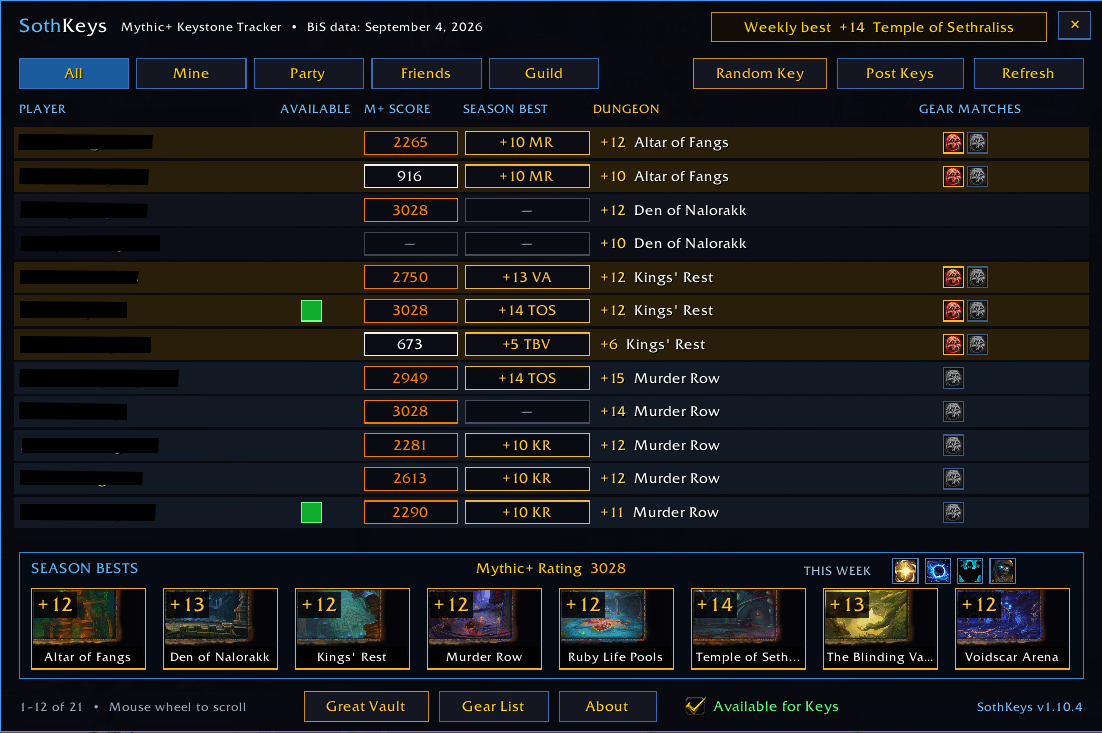
SothKeys can display:
Your characters and their current keys
Party and raid members
Participating guild members
Participating friends
Mythic+ Rating
Season-best key and dungeon initials
Current key level and dungeon
Gear matches for each key
Sort the list by player, rating, Season Best, dungeon, key level, or gear matches.
No spreadsheets. No guessing. No logging through six alts because you forgot which one had the good key.
“I’m Available for Keys!”
Want people to know you’re ready to run something? Check Available for Keys.
A green box appears beside all of your known characters. Other SothKeys users can click it to politely ask if you want to run a key—even if you’re currently playing a different alt.
Availability is completely optional:
No box appears unless you deliberately opt in.
Your setting survives quick character changes.
It automatically clears after you have been offline for 15 minutes.
Duplicate invitation whispers are limited to prevent spam.
Season-Best Dashboard
The bottom panel gives you a quick look at every dungeon in the current Mythic+ season.
See your best level for each dungeon.
Hover for dungeon score, best time, and completion status.
View your total Mythic+ Rating.
Check the current weekly affixes.
Affixes and character scores come directly from the game and update automatically.
Great Vault Access
Click Great Vault to open Blizzard’s Great Vault window and check what you have earned from Mythic+, raids, and other weekly activities.
No trip across the city required just to see whether you finished that third slot.
Find Keys That Drop Useful Gear
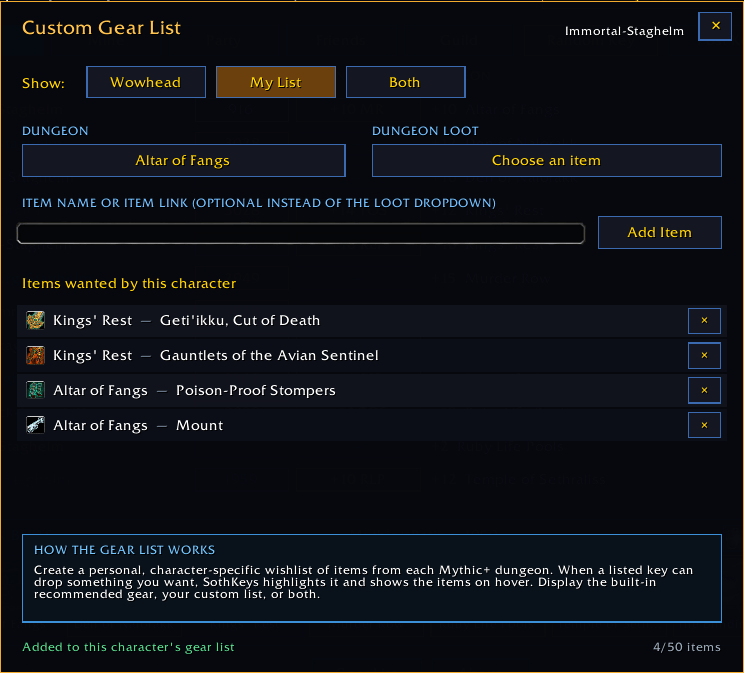
SothKeys includes spec-aware dungeon gear recommendations and a personal Gear List you can create. Don't let those websites tell you what is best if you don't want to!
See which keys contain recommended gear for your class and specialization.
View exact item names instead of generic armor slots.
Catalyst targets are clearly marked.
Add your own wanted items for each character.
Display the recommended list, your personal list, or both.
Gear Match icons make useful keys easy to spot.
Party Tools
Trying to decide what to run?
Post Keys shares the party’s keys in party chat.
Random Key chooses one of the available party keys for you.
Key-change announcements let the party know when completing a dungeon changes someone’s key.
Messages are spaced and throttled to prevent spam.
Sometimes democracy takes too long. Let the button decide.
Built for Alts
SothKeys remembers your characters after you log into them and automatically removes outdated weekly key information after reset.
Your characters stay together, even when your attention span does not.
Privacy
SothKeys does not upload your information to an external website.
It exchanges small, throttled addon messages inside World of Warcraft with other SothKeys users through supported party, guild, friend, and Battle.net connections.
Availability is strictly opt-in. If you do not check Available for Keys, no availability indicator is shown.
Shared keys and availability require the other player to have a compatible version of SothKeys installed.
Commands
/sk — Open or close SothKeys/sk refresh — Refresh and synchronize keys/sk post — Post party keys/sk gear — Open the Gear List/sk minimap — Show or hide the minimap button
Created by Soth-Staghelm. The Random Key button was all Skunk's idea!
SothKeys Team