Smooth Animated Bars
- By
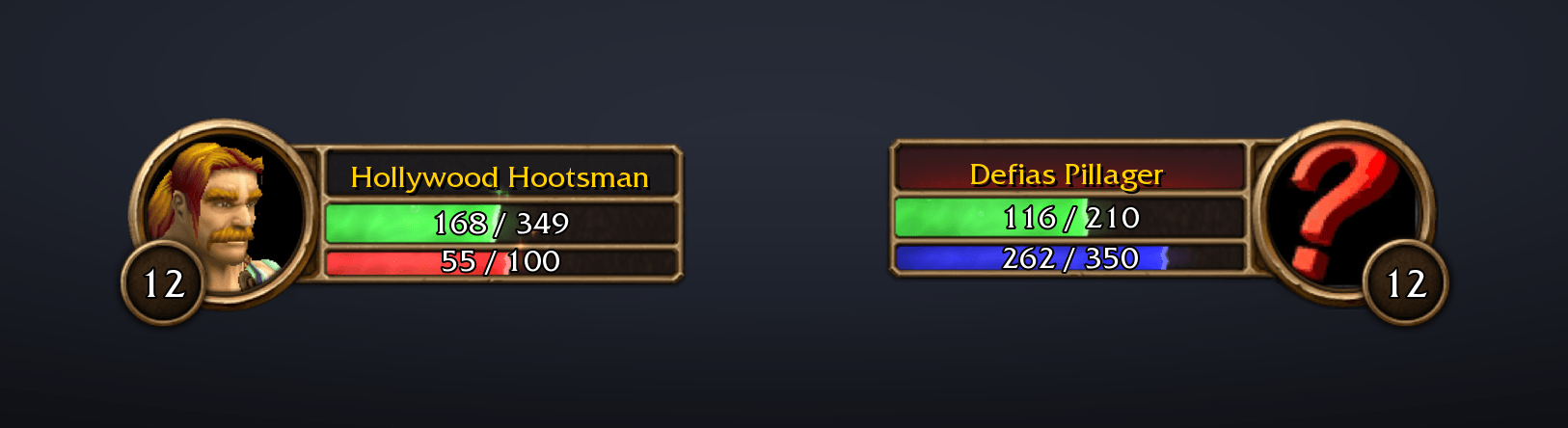
Turns your player and target frame health and power bars into animated liquid, with waves, bubbles, 24 themes, and an optional marker showing how much health your DoTs will burn away.
frames.png
themes.png
Description
Smooth Animated Bars
Liquid health and power bars for your unit frames in WoW Forever: yours, your target's, your pet's, your focus's, your targets of target and your party's, the Personal Resource Display, and nameplates too. Waves, a swirl of magic, bubbles, sparkles and lightning now fill the bars you watch all fight long, and they show what is on the way: your heals, your bandages, your food and your drink pour into your bars, and your DoTs eat into your target's.
Your frames stay the game's own. Only the fill changes, so nothing moves: log in and your bars are liquid. A short setup on your first login lets you choose the look, or skip it.
Features
- Liquid in every bar of your frame, your target's, your pet's, your focus's, your targets of target and your party members'.
- The Personal Resource Display: the extra health and power bars the game can show, with everything your own frame has: heals, food and drink, the mana build-up and Rage Fury.
- Every power type: mana, rage, energy and focus, each in its own colour, as the game shows it.
- Moves with the fight: the liquid eases to wherever the game's bar is, and stirs with every hit, heal, cast and tick.
- Your heals on the way: your own heals over time, bandages and the heal you are casting on yourself show ahead of your health as far as they will still bring it, and pour into it.
- Food and drink: what you are eating and drinking shows ahead of your health and mana, and food with a buff builds up to a burst of stars when you become well fed.
- Your DoTs on the target (optional): liquid in your DoTs' own colours eats into your target's health as far as they will still burn it, and the game's skull shows on its portrait when they will finish it.
- Nameplates (optional): the liquid in enemy and friendly nameplates too, with your DoTs on every mob that carries them.
- Party frames: each member's health and power, in their class or power colours.
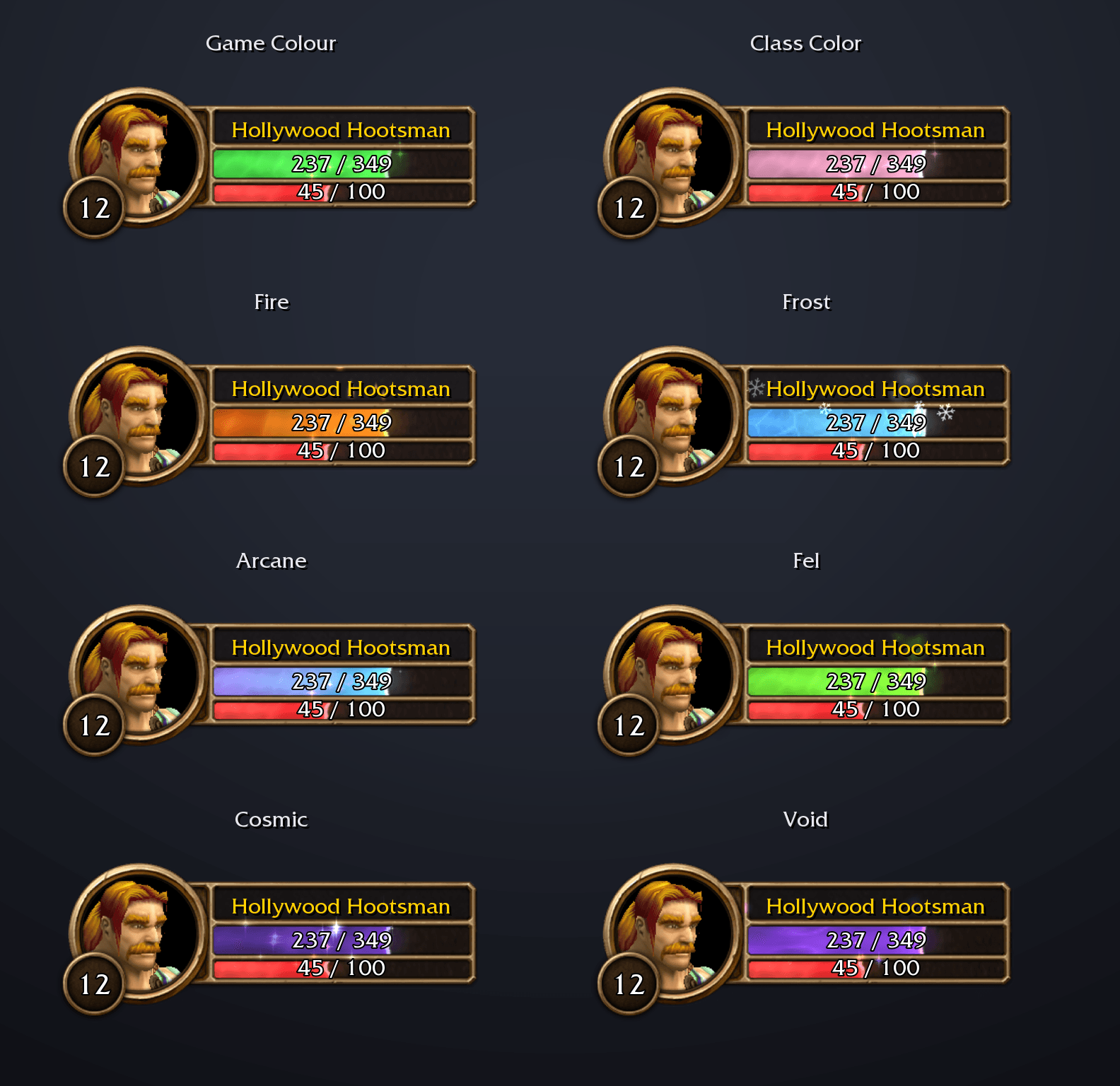
- 25 themes: keep the game's colours, or pick Class Color, Fire, Frost, Arcane, Shadow, Void and more, many with particles of their own. Each frame's health and power get their own choice, and Class Color shows each player's own class.
- Your call on every effect: waves, swirl, bubbles, sparkles, theme particles and lightning can each be switched off, and so can each bar.
- Mana regen build-up: your mana bar builds up through the five seconds after a spell, and lets go in a burst of stars as your mana starts to regenerate again.
- Rage Fury: your rage bar grows more furious as it fills, throbs at full rage, ready to burst, and bursts in sparks when you spend it.
- A quick setup the first time you log in, with preview frames that show each choice as you pick it, and the settings a right-click away on your frames.
Mage: every Fireball takes a bite out of your mana, and out of the kobold.
Rogue: energy flows back smoothly and pours out again on every strike.
Party frames
Party: each member's health and power in their own colours, rising and falling with the fight.
On by default, under Party in the settings, or right-click a party member's frame and choose Open Settings:
- Each bar follows its own member, wherever the game puts them, and stirs with every change to their health and power.
- Colours: Same as Yours follows your own; Class Color shows each member's class, and Game Colour each one's power type (blue mana, red rage, yellow energy).
- While a member is offline their bar goes back to the game's grey one, until they are back.
- The game's party frames only. With Use Raid-Style Party Frames on, they keep the game's bars. The game's own incoming heals and shields still show on them.
Personal Resource Display
Personal Resource Display: the rage grows furious and bursts with every spend, then a bandage pours into the health.
The extra health and power bars the game shows with its Personal Resource Display option on, wherever you place them with Edit Mode. On by default, under Personal Resource Display in the settings:
- Shaped to the game's bronze bars, with the liquid inside their rim and the bar text over it.
- Everything your own frame has: your heals, bandages, food and drink pour in, the mana bar builds up through the wait before mana regenerates, and a rage bar grows furious.
- Colours: Same as Yours follows your own; Game Colour takes the display's own, including its class colour setting in Edit Mode.
- A druid in Cat or Bear Form gets the liquid in the mana bar under the power bar too, with drink and the mana build-up there.
Your heals on the way
Priest: Renew and Flash Heal glow Holy ahead of the health, and a bandage goes up past them, throwing up green pluses.
Druid: Moonfire stays up on the mystic while Rejuvenation ticks and Healing Touch bursts in.
On by default, under Healing in the settings. The health your own heals will still bring back shows ahead of your health as a liquid of its own:
- Holy gold for priest and paladin heals, spring green for druid and shaman heals and for bandages, paler than the health so it stands out. Both at once show side by side, the one you started first next to the health.
- It pours in: its particles drift back into your health liquid, whose front ripples and takes on some of the incoming colour.
- A heal you cast bursts into your health as it lands: leaves for Nature, holy sparks for Holy. While you cast it, it shows at its lowest roll.
- Heals over time (Renew, Rejuvenation, Regrowth) run down tick by tick for their duration.
- Bandages tick every second, throwing up green pluses as the game does over a healed character, and if damage breaks one, what it had left drops out at once.
- It goes by your spells' tooltips, as WoW Forever keeps your health and each heal's size hidden from addons. Healing past full health is cut off at the bar's end.
- Your own heals on yourself only. Heals from others depend on their gear, which no tooltip tells, so they keep the game's own bar. Your own heals take the place of the game's flat teal bar while they show.
Food and drink
Eating: the honey pours in, the bar builds up, and a burst of stars says you are well fed.
- Food is a Honey liquid ahead of your health, and drink a Nagrand liquid ahead of your mana, each pouring into its bar.
- Food with a buff builds up while you eat, even at full health, then lets go in a burst of stars once you have eaten long enough to become well fed. Slow stars keep rising after that, so you know you can get up.
- Moving or casting anything else stands you up and ends them.
Your DoTs on the target
Warlock: Corruption eats in as Shadow, then Immolate joins behind it as Fire. When no green is left, they will finish it.
Warrior: Rend bleeds as Blood. When no green is left, it will finish the pillager.
Turn it on in the setup or under Damage Over Time in the settings. The health your damage-over-time spells will still burn away turns into liquid, eating into your target's health:
- Each school is a liquid of its own: Shadow, Fire, Frost, Arcane, Holy, Plague for Nature and Blood for bleeds like Rend and Rupture. The school you put up first sits at the front of the health, the next behind it. Two schools show at once; a third joins the second.
- It ripples with every tick and splashes when a DoT lands.
- The health liquid's front sits where the target's health will end once your DoTs are done.
- When no health liquid is left, your DoTs will kill it, and the game's own skull (the one it shows for a target far above your level) comes up on its portrait.
- It goes by your spells' tooltips, as WoW Forever keeps each hit's damage hidden from addons. A DoT runs down tick by tick for its whole duration, and one that is dodged, parried, missed or resisted as you cast it is left out.
- Nature DoTs give off the game's own poison skulls, poisons and stings alike, in a darker green than the Plague theme: a few skulls drift up while they run, and a burst comes with each tick.
- Rogue poisons that do damage over time, like Deadly Poison, show too: the poison is noted when you put it on your weapon and seen landing by its Nature ticks on your target. It counts one stack, so with more stacks the poison deals more than it shows.
Nameplates
Nameplates: Rend beats ahead of the pillager's health, the geomancer burns down under Corruption and Immolate after you tab away, and the boar and the guard keep their own colours.
Turn them on in the setup or under Nameplates in the settings, enemy and friendly plates each on their own:
- Enemy nameplates take the liquid in the nameplate's own colour (red, yellow for neutral) or your target's colour. In a big crowd the first 15 get it.
- Friendly nameplates have a colour of their own: the nameplate's, any theme, or Class Color for other players. Up to 10 get it, apart from the enemies, so a busy city cannot crowd out a fight. Friendly nameplates in dungeons keep the game's bar, as the game keeps them from addons.
- Your DoTs on nameplates: every mob carrying your damage over time shows it on its nameplate, as your target's frame does, and keeps it when you change target.
- The game's nameplates stay its own: health numbers turned on in the game's nameplate settings show over the liquid.
Mana regen build-up
Mana: the bar builds up through the five seconds after a spell, and lets go as your mana starts to come back.
On by default, under Mana in the settings. After a spell that costs mana, your mana stops regenerating from Spirit for five seconds, and your mana bar shows that wait:
- It builds up: motes gather into the front of the liquid, which turns pale and pulses faster while lightning starts up. The front itself holds still, so you can still read your mana.
- It lets go in a burst of stars and a flash as regeneration returns.
- Another spell that costs mana starts the wait again. Spells that cost none, like Shoot, do not.
- It goes by your casts, as WoW Forever keeps your mana hidden from addons. The burst still plays if your mana is already full, and Meditation and mp5 gear keep some mana coming back during the wait.
Rage Fury
Rage: the bar grows more furious as it fills, throbs at full, and bursts each time you spend it.
On by default, under Rage in the settings.
- It heats up from about half rage: the red turns to a fiery orange, flames lick up inside, lightning crackles and sparks fly off the top, and its front trembles.
- At full rage it throbs like a heartbeat, ready to burst, throwing sparks from its front with each beat.
- Spending rage lets it go: every ability that costs rage throws sparks off the front, and while the bar was hot the whole fury flares and cools back to red at what is left.
- It goes by your rage itself, which WoW Forever keeps hidden from addons: the game fades the fury in, so it shows exactly as far as your rage has climbed. It shows on any rage bar: yours, a druid's in Bear Form, your target's.
Make it yours
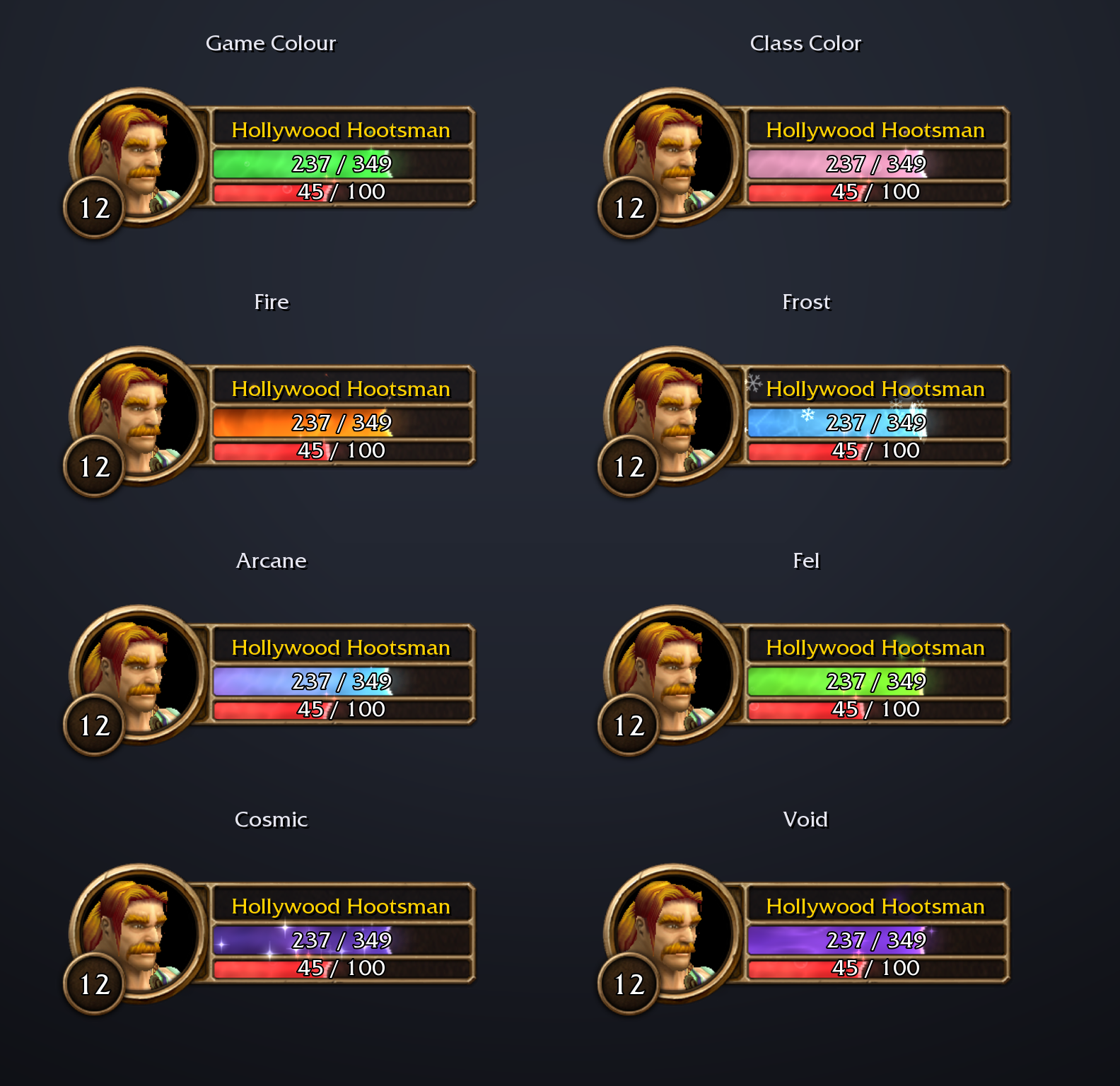
Open the settings with /sab, from Open Settings when you right-click your frame (or your target's, pet's, focus's or a party member's), or from Options > AddOns > Smooth Animated Bars:
- Player, Target, Pet, Focus, Target of Target, Party and Personal Resource Display: each frame's Health and Power, on or off, and while one is on, its colour: the game's own, any theme, or Same as Yours or Same as Target.
- Class Color shows each unit's own, and you choose what it shows on mobs: Reaction, Game Colour, Mob's Class or Your Class.
- Effects: Liquid Waves, Magic Swirl, Bubbles, Sparkles, Theme Particles and Lightning.
- Damage Over Time: DoT Marker and Kill Icon.
- Healing: Heal Marker, for your heals, bandages, food and drink.
- Mana: Mana Regen Build-Up.
- Rage: Rage Fury.
- Nameplates: Enemy Nameplates and their Colour, Your DoTs on Nameplates, and Friendly Nameplates with a Colour of their own.
- Setup Wizard: run the seven-step setup again. What's New: what changed in the latest versions.
Commands
| Command | |
|---|---|
/sab |
Open the settings |
/sab on / /sab off |
Liquid in all the bars, or back to the game's own bars |
/sab setup |
Open the setup again |
/sab changes |
What changed in the latest versions, as shown once after each update |
/sab debug |
What each bar is doing, if something looks wrong |
/sab dots |
Your DoTs on the target, and what the DoT tracking saw lately |
/sab heals |
Your heals, food and drink on the way to you, and what the tracking saw lately |
/sab mana |
The wait before your mana regenerates, and what it saw lately |
/sab perf |
What the liquid costs each frame: the unit frames (the Personal Resource Display and the party apart), the nameplates, and the costliest bars |
Good to know
- WoW Forever only. It draws on Forever's own unit frames.
- Player, target, pet, focus, target-of-target and party frames, the Personal Resource Display and nameplates. Raid-style party frames keep the game's bars.
- Always matches the game. WoW Forever keeps health and power hidden from addons, so the game itself places the liquid on its own bar. That is also why a hit and someone else's heal both just stir the liquid.
- Spell text in eight languages. The DoT tracking reads your spells' tooltips in English, French, German, Spanish, Portuguese, Russian, Korean and Chinese (rogue poisons in English only). The heal tracking reads English only, so on other client languages it may not pick up your heals.
- Light on your game. Once the bars settle, the liquid drops to a low update rate, and the party's small bars and the rage's fury keep to a lower one even in a fight.
- DoesItDie users: while DoesItDie is loaded, the DoT marker stays off so you don't get two.
Credits
- The liquid comes from Smooth Experience Bar, whose look is based on the Luxthos Experience Bar WeakAura by Luxthos & Daemoos.
- The DoT tracking is ported from DoesItDie by JoeGG (MIT licence), which worked out how to follow your DoTs on WoW Forever.
- The art is the game's own, the poison skulls too.
Open source under the MIT licence: source, issues and licence on GitHub.
Smooth Animated Bars is not affiliated with or endorsed by Blizzard Entertainment.
Smooth Animated Bars Team