SmartTotem 3.3.12
- By
SmartTotem is a custom World of Warcraft TBC Anniversary addon designed specifically for Shamans to provide intelligent raid-based totem recommendations during encounters.
Bars.jpg
Tremor.jpg
Tremor Recommended on mousover.jpg
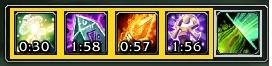
inuse.jpg
not in use.jpg
Description
SmartTotem 3.3.12
Note: Wow Forever is still in beta and updates will continue as it continues into release.
SmartTotem
- Healing Forever’s slate and teal theme, with larger text and icons.
- Cleaner dropdowns, improved panel spacing, and clearer locked controls.
- Customizable frame border thickness and color.
- Enhanced totem icons, timers, range fading, and utility-button feedback.
- Improved Water Shield and Lightning Shield charge displays.
- Level-aware mana potion recommendations
- Improved Watch Center drag reordering, saved with profiles.
- Expanded TBC and Forever compatibility.
3.3.12 Changes
SmartTotem 3.3.12
- Shield drop alerts now work mid-fight (WoW Forever). Water Shield and Lightning Shield watches play your alert sound the moment the shield drops in combat. The game itself plays it — addons can't read auras mid-fight on Forever, so we hand the trigger to Blizzard. Requires the watch's audio alert enabled in options.
Mana Tide Totem watch pulse no longer stutters: the drop alert now latches on a 3% mana threshold with hysteresis, a 0.75s release delay, and a single-writer fade driver -- the pulse breathes smoothly instead of flickering.
- Flyouts no longer visibly pop open at combat start on Forever: the combat-pinned close delay is now 0 (was 3.0s), so pinned columns conceal on the first frame instead of flashing open. Hover-to-reveal mid-combat is unchanged.
- Water Shield watch drop-pulse no longer stutters: the pulse driver is now the single writer of the icon brightness (it was being snapped flat every 0.5s), and the driver starts promptly on event-driven updates.
- Mana Tide cooldown no longer vanishes from the main bar on entering combat: the shared cooldown tracker keeps counting the last observed cooldown down instead of treating an unreadable (secret-gated) read as "ready", and leaves the display untouched when it has no observation. A readable "ready" still clears it.
- Water Shield watch now alerts in combat when the shield was down going in: combat state memory (last pre-combat read + your own casts, both reliable in combat) means down-at-pull with no recast is certain -- pulse + one-shot audio. A shield that drops mid-fight stays unknowable on Forever (aura reads are secret in combat), so the watch holds neutral there and alerts the moment combat ends.
3.3.xx changes
Restores Totemic Call on Forever and adds Call of the Elements to the main bar, with a profile-saved show/hide option in Layout & Appearance. Includes improved Forever combat flyouts and totem keybindings, restricted-name error fixes, corrected Poison Cleansing recommendations and aura timers, combat-safe Weapon Imbuement changes, minimap positioning fixes, Earth Shield tracking improvements
SmartTotem is an all-in-one Shaman companion for World of Warcraft: The Burning Crusade Classic Anniversary. From leveling and five-man dungeons to heroic content, raids, and PvP, SmartTotem provides intelligent totem recommendations, customizable loadouts, and advanced tools to help you play your best.
Intelligent Encounter Recommendations
SmartTotem continuously monitors combat events, enemy abilities, party status, encounter mechanics, and your current specialization to recommend the right totem at the right time.
Automatic recommendations include:
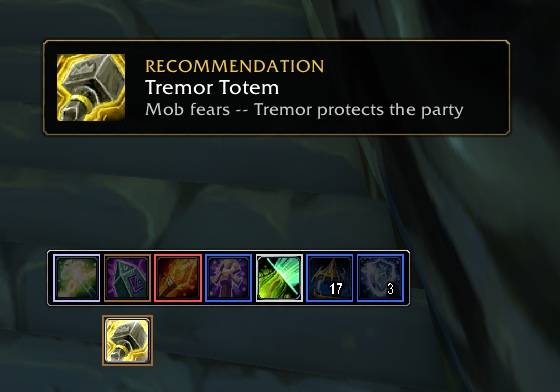
Tremor Totem
Grounding Totem
Mana Tide Totem
Poison Cleansing Totem
Disease Cleansing Totem
Nature Resistance Totem
Frost Resistance Totem
Fire Resistance Totem
Pre-Pull Boss Detection
One of SmartTotem's signature features.
Before combat even begins, simply:
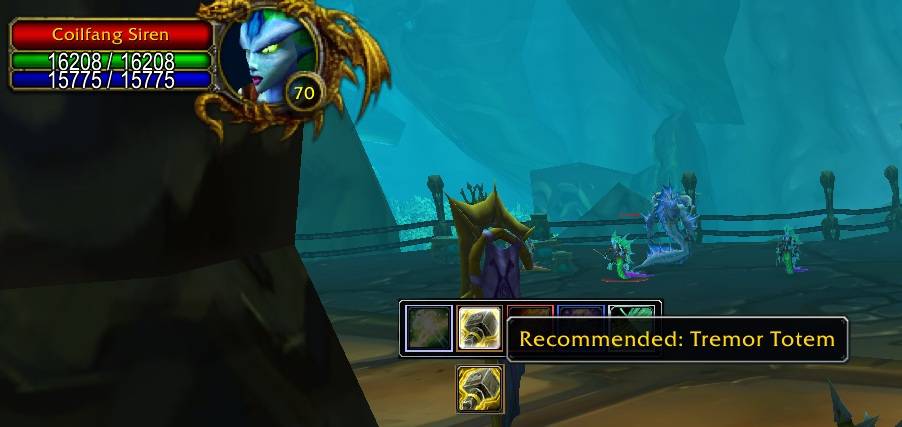
Mouse over an enemy
Target an enemy
Focus an enemy
If SmartTotem recognizes an upcoming fear mechanic, it immediately recommends Tremor Totem before the pull, giving your raid valuable preparation time.
Extensive Encounter Support
SmartTotem includes encounter awareness throughout The Burning Crusade Classic Anniversary.
Supported Raids:
Karazhan · Gruul's Lair · Magtheridon's Lair · Zul'Aman · Serpentshrine Cavern · Tempest Keep · Mount Hyjal · Black Temple
Support also includes numerous Classic-era raid encounters.
Supported Dungeons:
Hellfire Ramparts · The Blood Furnace · The Slave Pens · The Underbog · The Steamvault · Mana-Tombs · Auchenai Crypts · Sethekk Halls · Shadow Labyrinth · The Shattered Halls · The Botanica · The Mechanar · The Arcatraz · Magisters' Terrace
...along with many Classic leveling dungeons.
Instant Combat Casting
When SmartTotem recommends a totem, simply click it to cast. No searching through action bars, no scrolling through spell books, no guessing which totem should be dropped next. Just click and play.
Recommendation Panel and Flyout
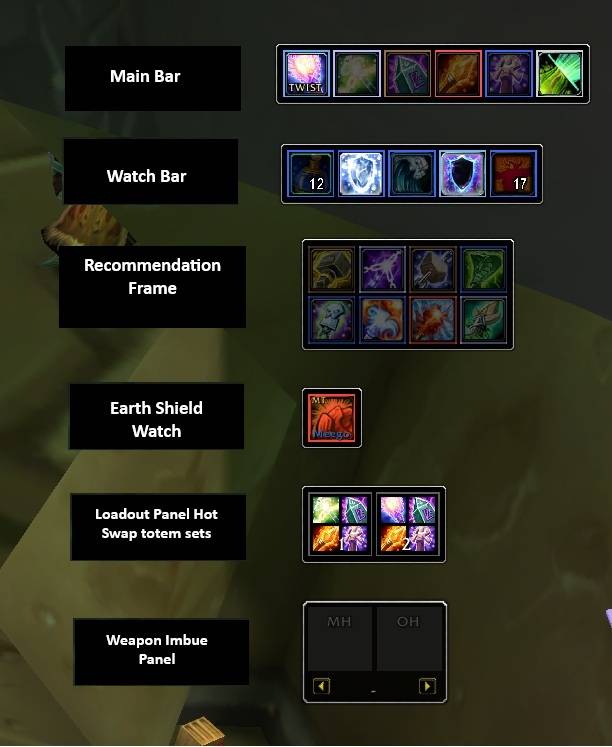
Choose how you see recommendations. The Recommendation Panel shows encounter-aware totem suggestions as a persistent icon grid, while the Recommended Flyout presents them inline when hovering the main bar. Both can be enabled independently and include visual demos for previewing recommendation behavior before entering content.
Earth Shield Watch
Restoration Shamans can assign up to four tanks or players through the Earth Shield Manager. SmartTotem tracks each assigned player's remaining Earth Shield charges and current target at a glance, alerting you with audio cues whenever Earth Shield expires or is missing so it can be quickly reapplied.
Earth Shield assignments can be silently broadcast to other SmartTotem users in your raid, helping coordinate coverage between multiple Restoration Shamans without cluttering chat.
Assignments, frame positions, and display settings are saved with your active profile.
Loadout Grid
Create and instantly switch between your favorite four-totem setups using the integrated Loadout Grid.
Save up to 12 custom loadouts
One-click loadout activation
Import full SmartTotem profiles as profile-backed loadouts that switch your entire configuration in one click
Instantly return to your active profile
Native Blizzard keybindings for every loadout slot
Draggable grid with saved position
Live synchronization with profile changes
Perfect for swapping between raid groups, bosses, PvP, farming, or leveling.
Standalone Options Window
Overview — feature summaries and quick reference
Caster — Earth Shield Watch, Water Shield, Lightning Shield, Mana Tide Totem, Mana Watch, weapon imbues, Ankh tracking, and Windfury Twisting
Recommendations — Recommendation Panel and Flyout configuration, icon order, visibility, duration, and pulse speed
Loadouts — loadout creation, profile import, display settings, and grid layout
Profiles — create, save, update, load, and delete named profiles
Layout & Appearance — global scaling, frame reset, icon hover effects, tooltips, timers, minimap button, and bar element reordering
Favorite Panels — pin your most-used option frames to a dedicated page for quick access
All options pages support movable and resizable layouts. Drag framed sections to rearrange them, use the corner grip to resize, and lock the layout when you're done. Positions are saved per profile.
Changes are staged with Save and Discard buttons, so nothing applies until you confirm.
Favorite Panels
Star any supported option frame to add it to your Favorite Panels page. Favorites belong to your currently loaded profile, so each profile can have its own set of pinned options. Unlock the layout to move or resize your favorite frames, then lock it to save their positions.
Flexible Profile System
Create separate configurations for every specialization and playstyle.
Restoration, Enhancement, Elemental, and unlimited custom profiles
Each profile stores its own settings, preferences, layouts, frame positions, Favorites, loadouts, and bar element order
Profile-backed loadouts let you switch your entire SmartTotem configuration in one click from the Loadout Grid
Mana Watch
Mana Watch helps Restoration and Hybrid Shamans manage mana throughout long encounters.
Real-time mana monitoring with configurable thresholds
Intelligent Mana Tide Totem recommendations with audio alerts
Mana consumable recommendations (potions, runes, and other items)
Water Shield monitoring with audio alerts
Lightning Shield monitoring with audio alerts
Self-Buff Monitoring
Never lose track of your most important buffs. SmartTotem monitors Water Shield, Lightning Shield, Earth Shield, weapon imbues, and Ankh availability, with clear reminders and optional audio alerts whenever a buff expires or needs refreshing.
Windfury Twisting Assistant
Designed specifically for Enhancement Shamans.
Windfury internal cooldown tracking
NOW / WAIT timing indicator with ICD blocking
Optional audio alerts with selectable sounds
Twist performance statistics
Frame Snapping and Drag Reorder
SmartTotem frames snap together automatically as you drag them, making it easy to build clean layouts. Drag any snapped frame and its attached group moves with it.
Supported bars and watch frames allow their icons to be reordered by dragging. Right-click drag to reorder, left-click drag to move.
Native Blizzard Key bindings
Every supported totem can be assigned directly through Blizzard's standard Key Bindings menu.
Updates
3.2.6
Fixed saved frame positions not restoring after `/reload` or relog when the active profile is "None".
Fixed right-drag/group movement skipping position saves without a named profile when dropped without snapping. The unnamed configuration now records that group's last position.
- Changed **Show Imbue Timer** to default to **OFF**, including when initializing a missing setting. Existing saved choices are preserved; users with it already ON can turn it OFF once.
3.0.1 - Flyout click-through fix
- Reworked the main totem hover flyouts so closed/inactive flyouts are genuinely hidden instead of remaining alpha-zero with an invisible click shield.
- Closed flyout areas no longer intercept mouse clicks from addons or UI elements placed beside/behind the SmartTotem bar.
3.0.0 - French, German, Spanish, Brazilian Portuguese, Russian, Korean, Traditional Chinese, and Simplified Chinese added.
2.8.8 Sticky Last Totem & Twist Keybind
Sticky Last Totem (option)
- Added a **Sticky last totem** option (Layout & Appearance → General). When enabled, each element slot keeps the last totem you cast there armed after it drops, instead of rolling back to the loadout/manual default.
- The faded resting icon now shows the totem the slot will actually recast, so what you see matches what a click will cast.
- Right-click a slot to clear it, or switch loadouts/profiles, to reset that slot back to its default.
- Off by default: with the option disabled, the bar behaves exactly as before.
2.8.7 — Hyjal Recommendations, Raid Check, and UI Polish
Hyjal Encounter Support
- Added persistent Tremor Totem recommendations for Archimonde, including pre-pull arming and automatic clearing when Tremor is active or the encounter ends.
- Archimonde recommendations now follow the global Display time setting instead of a separate per-boss toggle.
- Added Kaz’rogal Mana Watch urgency handling for mana-drain pressure.
Raid Check
- Added `/stcheck` and `/stwho` to report which party or raid members are running SmartTotem and their versions.
- Added `/stcheck missing` to list members who did not answer.
- Correlated replies to the active check so delayed responses cannot contaminate a newer report.
Mana Watch and Combat Safety
- Improved mana-consumable fallback so Mana Watch can advance from exhausted zone-specific items to available regular potions during the same combat.
- Added post-click verification of the consumable actually used before applying shared-cooldown lockout.
- Fixed combat-blocked scale restoration by deferring the complete scale pass until combat ends.
Visual & UI Overhaul
- Modernized the SmartTotem configuration interface.
- Added consistent ON/OFF switches and unified slider styling throughout.
- Redesigned the Watch Center and Favorites panels.
- Added row-hover highlighting for improved readability.
- Simplified Recommendation Display Settings to Display time, Pulse speed, and Favorites with corrected frame sizing and padding.
- Improved spacing, alignment, hover feedback, and overall visual consistency across the addon.
- Preserves existing profiles, loadouts, Favorites, Earth Shield assignments, Weapon Imbuement presets, frame positions, settings, and SavedVariables.
2.8.6 — Bindings, Cooldowns & Profile Enhancements
New Features
- Added a fully integrated **Bindings** page for configuring SmartTotem keyboard shortcuts directly from within the addon.
- Added customizable **Alt**, **Ctrl**, and **Shift** modifier-click assignments for every Main Bar element.
- Added **profile-backed modifier assignments**, allowing alternate totem bindings to automatically switch with profiles.
- Expanded cooldown tracking across the Main Bar, elemental flyouts, Recommendation Panel, and Recommendation Flyout.
- Added separate displays for **active totem duration** and **real spell cooldowns** for improved cooldown visibility.
- Expanded Recommendation Engine displays with cooldown overlays and timer support.
2.8.5 Scaling, Profiles, Earth Shield, and Totem Reliability
Totem Reliability
- Fixed a transient `PLAYER_TOTEM_UPDATE` race that could make an active Tremor Totem icon cast Stoneskin when clicked again to refresh it.
- Empty totem slots are now briefly confirmed before the main bar reverts to the configured element default, keeping the visible active totem synchronized with its secure cast spell.
- Fixed Mana Tide Totem warning audio occasionally playing more than once by filtering global-cooldown updates and guarding each alert window.
Scaling
- Capped all frame scale maximums at 150% (was 200%).
- New `restoreAllScales()` applies plain `SetScale` after position restore on login/load — eliminates cumulative position drift on every reload.
- Scale is per-profile; auto-save keeps values current across reloads and profile switches.
Snap System — Reload, Scale & Chain Safety
- Login `Snap.restoreAll()` now runs with safety checks suspended — valid snap attachments are no longer rejected at non-100% scale on reload.
- `EndScaleTransaction` applies the same suspension pattern for the scale slider.
- `applySnapshot` Config.set loop wrapped in snap suspension — prevents onChange-triggered scale re-applies from deleting valid attachments during profile load.
- Dragged snap parents now exclude their own attached descendants from snap-target selection, preventing frames from landing beside or reverting from the intended drop position.
- Snap parents are protected from factory repositioning and layout clamps while other frames remain attached to them.
Group drag aborts silently if combat starts mid-drag.
Group drag cancel skips frame repositioning during combat lockdown.
Profile Auto-Save
- Config changes now auto-save the active profile after a 0.5-second debounce — no more manual Save/Update required for day-to-day changes.
- Position lock removed — frame drags always save through.
New Button & Profile Creation Workflow
- "Update" button replaced with "New" button. Workflow: click New (detaches from active profile, resets all settings and totem visibility to defaults) → configure → type name → Save.
- Deleting the active profile now resets all settings to defaults instead of leaving ghost settings.
Profile Export / Import
- Export: one-click auto-save of full profile snapshot (config, positions, snap attachments, Manual visibility/order) to SavedVariables. Persists across reloads and addon updates.
- Import: toggle popup with dropdown of saved exports, name field, and Delete Export button. Anchored to the options window.
Bug Fix
- Fixed undefined `threshold` variable reference in PartyAura.lua that prevented Poison Cleansing Totem recommendations from firing.
2.8.4 — Weapon Imbuement Restoration & Bug Fixes
- Restored the full standalone Weapon Imbuement system (presets, dedicated bar, options panel, keybinds, macro builder, tooltip scanning, timers, and scale controls) that was inadvertently removed during the 2.8.3 performance pass.
- Restored all five Weapon Imbuement keybindings: Toggle Bar, Apply Main-Hand, Apply Off-Hand, Previous Preset, and Next Preset.
- Restored the "Weapon Imbuement" tab in the options window with complete preset management, MH/OH spell selection, timer toggles, and scale sliders.
- Restored standalone frame positioning and snap integration for the Weapon Imbuement bar.
- Fixed Hydross phase scanner disarm: replaced inline GetTime countdown with C_Timer.After plus token-based invalidation, ensuring reliable disarm after marks clear and proper recommendation clearing on phase exit.
- Fixed ManaWatch forward-reference bug: `manaEnsurePulse` was called before its definition; added forward declaration and converted to assignment form.
- Preserves existing profiles, loadouts, Earth Shield assignments, settings, frame positions, and SavedVariables.
2.8.3 —Performance Optimization
- Converted six always-on every-frame OnUpdate handlers to demand-driven: glow-pulse drivers in Bar, Self Buff Watch, Mana Watch, Water Shield Watch, and Mana Tide Watch now sleep when nothing is pulsing, and the Flyout hover watcher and timer driver stop entirely when no flyout is open.
- Filtered the Indicator UNIT_AURA handler to player-only, eliminating redundant buff scans triggered by other raid members' aura changes. The periodic range-check timer covers fallback.
- Gated the Hydross phase scanner behind CLEU detection of Mark of Hydross / Mark of Corruption application. The scanner activates only when a Mark is seen and disarms after marks clear for five seconds, reducing Hydross-related CPU to zero outside SSC.
- Restructured `playerHasAnyBuff()` from an outer-names / inner-buffs nested loop to a single pass over the buff list, removing a redundant reverse substring check.
- Coalesced the Hydross `GROUP_ROSTER_UPDATE` handler through the same 0.15-second settle timer used for aura events.
- Preserves existing profiles, loadouts, Earth Shield assignments, settings, frame positions, and SavedVariables.
2.8.2 Changes
2.8.2 — Profile-Optional Customization and Options Improvements
Made the unnamed **None** configuration a fully persistent working setup, allowing users to customize SmartTotem without first creating a named profile.
Enabled Favorite Panels, options-page layouts, frame positions, scaling, and snap relationships while using None.
Creating a named profile now captures the user's current working configuration, including Favorites and layouts.
Added **Reset Layout**, **Reset This Tab**, and **Factory Defaults** controls with clear, separate scopes.
Improved tab-reset coverage for custom controls, including Loadout editor selections and Visible
Preserves existing named profiles, loadouts, Earth Shield assignments, settings, frame positions, and SavedVariables when upgrading.
2.8.1 — Persistent Settings Without a Named Profile
- Made the unnamed "None" configuration persist normally across `/reload`, logout, and login.
- Preserved explicit loading of "None" as the existing full factory-reset action.
- Limited talent/spec changes while using "None" to refreshing only spec-dependent default totems and shield mode.
- Preserved named profiles, profile snapshots, loadouts, Favorites, Earth Shield assignments, frame positions, SavedVariables names, and existing database formats.
SmartTotem Changelog
2.8.0 — Standalone Options and Earth Shield Manager
- Added a fully standalone SmartTotem options window while retaining Blizzard Settings as a fallback route.
- Expanded Earth Shield Watch into a multi-target Earth Shield Manager with assignment menus, status and charge tracking, missing-shield alerts, assignment sharing, and duplicate-target warnings.
- Added profile-backed Loadout Panel entries for rapidly switching complete SmartTotem setups while preserving regular four-totem loadouts.
- Improved the Loadout Grid, Recommendation Panel, Watch Cluster, Favorites, minimap controls, factory layouts, snapping, scaling, and frame positioning.
- Added an Overview page with setup and workflow guidance.
- Refined options sizing, spacing, alignment, dropdown controls, Save/Discard behavior, profile handling, and standalone-window layering.
- Updated recommendation demonstrations and default behavior for fresh profiles.
- Completed release cleanup by removing verified unused helpers, obsolete diagnostics, dormant debug paths, and superseded assets without changing gameplay behavior or saved data.
- Corrected the internal `/st test` smoke checks for the current recommendation architecture.
- Preserves existing profiles, loadouts, Favorites, frame positions, settings, and SavedVariables when upgrading from 2.7.2.
- Includes numerous stability, combat-safety, layout, and usability fixes accumulated throughout 2.8 development.
SmartTotem 3.3.12 Team