Smart Drawer
Turn an action button into a pop-out row of spells and items. Works in combat.
Description
Smart Drawer
Turn an action button into a pop-out row of spells and items.
Press the button and a row opens beside it: the button's own spell first, then anything else you drag in. Click what you need or use the number keys. It all works in combat, so a skill, a potion and a bandage can share one button.
Tested in combat with the game’s raid and boss-fight addon restrictions forced on, and it still works.
Setting one up
- Hold Ctrl and Shift and right-click an action button, out of combat.
- Choose Make Smart Drawer.
- Drag spells and items from your spellbook or bags into the open row.
Drag an entry out to take it off. The same menu can edit a drawer or remove it.
Quick cast
Hold the quick cast key (Shift by default) as you press the button to cast the one you used last, without opening the row. The button shows the drawer's number and the icon of that last choice, so you can see what a quick cast will bring.
There is also an option to press the button twice instead, if you would rather not hold a key. And each drawer can be given a key of its own in Key Bindings, under Smart Drawer Quick Cast, for a quick cast from anywhere on your bars.
Keys for an open drawer
While the row is open, the number keys pick entries, and each entry shows its key. Any place in the row can be given its own key in the settings. Those keys do nothing while no drawer is open, so the rest of your bars is unaffected.
What you get
- Up to 12 drawers with up to 12 entries each.
- Item counts and cooldowns on every entry.
- Works on the game's action bars and on buttons from addons that replace them.
- Nothing to type: drawers are made from a menu and saved per character.
Settings
Game Menu → Options → AddOns → Smart Drawer. There you can change the quick cast key, turn on press twice and set the keys for an open drawer.
Compatibility
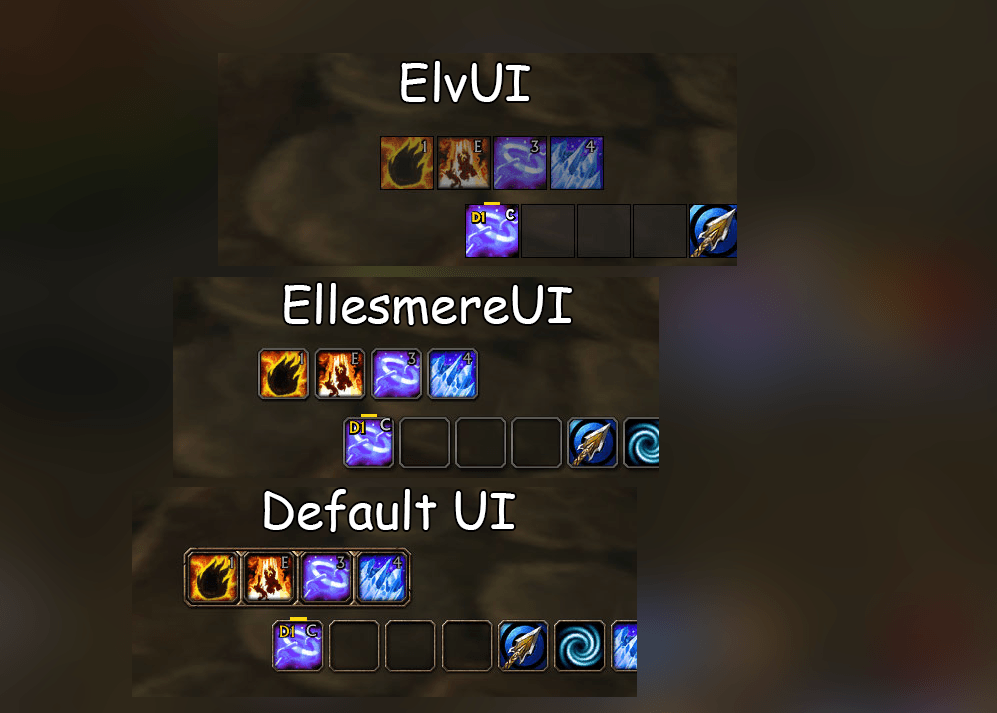
Built for World of Warcraft: Forever. Works with Elvui, EllesmereUI, Bartender4 and Dominos and default Blizzard action bars by default, inherits their skin and keybind text.
Bugs or Ideas
When reporting a problem, please include what you were doing, any Lua error, and other addons affecting your action bars. A screenshot of the button and its row is a big help.
Credits and license
Made by Norn. The code is released under the MIT license.
Smart Drawer Team