Slerne Notes
- By
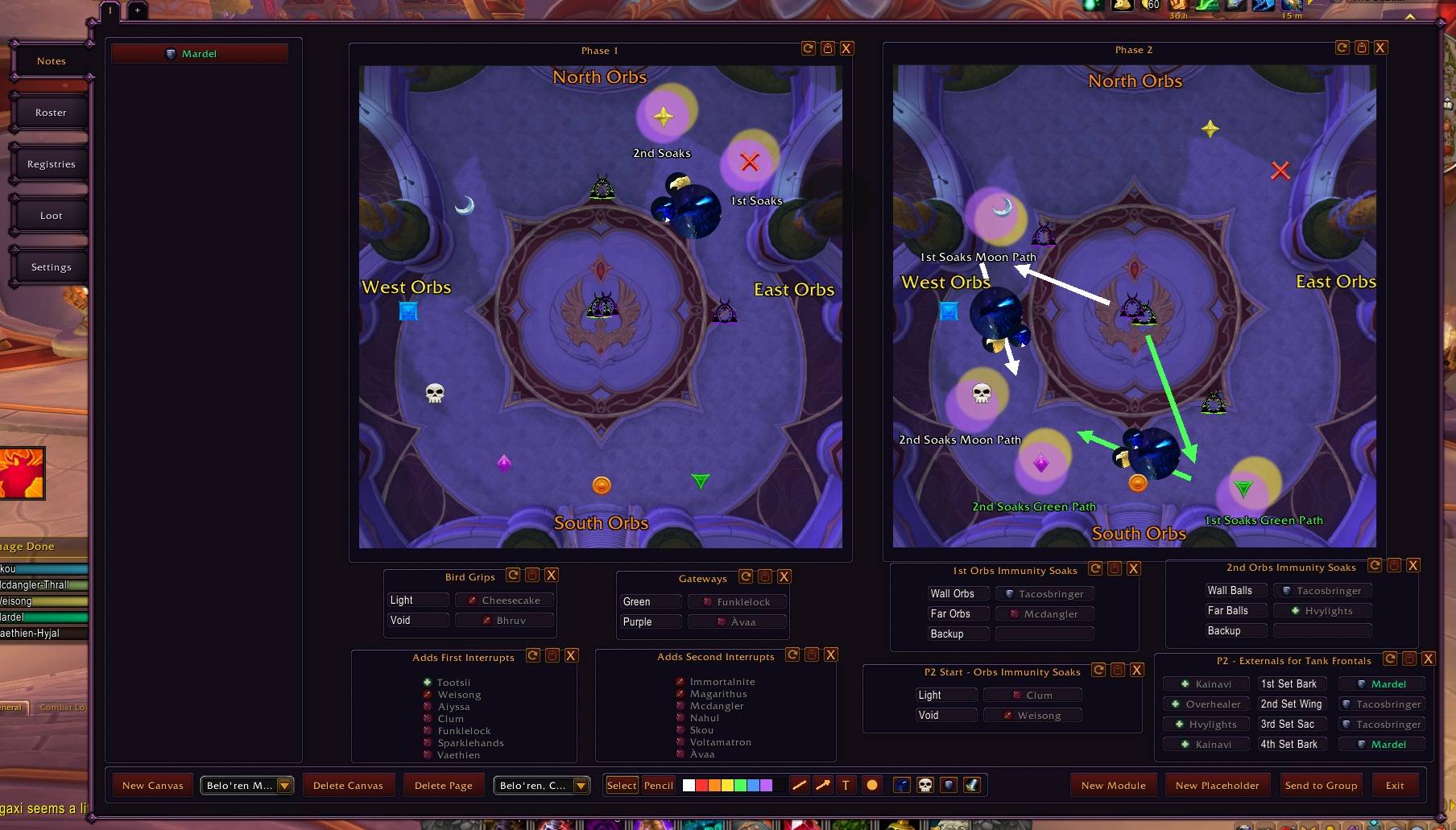
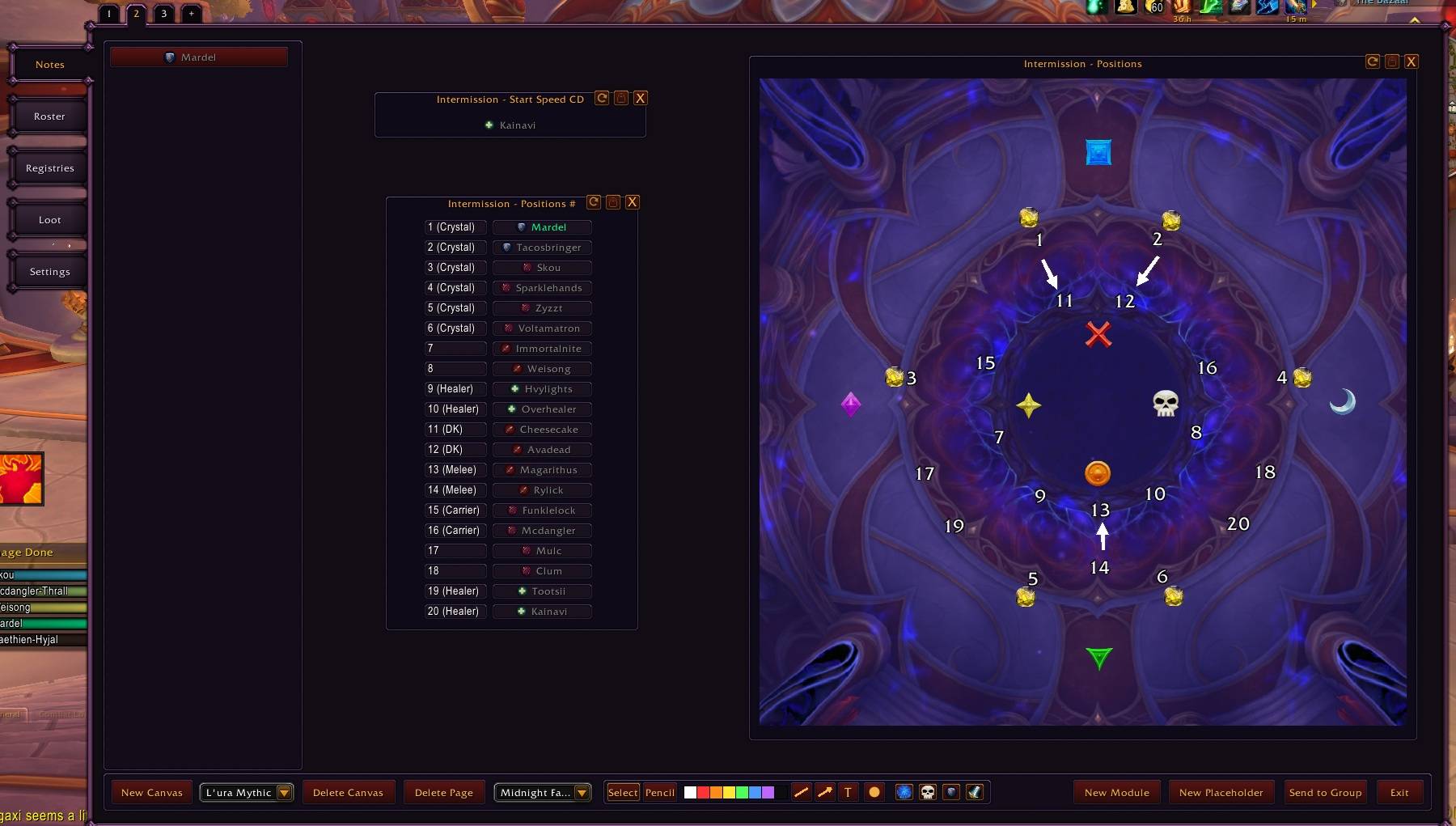
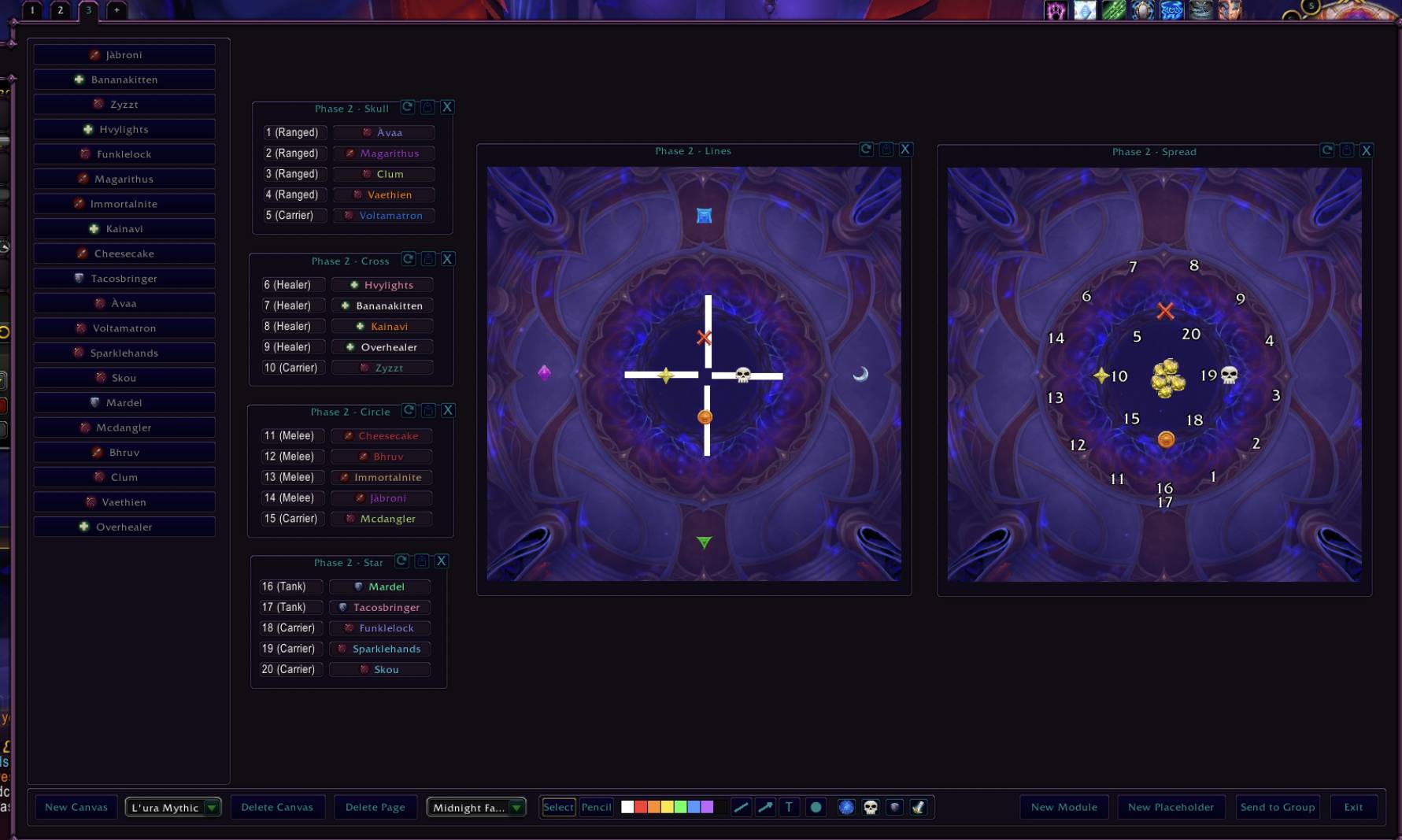
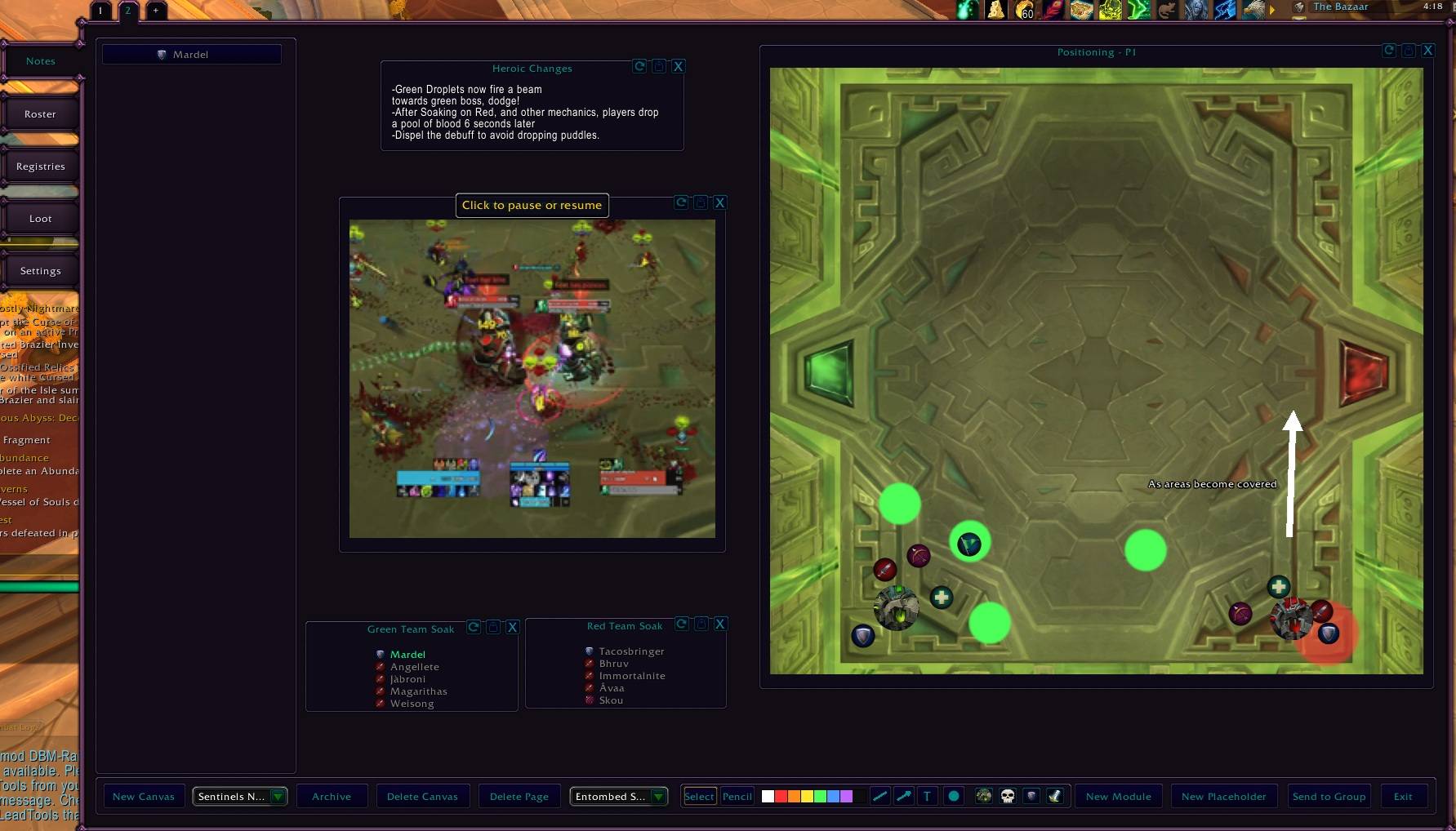
Raid assignment planner for World of Warcraft (Retail). Build a plan by dragging raid members into modules, drawing on a shared canvas, and broadcasting the result to your group.
media2.jpg
media0.jpg
media1.jpg
Description
What this Addon is:
Slerne Notes is a raid planning addon for raid leaders. You build the plan in game, on the actual boss arena, with your actual roster. A lot of Quality of Life features like greyed out players not in the raid that are assigned to tasks, so you can at a glance see assignments that need to be replaced from raid to raid.
Optionally, your raiders can install the lightweight companion addon, Slerne Notes Viewer, and receive and save everything you made with the push of a button. They do not need Slerne Notes itself.
I used to use spreadsheets for everything, this addon was born to improve upon that process and it has helped me tremendously, if it can help anyone else, i'm happy to share it! Feel free to send me a message to my Discord: Slerne if you have any questions or bugs!
Disclaimer: Parts of this addon were coded with AI Assistance.
How it works
- Open the addon with
/snor the minimap button - Create a canvas for a boss. Its arena map and encounter icon pack load automatically
- Drag raiders from the roster list onto modules, draw the positioning, write the notes
- Press Send to Group. Everyone running the Viewer receives the full plan, every page of it, in a few seconds.
The canvas
One canvas per boss, up to eight pages per canvas, so a single fight can have one page per phase. Pages are switched with tabs above the window, and the whole set is sent together.
Old canvases do not have to be deleted. Every canvas has an Archive button that moves it into an Archive folder inside the canvas dropdown, out of your way but still there. The folder only appears once something is in it, and while you are viewing an archived canvas the button reads Unarchive.
Built-in arenas
- Midnight Season 1: The Voidspire (six encounters), March on Quel'Danas, Sporefall, The Dreamrift
- Midnight Season 2: The Venomous Abyss, every encounter from Nek'zali the Soulcoiler to Ula'tek, including the broken arena from the final phase as its own map, plus The Tidebound Grotto
- Season 2 encounters ship with their own icon packs: boss and add portraits you can stamp directly onto the map
Huge thanks to Ekto from https://raidplan.io/ for allowing the use of the Boss Arena Maps and icons!
Modules
Modules are the building blocks you place on a canvas. Add one with New Module, drag it anywhere, and drop players into it.
- Assignment: a titled box you drop players into. Names sort by role and are class colored. Example: a "Soak Group 1" box with two healers and three DPS
- List: labeled slots filled one player each. Example: an interrupt rotation numbered 1 to 4
- Action List: rows with a player slot on each side of a center label. Example: left column a priest player, label "Life Grip", right column a name of a player to be saved during a specific mechanic.
- Image: an arena map or one of your own pictures, resizable, with a three state lock (see below)
- Text Block: free text that sizes itself to what you write
- Flipbook: a short looping clip of a mechanic, playing right on the canvas. Click it to pause or resume
Placeholder players: If you're looking to create your plan ahead of time, since the roster is auto-filled by the players in your group, that can be an issue. That's why you can create Placeholder creates a named player with a class of your choice. They behave exactly like a real roster member and can be dropped into any module, the real player will take over their slot once they join your party.
Sort your raid groups
List modules have an S button. Press it and your raid subgroups rearrange to match the list: slots 1 to 5 become group 1, slots 6 to 10 become group 2, and so on. No more calling out group swaps one by one.
It needs a raid, raid lead or assist, and to be out of combat. If something is missing it tells you which in chat, and players on the list who are not in the raid are skipped and named so you can see who is absent.
Drawing tools
The toolbar in the footer draws directly on the canvas, on top of everything:
- Pencil for freehand strokes, with eight colors
- Line and Arrow for movement and kick assignments
- Circle for soak spots and spread markers
- Text for labels placed anywhere
- Raid target markers, all eight
- Role icons (tank, healer, melee, ranged) and a flag marker
- Class icons, all thirteen classes, plus green and purple gate icons
- Encounter icons: the boss and add portraits of whichever fight the canvas belongs to
One control scheme for everything
Every icon, marker, circle, line, text, and pencil stroke uses the same controls. Learn it once:
- Drag to move
- Right click to remove
- Mousewheel to resize (or change stroke and line thickness)
- Shift + mousewheel to change opacity
The Image module lock cycles through three states when you click the padlock: unlocked, icon lock (drawings on the image are frozen and move together with the image when you drag it), and full lock (nothing moves). Icon lock is the one you want once a map is finished: reposition the whole map, plan intact.
Custom maps and flipbooks
Drop your own images into Interface/AddOns/SlerneNotes/img/maps/custom/ as uncompressed 24 or 32 bit TGA files and they appear in the Image module picker. Anything works: a screenshot, a hand drawn diagram, a boss arena image.
You can add your own animated clips too. Drop a sheet into Interface/AddOns/SlerneNotes/img/flipbooks/custom/ as a PNG, then in the Flipbook module type its file name and set rows, columns, frames and FPS. A sheet is one image holding every frame in a grid, read left to right and top to bottom. The grid settings travel with the broadcast, so raiders who have the same file see it play correctly.
Broadcasting
Send to Group serializes the entire canvas, all pages, all modules, all drawings, and broadcasts it over the addon channel. Transfers are chunked and queued against the game's throttle, so large multi page plans arrive complete instead of silently dropping pages. It picks the right channel automatically: party, raid, or instance chat inside instances. Solo, it sends to yourself, which is a handy way to test what your raiders will see if you also run the Viewer.
The Registries plugin
Registries are pop out checklists for things that do not live on a map.
- Manual: a list of lines. Press Export and it becomes a small movable window on your screen. Click a line to grey it out, Reset to restore. Example: a pull checklist with "Flask, Rune, Repair, Summon stragglers"
- Countdown: lines that start with a time auto grey themselves during combat. The timer starts when combat starts and resets when it ends. Example:
0:15 Lines + Soaks
1:30 Spread
2:40 Soak
At 1:30 into the pull, the Spread line greys itself out on its own.
The Roster plugin
An attendance sheet that fills itself. Everyone who joins your groups is logged (the list self trims to the last 100 people, it never grows forever), and you can flag raiders as guaranteed or inactive. Next to it sits a raid buff coverage panel: hover a buff such as Mystic Touch or Chaos Brand and the roster highlights everyone who provides it.
The Loot plugin
A loot log for group content.
- Choose which equipment slots to track with checkboxes
- Every tracked drop from the group loot history is logged with the item, everyone's roll (Need, Need offspec, Transmog, Greed, Pass, with roll numbers), and the winner
- The log shows what the winner had equipped in that slot, item level included, next to what they just won. Raiders running Slerne Notes Viewer share their equipped gear automatically, which is what makes the comparison possible
- The log keeps the last 50 drops and cleans itself. Clear Log wipes it manually
/snlootprints its small utility commands
Disclaimer: Still a little rough around the edges, plan to update it soon.
Settings
- Theme: font color and button color, with a live preview
- Minimap: hide the minimap button
- Plugins: hide the Roster, Registries, or Loot tabs entirely if you only want the planner. Everything keeps working in the background, including the self cleaning logs
- Group Viewer Versions: see which version of the Viewer every group member is running, with a Refresh button that polls the group on demand
Good to know
- Escape closes the window, like any Blizzard frame
- The planner and the Viewer speak a versioned protocol. When in doubt, the Settings tab shows you exactly who runs what
- There is one small secret image hidden in the addon for the curious.
Credits
- Custom art by Tado (instagram.com/tadogram)
- Secret easter egg art by Taco
- Base Boss Arena Maps & Boss/Add Icons by Ekto (raidplan.io)
- Base Flipbook gifs taken from various Team Liquid Streams, thank you!
- Code released under the MIT License. The bundled art remains the property of its artists and is not licensed for reuse
- Parts of this addon were developed with AI assistance
Slerne Notes Team