SkyInfoTiles
- By
Lightweight UI tiles for retail WoW: Season 3 currencies, Mythic Keystone info, and Character Stats—drag to position, lock when you’re done. Minimal visuals, fast, and configurable.

skyinfotiles_keystone.png
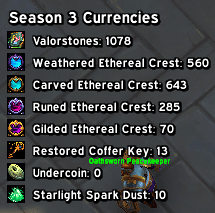
skyinfotiles_currency.png
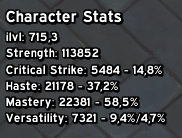
skyinfotiles_charstats.png

dungeon_portals_vertical.png
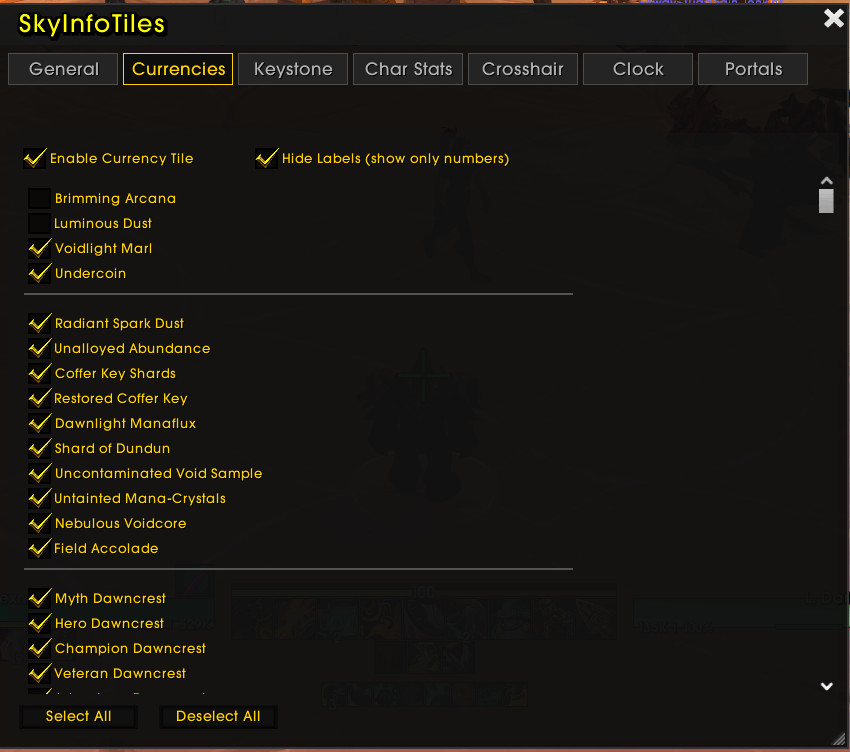
infotiles_options.png
Description
SkyInfoTiles
Small, lightweight info tiles you can place anywhere on your screen. Each tile is focused, readable, and performance‑friendly—ideal for getting key data at a glance without bulky UI.
What’s included (current)
-
Season 1 Currencies (Midnight)
- Shows a curated list of current‑season currencies (ID‑based, so it works across locales).
- Displays amount and (when available) season cap and weekly progress.
- Optional scope tag via
/skytiles scope char|warband(where supported by the client API). - Only shows at max level.
-
Mythic Keystone
- Detects your owned keystone (API + bag fallback): big level number and dungeon name.
- Uses the dungeon icon when it can resolve it.
- If the corresponding teleport spell is known, left‑click the icon to teleport.
- Only shows at max level.
-
Character Stats
- Equipped item level and primary stat (Strength/Agility/Intellect).
- Secondary stats with percent + rating: Crit, Haste, Mastery, Versatility.
-
Dungeon Teleports (Seasonal)
- Clickable teleport icons for the current season.
- Hover shows tooltip + cooldown; cooldown swipe is displayed on the icon.
- Layout can be horizontal/vertical and supports per‑tile scale.
- Only shows at max level.
-
Crosshair
- Configurable overlay crosshair (size, thickness, color).
- Always centered and not draggable.
-
24h Clock
- Clean 24‑hour time display (HH:MM).
- Supports font, size, outline and color.
Dragging vs clicking (Lock)
- When unlocked, tiles are draggable.
- When locked, clickable actions are enabled (teleports).
Sharp text
- Global outline option for improved readability:
/skytiles outline none|outline|thick
Commands
-
/skytiles— show help (also available as/skyinfotilesand/infotiles) -
Lock / Unlock
/skytiles lock/skytiles unlock
-
Enable / Disable tiles
/skytiles enable <key>/skytiles disable <key>
Keys (current):
season3,keystone,charstats,crosshair,clock,dungeonports -
List / Reset / Clean
/skytiles list— list catalog tiles and their enabled state + position/skytiles reset— reset active profile layout to catalog defaults/skytiles clean— remove duplicates + re-seed catalog entries
-
Scope (used by tiles where applicable)
/skytiles scope <char|warband>
-
Dungeon Teleports layout/scale
/skytiles layout dungeonports <horizontal|vertical>/skytiles scale dungeonports <0.5-2.0>
-
Profiles (managed via slash commands)
/skytiles profile list/skytiles profile set <name>/skytiles profile new <name> [copyFrom]/skytiles profile delete <name>/skytiles profile assign <specID|specName> <profile>/skytiles profile clear <specID|specName>
Settings (Interface → AddOns → SkyInfoTiles)
A minimal, lightweight options panel:
- Lock tiles (disable dragging)
- Reset layout (active profile)
- Clean duplicates
- Enable/disable the predefined tiles
- Dungeon Teleports
- Layout (horizontal/vertical)
- Scale (0.5–2.0)
(Profiles are currently managed via /skytiles profile ....)
Requirements
- World of Warcraft (Retail) 12.0+
Performance
- Tiles update on relevant in‑game events and via right‑click refresh.
- No heavy polling loops; designed to stay lightweight.
Troubleshooting
- Seeing duplicate tiles or odd entries? Run
/skytiles clean. - Want to reset to a known‑good layout? Run
/skytiles reset.
Advanced / Debug (optional)
- Keystone teleport debug:
/skykeydebug(also Alt+Right‑click on the Keystone tile) - Dungeon teleports debug helpers:
/skyportshelp,/skyportsdebug,/skyportsfind,/skyportssearch <text>,/skyportsdesc <text>
Credits & License
- Addon code © 2026 SkyInfoTiles authors.
- Suggested license: MIT (replace with your preferred license as needed).
SkyInfoTiles Team