Skip Dialogue
Skip Dialogue is a simple addon that makes questing and NPC conversations faster and easier. Normally, some quests require you to click through the same gossip options multiple times, and the position of those options may change depending on dialogue text length. That means you constantly need to move your mouse and aim at changing buttons.
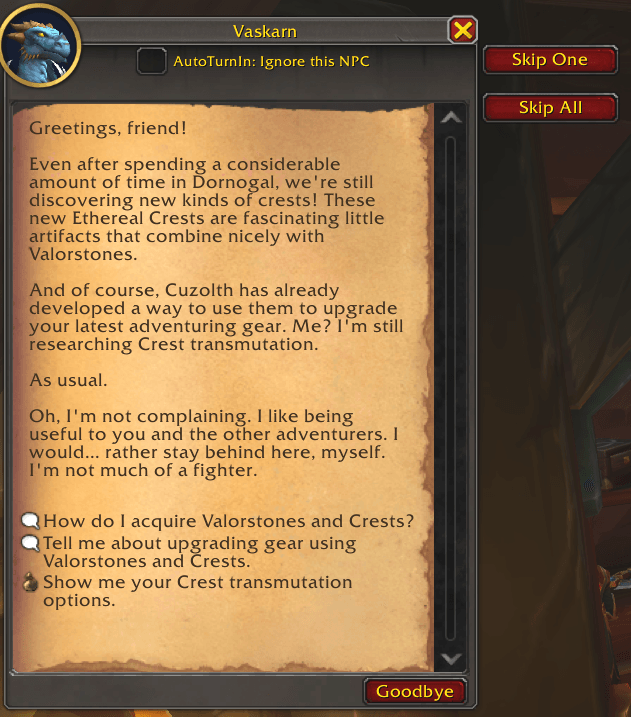
This addon solves the problem by adding simple buttons next to the NPC dialogue (gossip) window:
- Skip One - Instantly selects the first gossip option once.
- Skip All - Continues selecting the first gossip option until the dialogue ends. It also safely stops if the NPC presents a looping option (like "let's talk about something else…"), so you don't get stuck clicking forever.
- Settings - Opens the addon settings window.
Keybinds
You don't even have to click the buttons. Bind a key to Skip One and/or Skip All and just press it while the NPC window is open.
- The current bind is shown right on the button, for example Skip One (Ctrl-F). If nothing is bound, the button shows (No bind).
- Binds are active only while the NPC dialogue window is open, so your normal keybinds are never affected anywhere else.
- Modifiers (Shift / Ctrl / Alt) are supported. The same key can't be assigned to both buttons.
- If the dialogue opens during combat, binds are applied as soon as combat ends.
Settings
Open the settings window in any of these ways:
- Click the Settings button on the NPC dialogue window
- Type
/skipdialogueor/sd - Go to Options > AddOns > Skip Dialogue
Click a bind field, then press the key you want. Press Esc in the field to clear the bind. Your settings are saved between sessions.
With these buttons and keybinds, you can breeze through repetitive NPC dialogues with a single click or key press, without worrying about aiming, scrolling, or tracking changing option positions.
Skip Dialogue Team