
SkillChargeTimer
- By
Tracks spell cooldowns, charges, and durations with manual combat tracking and automatic out-of-combat API synchronization.
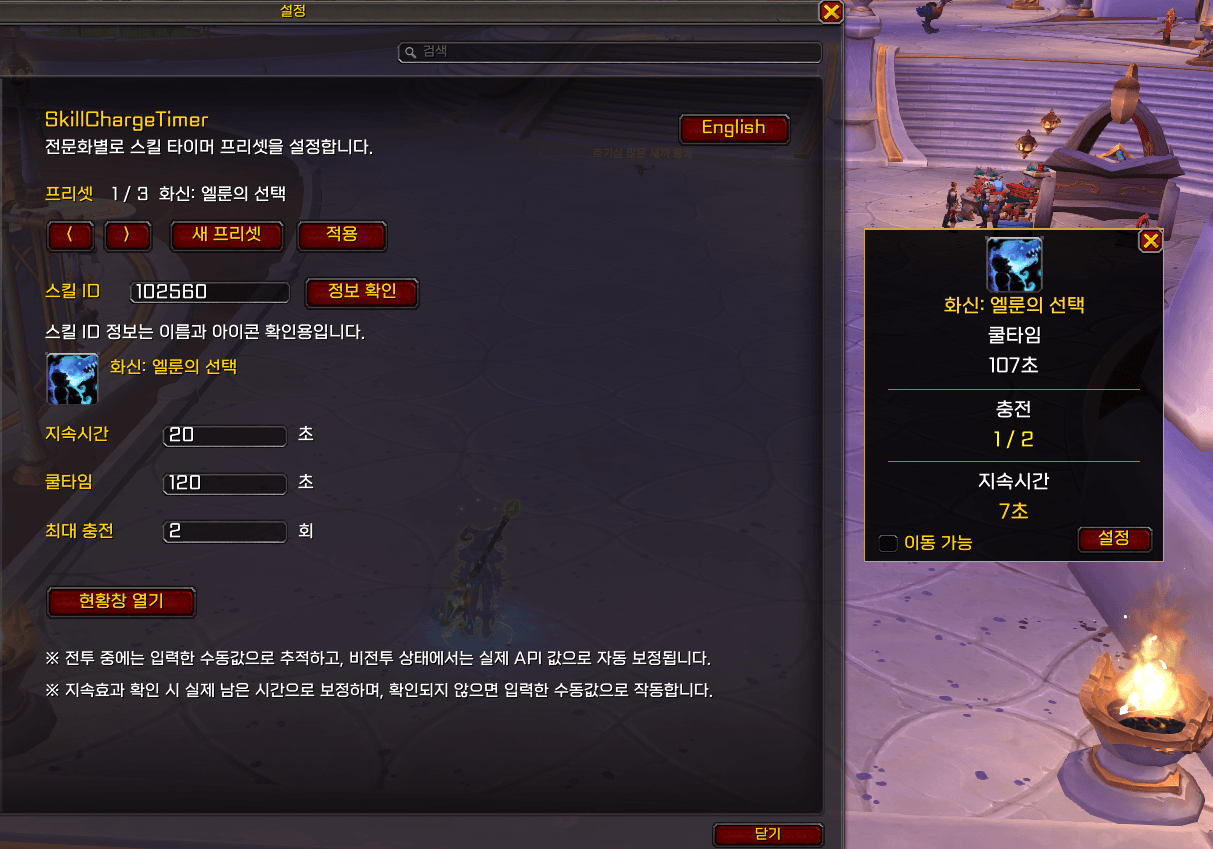
20260827_025547.png
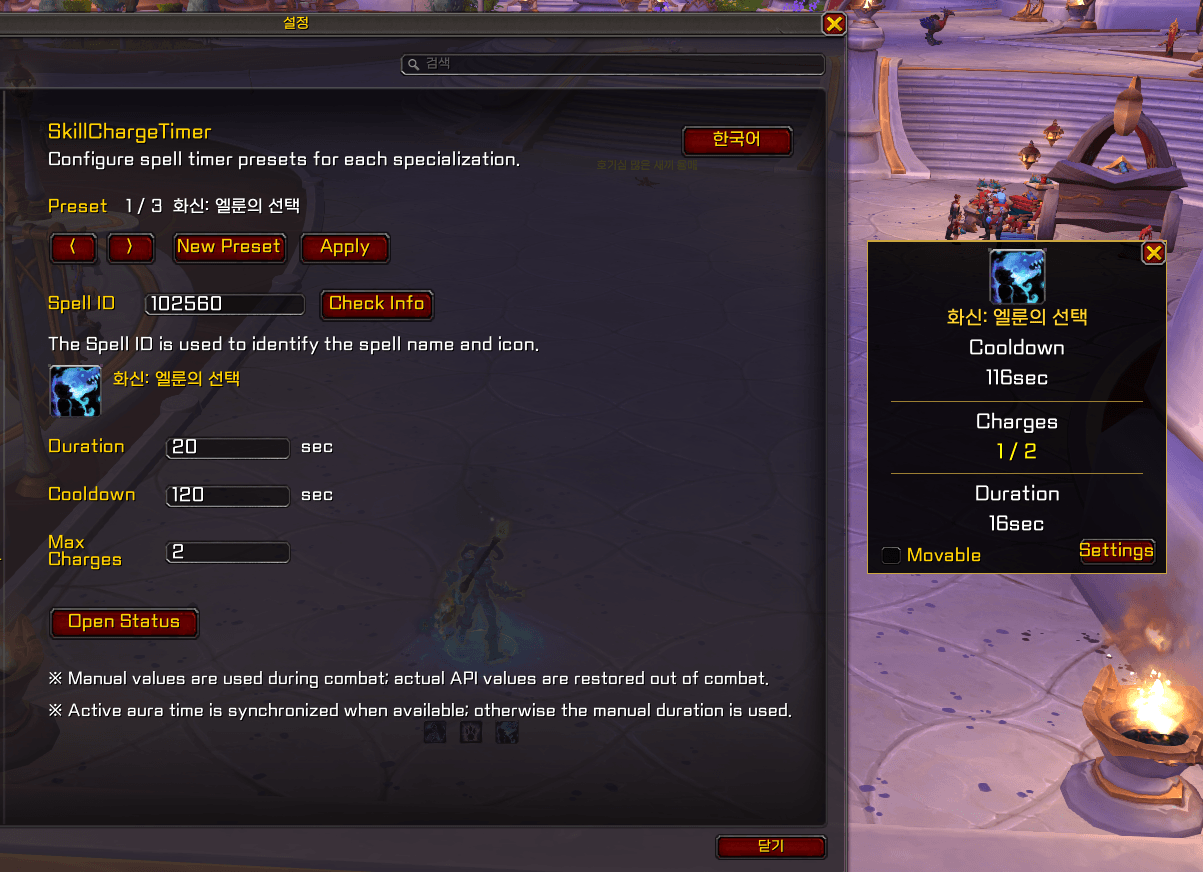
20260827_025536.png
Description
SkillChargeTimer
SkillChargeTimer is a lightweight World of Warcraft addon that tracks spell cooldowns, charges, and active durations in a compact status window.
The addon uses manually configured values during combat and automatically synchronizes with the available World of Warcraft API while out of combat.
FEATURES
• Tracks spell cooldowns, charges, and active durations
• Supports separate presets for each specialization
• Automatically detects charged and non-charged abilities
• Synchronizes actual cooldown and charge information while out of combat
• Synchronizes supported active aura durations when available
• Continues tracking with manual values when API information is restricted during combat
• Refreshes API information when changing presets or interacting with the addon interface
• Preserves the status window after loading screens, portals, and zone changes
• Movable and lockable status window
• Displays the default spell tooltip when hovering over the spell icon
• Supports English and Korean interfaces
• Saves presets, language, window position, and lock settings
HOW TO USE
-
Open the World of Warcraft Settings menu.
-
Select AddOns and then SkillChargeTimer.
-
Enter the Spell ID you want to track.
-
Enter the duration, cooldown, and maximum charge values.
-
Click Apply.
-
Click Open Status to display the status window.
SLASH COMMAND
/sct
Opens the SkillChargeTimer status window.
HOW TRACKING WORKS
Some cooldown, charge, and aura information may be restricted by the World of Warcraft API during combat.
SkillChargeTimer uses your manually configured values and successful spell casts to continue tracking during combat. When combat ends, the addon checks the available API information and automatically corrects the displayed cooldown and charge state.
For supported player buffs, the addon also checks the active aura expiration time while out of combat. If the duration cannot be detected, the manually entered duration is used instead.
IMPORTANT
For the best combat tracking accuracy, configure the ability while it is ready and at its maximum charge count.
Some abilities may use a different aura ID from their cast Spell ID. SkillChargeTimer attempts to detect and save this information automatically, but not every ability provides readable aura information.
Spell names and default tooltips follow the language of your World of Warcraft client.
──────────────────────────────
SkillChargeTimer
SkillChargeTimer는 스킬의 재사용 대기시간, 충전 횟수 및 지속시간을 작은 현황창으로 추적하는 월드 오브 워크래프트 애드온입니다.
전투 중에는 사용자가 입력한 설정값으로 추적하고, 비전투 상태에서는 사용 가능한 WoW API 정보를 이용해 실제 상태를 자동으로 보정합니다.
주요 기능
• 스킬 쿨타임, 충전 횟수 및 지속시간 추적
• 전문화별 개별 프리셋 지원
• 충전형 스킬과 일반 쿨타임 스킬 자동 판별
• 비전투 상태에서 실제 쿨타임과 충전 상태 자동 동기화
• 확인 가능한 강화 효과의 실제 남은 지속시간 동기화
• 전투 중 API 정보가 제한되면 수동 설정값으로 계속 추적
• 프리셋 변경 및 애드온 인터페이스 조작 시 API 정보 갱신
• 포탈, 지역 이동 및 로딩 화면 이후에도 현황창 유지
• 현황창 이동 및 위치 고정
• 스킬 아이콘 마우스오버 시 WoW 기본 툴팁 표시
• 한국어 및 영어 인터페이스 지원
• 프리셋, 언어, 창 위치 및 고정 상태 저장
사용 방법
-
월드 오브 워크래프트 설정 메뉴를 엽니다.
-
애드온 항목에서 SkillChargeTimer를 선택합니다.
-
추적할 스킬 ID를 입력합니다.
-
지속시간, 쿨타임 및 최대 충전 횟수를 입력합니다.
-
적용 버튼을 누릅니다.
-
현황창 열기를 눌러 상태창을 표시합니다.
명령어
/sct
SkillChargeTimer 현황창을 엽니다.
추적 방식
전투 중에는 월드 오브 워크래프트 API에서 일부 쿨타임, 충전 및 강화 효과 정보가 제한될 수 있습니다.
SkillChargeTimer는 사용자가 입력한 수동값과 스킬 사용 성공 기록을 이용해 전투 중에도 타이머를 계속 추적합니다. 전투가 끝나면 사용 가능한 API 정보를 다시 확인하고, 표시 중인 쿨타임과 충전 상태를 실제 값으로 자동 보정합니다.
지원되는 플레이어 강화 효과는 비전투 상태에서 실제 만료 시각도 확인합니다. 지속시간을 확인할 수 없는 경우에는 사용자가 입력한 수동 지속시간을 사용합니다.
주의사항
전투 중 추적 정확도를 높이려면 스킬을 사용할 수 있고 최대 충전 상태일 때 설정하는 것을 권장합니다.
일부 스킬은 시전 스킬 ID와 실제 강화 효과 ID가 다를 수 있습니다. SkillChargeTimer가 내부적으로 자동 탐색하고 저장하지만, 모든 스킬의 강화 효과 정보를 확인할 수 있는 것은 아닙니다.
스킬명과 기본 툴팁의 언어는 사용 중인 월드 오브 워크래프트 클라이언트 언어를 따릅니다.
SkillChargeTimer Team

![MouseOverActionBar [MOAB] project image](https://media.forgecdn.net/avatars/thumbnails/2010/650/256/256/639234450525546391.png)