![MouseOverActionBar [MOAB] logo](https://media.forgecdn.net/avatars/thumbnails/2010/650/64/64/639234450525546391.png)
MouseOverActionBar [MOAB]
- By
Hide selected action bars until you mouse over them, with smooth fade animations and individual bar controls.
20260823_194639.png
Description
**** /moab on ****
MouseOverActionBar
MouseOverActionBar is a simple and lightweight World of Warcraft addon that keeps selected action bars hidden until you move your mouse over them.
It was made for players who prefer a cleaner UI while still being able to quickly access their action bars whenever needed.
Each action bar can be controlled individually, and your settings are saved automatically.
Features
• Mouseover hiding for Action Bars 1–8
• Individual ON/OFF control for each action bar
• Mouseover support for Druid Form Bar, Warrior Stance Bar, and Stealth Bar
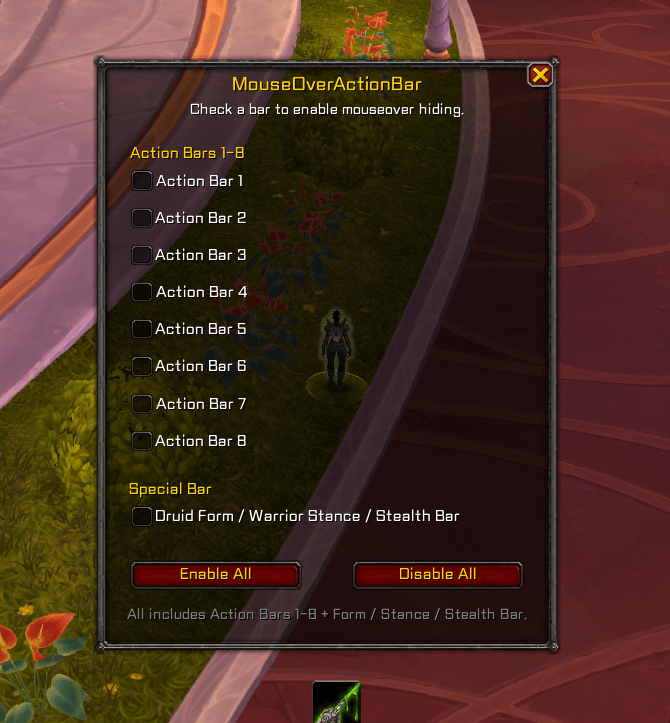
• In-game settings window with checkbox controls
• Enable or disable all supported bars at once
• Smooth fade-in and fade-out
• Automatically saves your settings
• English and Korean slash commands
• Lightweight and simple
• Designed for World of Warcraft Retail
Settings Window
Use the following command to open the settings window:
/moab on
Check a bar to enable mouseover hiding.
Uncheck a bar to keep it always visible.
Enable All / Disable All controls Action Bars 1–8 and the Form / Stance / Stealth Bar together.
English Commands
Action Bar 1/bar1 on – Enable mouseover hiding/bar1 off – Always show
Action Bar 2/bar2 on – Enable mouseover hiding/bar2 off – Always show
Action Bar 3/bar3 on – Enable mouseover hiding/bar3 off – Always show
Action Bar 4/bar4 on – Enable mouseover hiding/bar4 off – Always show
Action Bar 5/bar5 on – Enable mouseover hiding/bar5 off – Always show
Action Bar 6/bar6 on – Enable mouseover hiding/bar6 off – Always show
Action Bar 7/bar7 on – Enable mouseover hiding/bar7 off – Always show
Action Bar 8/bar8 on – Enable mouseover hiding/bar8 off – Always show
All Bars/barall on – Enable mouseover hiding for all supported bars/barall off – Always show all supported bars
Form / Stance / Stealth Bar/formbar on – Enable mouseover hiding/formbar off – Always show
MouseOverActionBar
MouseOverActionBar는 선택한 행동 단축바를 평소에는 숨겨두고, 해당 위치에 마우스를 올리면 다시 표시해 주는 간단하고 가벼운 World of Warcraft 애드온입니다.
행동 단축바를 완전히 없애지 않으면서 화면을 조금 더 깔끔하게 사용하고 싶은 분들을 위해 만들었습니다.
각 행동 단축바를 개별적으로 설정할 수 있으며, 설정한 내용은 자동으로 저장됩니다.
주요 기능
• 행동 단축바 1–8 마우스오버 숨김
• 각 행동 단축바 개별 ON/OFF 설정
• 드루이드 변신, 전사 태세 및 은신 단축바 마우스오버 지원
• 체크박스 방식의 인게임 설정창 지원
• 지원되는 모든 단축바 전체 활성화/비활성화
• 부드러운 페이드 인/페이드 아웃
• 설정 자동 저장
• 영어 및 한국어 명령어 지원
• 가볍고 간단한 구성
• World of Warcraft 리테일 버전용
설정창
다음 명령어를 입력하면 설정창을 열 수 있습니다.
/moab on
체크하면 해당 단축바의 마우스오버 숨김 기능이 활성화됩니다.
체크를 해제하면 해당 단축바가 항상 표시됩니다.
Enable All / Disable All 버튼은 행동 단축바 1–8과 변신 / 태세 / 은신 단축바를 모두 함께 설정합니다.
한국어 명령어
행동 단축바 1/단축바1 on – 마우스오버 숨김 사용/단축바1 off – 항상 표시
행동 단축바 2/단축바2 on – 마우스오버 숨김 사용/단축바2 off – 항상 표시
행동 단축바 3/단축바3 on – 마우스오버 숨김 사용/단축바3 off – 항상 표시
행동 단축바 4/단축바4 on – 마우스오버 숨김 사용/단축바4 off – 항상 표시
행동 단축바 5/단축바5 on – 마우스오버 숨김 사용/단축바5 off – 항상 표시
행동 단축바 6/단축바6 on – 마우스오버 숨김 사용/단축바6 off – 항상 표시
행동 단축바 7/단축바7 on – 마우스오버 숨김 사용/단축바7 off – 항상 표시
행동 단축바 8/단축바8 on – 마우스오버 숨김 사용/단축바8 off – 항상 표시
전체 단축바/단축바all on – 지원되는 모든 단축바의 마우스오버 숨김 사용/단축바all off – 지원되는 모든 단축바 항상 표시
드루이드 변신 / 전사 태세 / 은신 단축바/변신바 on – 마우스오버 숨김 사용/변신바 off – 항상 표시
MouseOverActionBar [MOAB] Team