SimpleRogueHelper - Forever
- By
Rogues: marks on your energy bar at each chosen spell's cost, lit gold once you have enough energy. Gamepad-friendly.
Description
SimpleRogueHelper - Forever
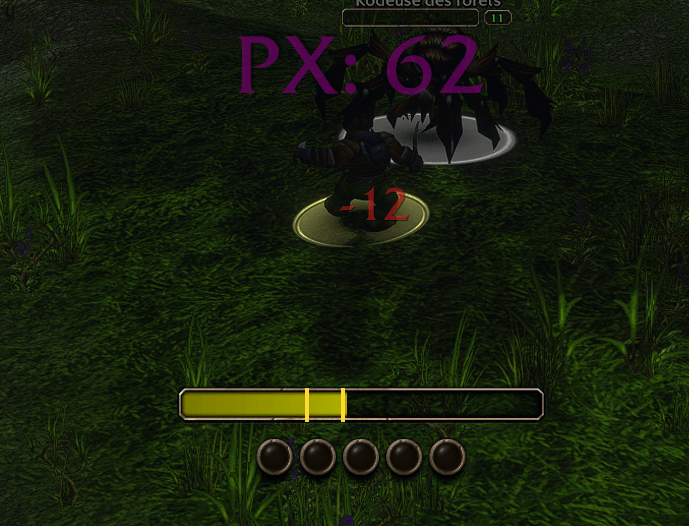
Energy marks for rogues on WoW Forever. On the game's own personal resource display, a thin mark on your energy bar at the energy each spell you choose costs: dim below it, lit in gold once you have enough energy to cast it. No more guessing whether that Eviscerate will go off.
To get started: turn on the Personal Resource Display in the game's Edit Mode, then type
/srhand tick your spells.
Features
- The game's own cost: a talent that lowers a spell's cost moves its mark.
- Your spells, your choice: the spells of your spell book that cost energy, the cheapest first; tick the ones you want. Kept per character, and by name: a new rank keeps its mark.
- On the bar itself: the marks follow the game's energy bar, shown, hidden and scaled with it, and are placed again when your maximum energy, your spell book or your talents change, or when you resize the bar in Edit Mode.
- In combat too: where the game hides power values from addons, the marks stay in place and are lit by the game itself.
- Gamepad or mouse: a small settings window driven with the D-pad, made for WoW Forever's gamepad play.
- Five languages: English, French, German, Spanish and Italian.
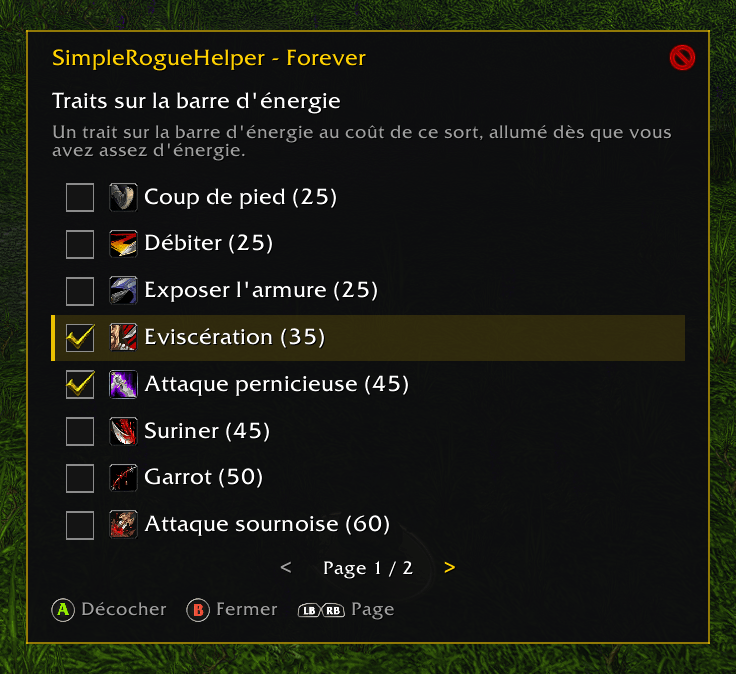
The settings window
Open it with /srh, from Escape › Options › AddOns › SimpleRogueHelper - Forever, or with a key of
your own (Key Bindings › AddOns).
| Gamepad | Mouse | |
|---|---|---|
| D-pad up / down | hover | move |
| A | click | check / uncheck the spell |
| B | the × button | close |
| LB / RB | wheel | previous / next page |
The window closes when a fight starts, and doesn't open in combat.
Installation
Install with the CurseForge app, or extract the zip into
World of Warcraft/_classic_beta_/Interface/AddOns/.
Fully restart the game after installing (a /reload does not load a new addon).
Compatibility
Made for WoW Forever. Works on its own, with or without Easy Controller - Forever.
Source code and issues: GitHub
Code under the MIT license.
SimpleRogueHelper - Forever Team