Simple Skill Tracker
- By
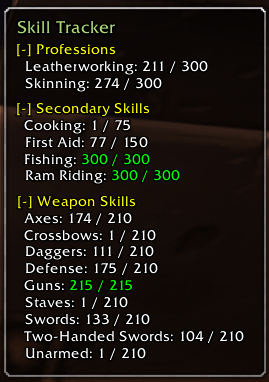
SkillTracker is a minimalist, customizable monitoring tool for tracking weapon proficiencies and professions with collapsible categories and integrated minimap controls.
SimpleSkillTracker.png
SimpleSkillTracker2.png
Description
1. Core Skill Tracking
- Comprehensive Monitoring: Automatically tracks and displays three specific categories: Weapon Skills, Primary Professions, and Secondary Skills.
- Dynamic Rank Display: Shows current skill rank against maximum potential rank (e.g., 250 / 300).
- Bonus Calculation: Detects and displays temporary and item-based skill bonuses in a dedicated green format:
(+5). - Max-Rank Highlighting: Automatically changes skill text to green once the maximum rank for the current tier is achieved.
2. Interactive UI Design
- Collapsible Sections: Each major header (Weapon, Profession, Secondary) features an interactive toggle to expand
[-]or collapse[+]the list, allowing for a highly compact footprint. - Moveable & Persistent Frame: The tracker can be freely dragged across the screen. Its coordinates and "collapsed" states are saved per character, maintaining your layout across sessions.
- Smart Auto-Sizing: The window background automatically recalculates its width and height based on the length of your longest skill name and the number of visible lines.
3. Visual Customization & Skinning
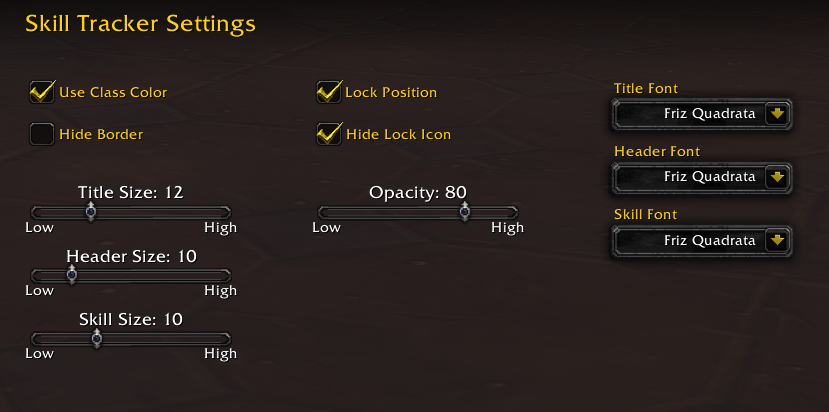
- Typography Engine: Supports four distinct fonts (Friz Quadrata, Arial Narrow, Morpheus, and Skurri) with individual font selection for titles, headers, and skill lines.
- Independent Scaling: Three separate sliders allow precise font size adjustment for the window title, section headers, and content text.
- Class Theming: Features a "Use Class Color" option that tints the main title based on the player’s character class (with a specific dark blue override for Shamans).
- Backdrop Styling: Users can toggle the window border and adjust background transparency from 0% to 100%.
4. Minimap & Access Features
- Interactive Minimap Button: Includes a draggable icon that orbits the minimap for quick access.
- Left-Click: Toggles the main tracker window on/off.
- Right-Click: Instantly opens the configuration menu.
- Locking Mechanism: Includes a visual lock icon on the main frame (which can be hidden in settings) to prevent accidental movement during gameplay.
5. Advanced Settings Management
- Native Integration: The settings menu is fully integrated into the standard World of Warcraft "Addons" interface category.
- Live Updates: Changes to colors, fonts, or sizes update the UI in real-time without requiring a reload.
- Emergency Reset: A "Reset UI" button is provided to wipe current settings and restore defaults in the event of a layout conflict.
Simple Skill Tracker Team