Shard Tracker
Shard tracker
billede_2026-01-25_231819738.png
billede_2026-01-25_231830839.png
billede_2026-01-25_231844897.png
Description
Simple Shard Tracker (SST) is the ultimate inventory management tool designed specifically for Warlocks in World of Warcraft Classic & TBC.
Tired of opening your bags to count shards? Tired of manually deleting shards one by one when your bags are full? SST solves this with a clean, movable interface that keeps track of your Soul Shards and helps you manage them efficiently.
Key Features
-
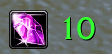
💎 Visual Tracking: Instantly see your current Soul Shard count.
-
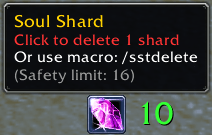
🗑️ One-Click Deletion: Simply click the Soul Shard icon on the tracker to delete one shard from your bags. No more dragging items out of your inventory!
-
🛡️ Safety Limit: Set a "Max Shards Limit" in the settings (e.g., 16, 20, 28). The addon will refuse to delete shards if you are at or below this limit, preventing you from accidentally running out of shards mid-raid.
-
🎨 Smart Color Coding:
-
Green Text: You have shards above your limit.
-
Red Text: You are empty (0) or have reached your safety limit.
-
-
⌨️ Macro Support: Supports keybinding! Use the slash command
/sstdeletein a macro to delete shards without clicking the UI. -
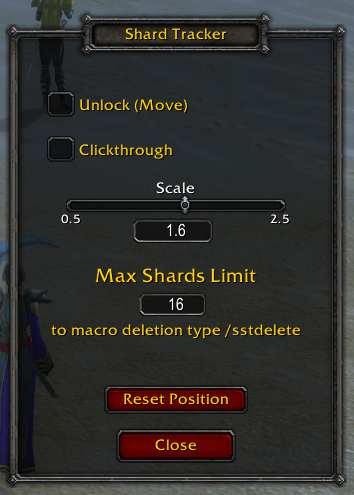
⚙️ Customization:
-
Unlock and move the frame anywhere.
-
Scale the size (0.5x to 2.5x).
-
"Clickthrough" mode for a purely visual display.
-
How to Use
-
Settings: Type
/sstto open the configuration menu. Here you can scale the UI, lock/unlock the frame, and set your Max Shards Limit. -
Deleting Shards:
-
Click: If the frame is locked, Left-Click or Right-Click the icon to delete 1 shard.
-
Macro: Create a macro with
/sstdeleteand bind it to a key for fast management.
-
Note: The delete function intelligently scans your bags from the last slot backwards, ensuring it prioritizes deleting shards from your Soul Bags first.
Commands:
-
/sst- Opens the settings menu. -
/sstdelete- Deletes 1 Soul Shard (respecting your safety limit).
Installation: Simply extract the folder into your Interface\AddOns directory and reload your game.
Shard Tracker Team