Killing Blow
Announces Killing blows in PvP
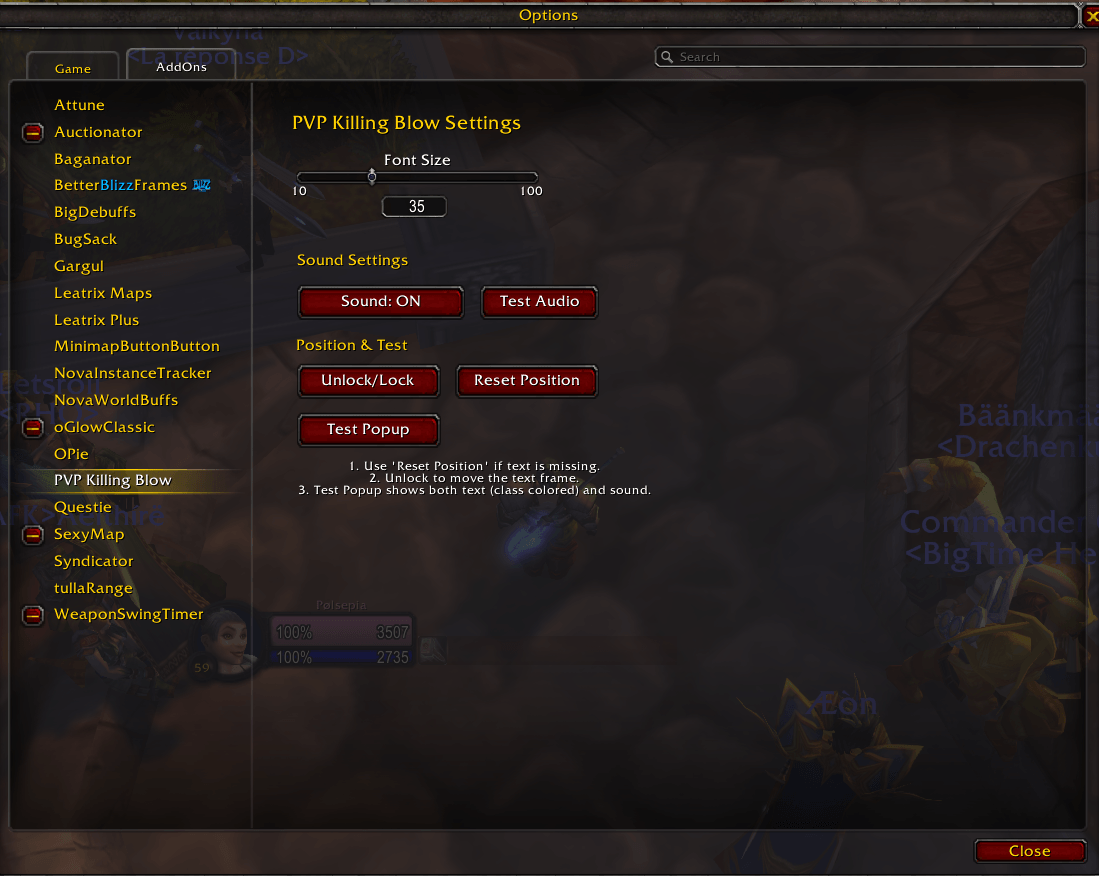
billede_2026-01-31_192658096.png

billede_2026-01-31_192711575.png
Description
PVP Killing Blow is a lightweight and satisfying addon designed for TBC Classic and Anniversary Edition. It provides instant visual and audio feedback whenever you land a killing blow on an enemy player in Battlegrounds, Arenas, or World PvP.
Never wonder if you got the kill again!
Key Features
-
💥 Instant Visual Alert: Displays a large, clear text message ("KILLING BLOW: [Name]!") on your screen the moment you secure a kill.
-
🎨 Class Colored Names: Enemy names are automatically colored according to their class (e.g., Mages appear in Blue, Rogues in Yellow), allowing for quick identification.
-
🔊 Audio Feedback: Plays a crisp, satisfying sound effect upon a killing blow.
-
Includes a simple Sound ON/OFF toggle in the settings.
-
-
🧹 Clean & Smart:
-
Player Only: Automatically filters out totems, pets, and guardians – only triggers on actual players.
-
No Realm Names: Strips server names (e.g., "Name-Gehennas" becomes "Name") for a cleaner UI.
-
-
⚙️ Fully Customizable:
-
Movable: Unlock the frame and drag the text anywhere on your screen.
-
Resizable: Adjust the font size via a slider (from 10 to 100).
-
Safe: Includes a "Reset Position" button in case the text gets lost off-screen.
-
Top Layer: Text uses the "Dialog" strata to ensure it always appears on top of other UI elements.
-
How to Use
-
Install the addon.
-
Go to Game Menu (Esc) -> Options -> AddOns -> PVP Killing Blow.
-
Click "Unlock/Lock" to move the text anchor.
-
Use "Test Popup" to preview the alert and sound.
Killing Blow Team