Simple Rogue Bar
- By
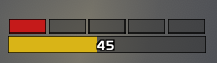
A small movable bar for your energy and combo points. Combo point squares sit on top. Your energy total sits underneath.
Screenshot 2026-11-10 090629.png
Description
Rogue Bar
A small movable bar for your energy and combo points. Combo point squares sit on top. Your energy total sits underneath.
The bar is there for Rogues, and for Druids in Cat Form. Settings are saved per character.
Combo points
Squares fill for the target you have selected, the same way they do on the target portrait.
- Switching targets shows that target's points. A new target starts empty.
- Clearing your target, or targeting yourself, empties the squares.
- Targeting someone who still has points brings those points back.
- This uses the target itself, so it stays correct with the default portrait or a unit-frame addon.
The row grows when a talent raises your combo point cap, up to 10 squares.
Move, scale, and lock
The bar starts unlocked, with a gold border.
- Drag it to move.
- Use the mouse wheel over it to scale it.
- Right-click it to lock it.
- Click the addon compartment button to lock or unlock.
A locked bar has a black border and ignores the mouse. Unlock it again with /rb unlock or the addon compartment button.
Commands
/rb and /roguebar do the same thing.
| Command | What it does |
|---|---|
/rb |
List commands |
/rb lock |
Lock the bar in place |
/rb unlock |
Unlock it so you can drag and scale |
/rb scale 1.2 |
Set the scale (0.5 to 2.5) |
/rb width 165 |
Set the width (120 to 400) |
/rb show |
Show the bar |
/rb hide |
Hide the bar |
/rb reset |
Reset position, scale, and width, and leave it unlocked |
Simple Rogue Bar Team