JewelcrafterPro
- By
Replaces gem names with their stats in the Jewelcrafting tradeskill window for easy searching.
Screenshot 2026-05-26 165631.png
Screenshot 2026-05-26 165215.png
Description
JewelcrafterPro
Stop memorizing gem names. See the stats instead.
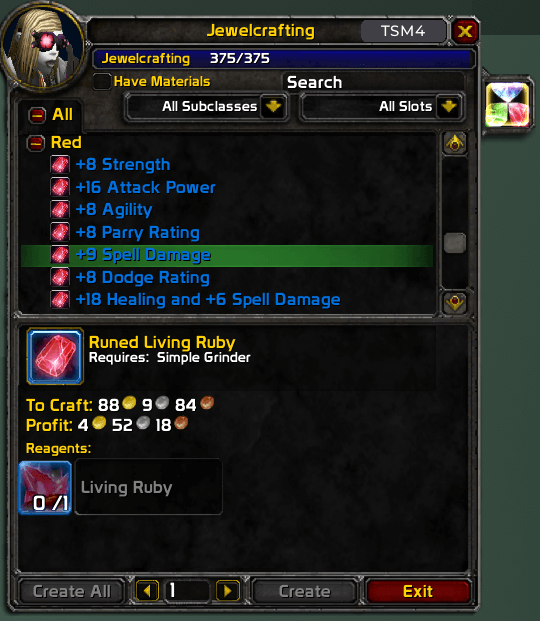
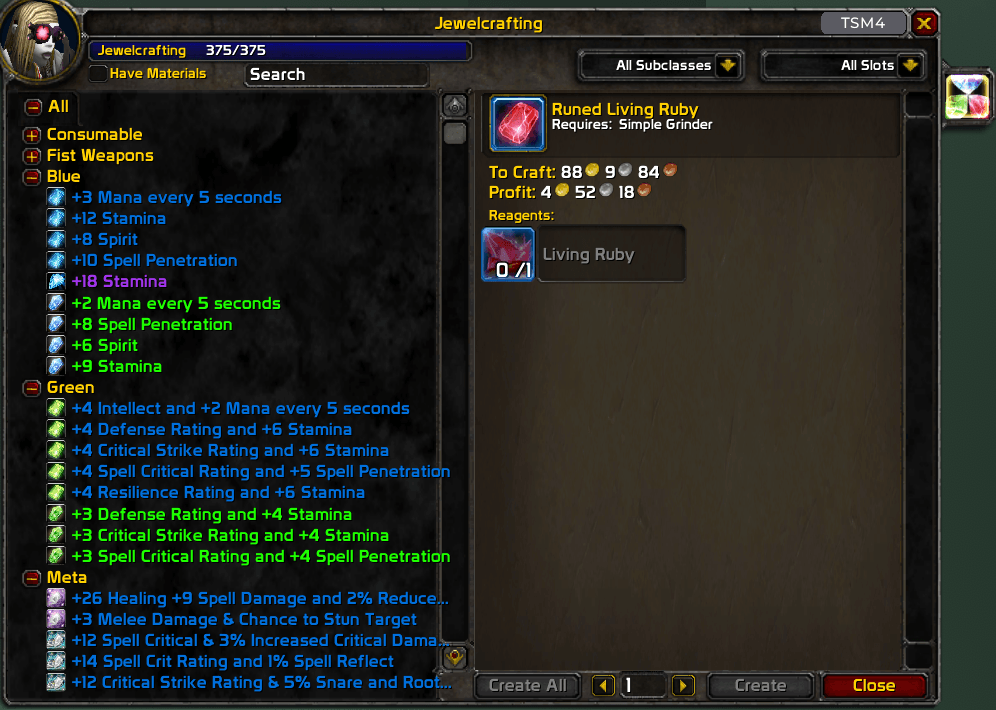
JewelcrafterPro replaces gem names in your Jewelcrafting window with the actual stats they provide, so you can instantly find the gem you need without alt-tabbing to Wowhead.
Features
Gem Stats Display
Every gem in your recipe list is renamed to show its stats directly:
- Before:
Delicate Living Ruby - After:
+8 Agility
Works for all gem colors: Meta, Red, Orange, Yellow, Green, Blue, and Purple.
Meta Gem Clarity
Meta gems show only the effect — requirement lines like "Requires at least 2 Blue Gems" are stripped out so you see what actually matters:
- Before:
Relentless Earthstorm Diamond - After:
+12 Agility & 3% Increased Critical Damage
Gems-Only Filter
When enabled, non-gem categories (Consumable, Fist Weapons, Trinkets, etc.) are automatically collapsed, leaving only gem categories expanded for a clean, focused view.
One-Click Toggle
A gem icon sits in the top-right corner of the Jewelcrafting window, next to the close button. Click it to toggle JewelcrafterPro on or off:
- Colored gem = ON (stats mode)
- Gray gem = OFF (default names)
Your preference is saved between sessions.
Installation
- Download and extract into your
Interface/AddOns/folder. - Make sure the folder is named
JewelcrafterPro. - Restart WoW or
/reloadyour UI.
Compatibility
- WoW Classic Anniversary Edition (TBC Jewelcrafting)
- All client languages supported
JewelcrafterPro Team