Simple HoTs Prediction
- By
Does It Die, but for HoTs: the healing your own heal over time spells still have to give, drawn on health bars. WoW Forever only.
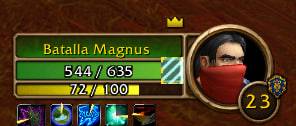
photo_2026-11-17_18-48-50.jpg
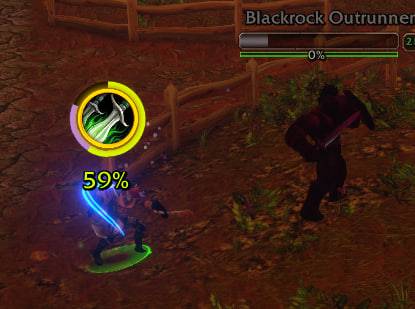
photo_2026-11-17_18-48-58.jpg
Description
Does It Die, but for HoTs. Where Does It Die marks on an enemy's health bar the damage your DoTs still have to deal, this addon marks on a friend's health bar the healing your own heal over time spells (Rejuvenation, the periodic part of Regrowth, …) still have to give. You see at a glance whether your HoTs will top someone off or whether they need another heal.
The segment is drawn on the health bars of the party and raid frames, your own frame and personal resource display, the target and focus frames, and friendly players' nameplates.
For WoW Forever only (interface 16001). English and Spanish.
Works with Simple Friendly Plates
The addon works on its own. If you also use Simple Friendly Plates (0.1.5-beta or later), its health ring shows your HoTs still to come after the health and the incoming heals, with nothing to set up.
Limits set by the game (not addon bugs)
- Only your own HoTs. Auras cannot be read in combat, so the addon follows your casts and the spell descriptions. Other healers' HoTs are not shown, nor HoTs put on several players by one cast.
- Ticks are predicted from the tooltip numbers: no critical ticks, no changes made to a HoT after the cast (longer duration, haste).
- Dispels are only caught with an experimental option, off by default.
- Nothing on friendly nameplates inside dungeons and raids. The game protects them there; party and raid frames still work. If another addon hides a nameplate's health bar, the segment hides with it.
- No options panel in combat, and no test mode in combat.
- The segment overlaps the game's own incoming heal segment.
What it shows
- A segment on each health bar that steps down with each tick and disappears when the HoT ends. By default it fills the missing health from where the health ends: reaching the end of the bar means your HoTs will top that unit off. The other style draws it from the end of the bar.
- A look that cannot be taken for the game's incoming heal bar: diagonal stripes over a translucent fill, a dashed gold outline and a bright edge where the health will end up. Each part can be turned off.
- Fit to the bar and a vertical margin for each kind of frame.
- Overhealing past the end of the bar (optional, off by default).
- Colour, opacity, fill opacity, height, outline colour and thickness; each kind of frame can be turned on or off.
- Test mode: samples marked TEST on every visible frame to set the look.
Commands
/shpopens the options./shp testtoggles the test mode./shp resetrestores the defaults.
Credits
The segment's look and its textures come from DoesItDie by Joe Greive (MIT licence); the licence text ships with the addon (THIRD_PARTY.md).
Simple HoTs Prediction Team