Simple Cursor Tooltip
- By
Move World of Warcraft tooltips next to your cursor, with per-category controls and dedicated party and raid options.
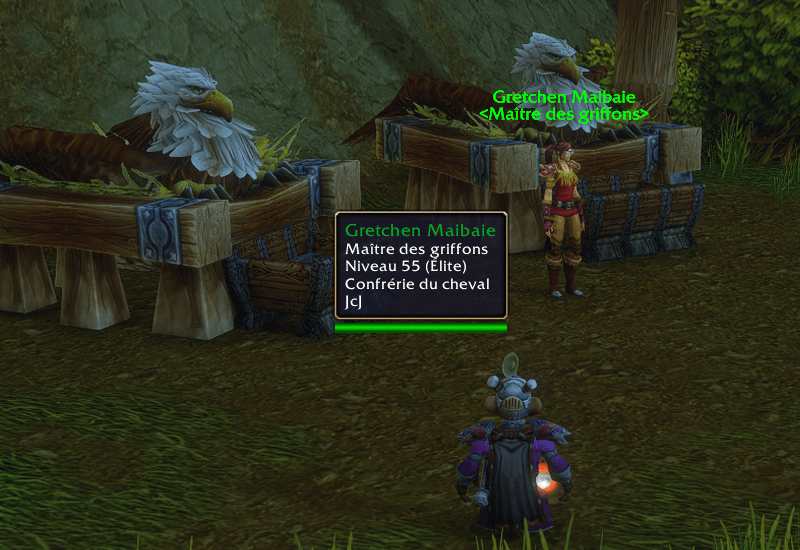
Simple Cursor Tooltip displays the flight master's tooltip next to the cursor in WoW Forever.
Description
🖱️ Tooltips by your cursor
Simple Cursor Tooltip puts WoW tooltips beside your mouse so you can read item stats, spell details and unit information without looking down at the bottom-right corner of the screen. It works with units, action bars, bag items and other interface elements. Item comparisons follow the main tooltip.
🎛️ Placement and behavior
Choose where tooltips appear, how they move and when they show up. Each tooltip keeps its original text, fonts, colors, borders and layout, including styling from compatible tooltip addons.
- Pick a position with automatic placement or a fixed side to the right, left or above the cursor. Adjust horizontal and vertical offsets separately.
- Choose how tooltips move by making them follow the cursor or stay where they first appear.
- Set rules by category for units, items, action bars, party and raid frames, and other interface elements.
- Fine-tune party and raid frames. Their tooltips stay in the usual position by default. Show them immediately, delay them, hide them in combat or hide them entirely.
- Set combat and fade behavior. Choose whether tooltips move during combat and whether they disappear instantly or fade out.
⚙️ Getting started
Cursor positioning is enabled by default and works as soon as the addon loads. To customize it, type /ctip or go to Options → AddOns → Simple Cursor Tooltip. You can also enable a minimap button, and Retail has an entry in the addon compartment. Settings apply immediately and are shared across your account. The settings panel is available in English and French.
🧩 Compatibility
No dependencies. Compatible with the standard game tooltip and with common tooltip and UI addons such as ElvUI, TipTac and Leatrix Plus. When another addon already uses WoW's cursor anchor for a tooltip, its placement takes precedence.
The ZIP includes interface versions for Retail, Forever, Classic Era, Burning Crusade Classic, Wrath Classic, Titan Reforged Classic, Cataclysm Classic and Mists of Pandaria Classic. Check the release's game versions for your client. The initial release was tested in-game on WoW Forever.
💬 Community & support
- Minibox Studio Discord for questions, feedback and bug reports.
- Support development on Ko-fi.
Simple Cursor Tooltip Team