Silvermoon Orientation
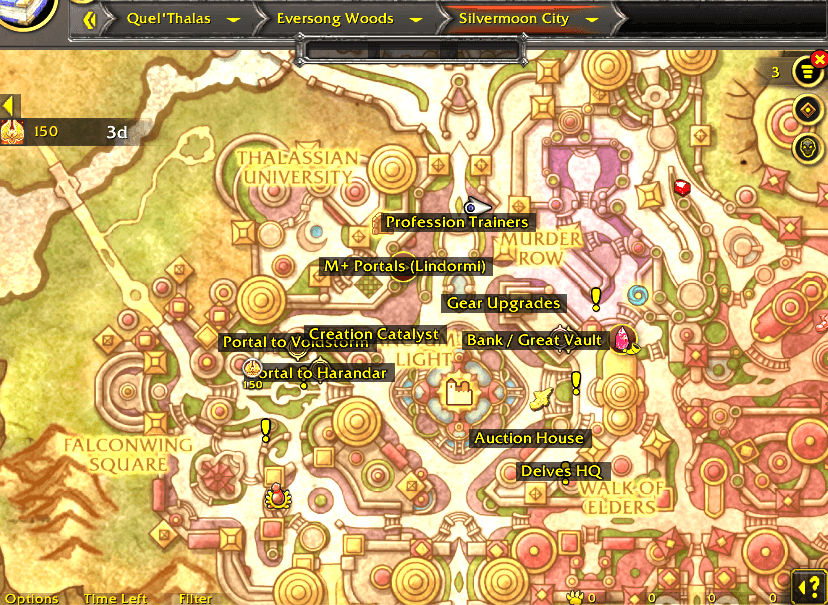
Navigate every Midnight zone with confidence. This lightweight addon overlays clear, readable labels on your World Map for all key points of interest across the five zones introduced in WoW: Midnight.
Maps.png
configs.png
Description
Midnight Orientation
Navigate every Midnight zone with confidence. This lightweight addon overlays clear, readable labels on your World Map for all key points of interest across the five zones introduced in WoW: Midnight.
Features
🗺️ 55+ Labeled Locations Across All Midnight Zones
| Zone | POIs | Highlights |
|---|---|---|
| Silvermoon City | 16 | Portals, Auction House, Bank, Great Vault, Inn, Trading Post, BMAH, Profession Hub, Gear Upgrades, Creation Catalyst, M+ Portals, PvP Hub, Transmog, Delves HQ |
| Eversong Woods | 8 | Renown Quartermaster, Fairbreeze Village, Tranquillien, Suncrown, Windrunner Spire |
| Zul'Aman | 10 | Renown Quartermaster, Amani'Zar Village, Dungeon Entrances, Loa Temples |
| Harandar | 14 | Renown Quartermaster, The Den, Har'Kuai, Fungara Village, Rift of Aln |
| Voidstorm | 11 | Renown Quartermaster, Slayer's Rise PvP, Voidspire Raid, Citadels, Nexus Points |
✨ Smart Map Detection
Labels automatically appear only for the zone you're currently viewing. Open your World Map on any Midnight zone and the relevant POIs are instantly visible.
⚙️ Fully Customizable
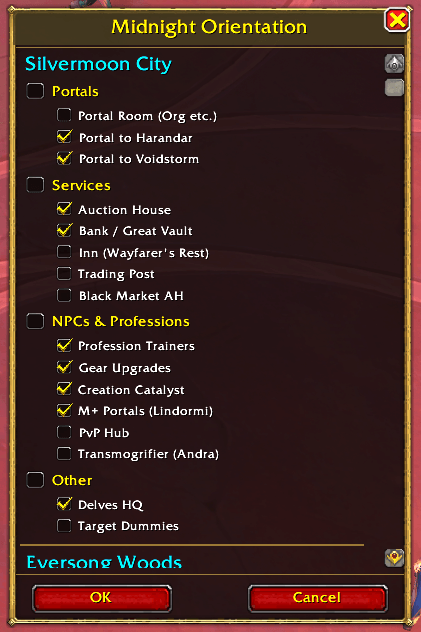
- Per-location toggles — show or hide each individual POI
- Per-category toggles — quickly toggle entire groups (Portals, Services, NPCs, Other)
- Per-zone sections — organized by zone for easy management
- Live preview — see changes on the map in real-time as you toggle
- OK / Cancel — commit or revert your changes
🔘 Minimap Button (MBB Compatible)
- Works with MinimapButtonButton, MBB, and similar minimap button managers
- Built with LibDBIcon + LibDataBroker for maximum compatibility
- Left-click: open options panel
- Right-click: quick toggle all labels on/off
- Also registers with the Addon Compartment as a fallback
🛠️ Developer Tools
/smo coords— coordinate picker overlay for precise POI calibration/smo debug— diagnostic info (map IDs, zone detection, label count)/smo mapzone <id> <zone>— dynamically assign new map IDs to zones
Slash Commands
| Command | Description |
|---|---|
/smo |
Open the options panel |
/smo coords |
Toggle coordinate picker on the World Map |
/smo debug |
Show debug information |
/smo mapzone <id> <zone> |
Map a new map ID to a zone (silvermoon/eversong/zulaman/harandar/voidstorm) |
FAQ
Q: Labels aren't showing on a zone map.
A: Type /smo debug while viewing that map. Send me the map ID and I'll add support for it. You can also use /smo mapzone <id> <zone> to add it yourself instantly.
Q: A label is in the wrong position.
A: Use /smo coords to find the correct coordinates and let me know — I'll update them in the next version.
Q: Can I hide specific labels I don't need?
A: Yes! Open /smo and uncheck any individual location. Changes preview live on the map. Click OK to save or Cancel to revert.
Coordinates Source
All coordinates are sourced from method.gg, games.gg, and icy-veins.com guides for WoW: Midnight. Community corrections are welcome!
Made with ❤️
Silvermoon Orientation Team