BiS Helper
BiS Helper shows you exactly which gear slots need an upgrade — right inside the game. Also allows to create bis lists and filter M+ items.
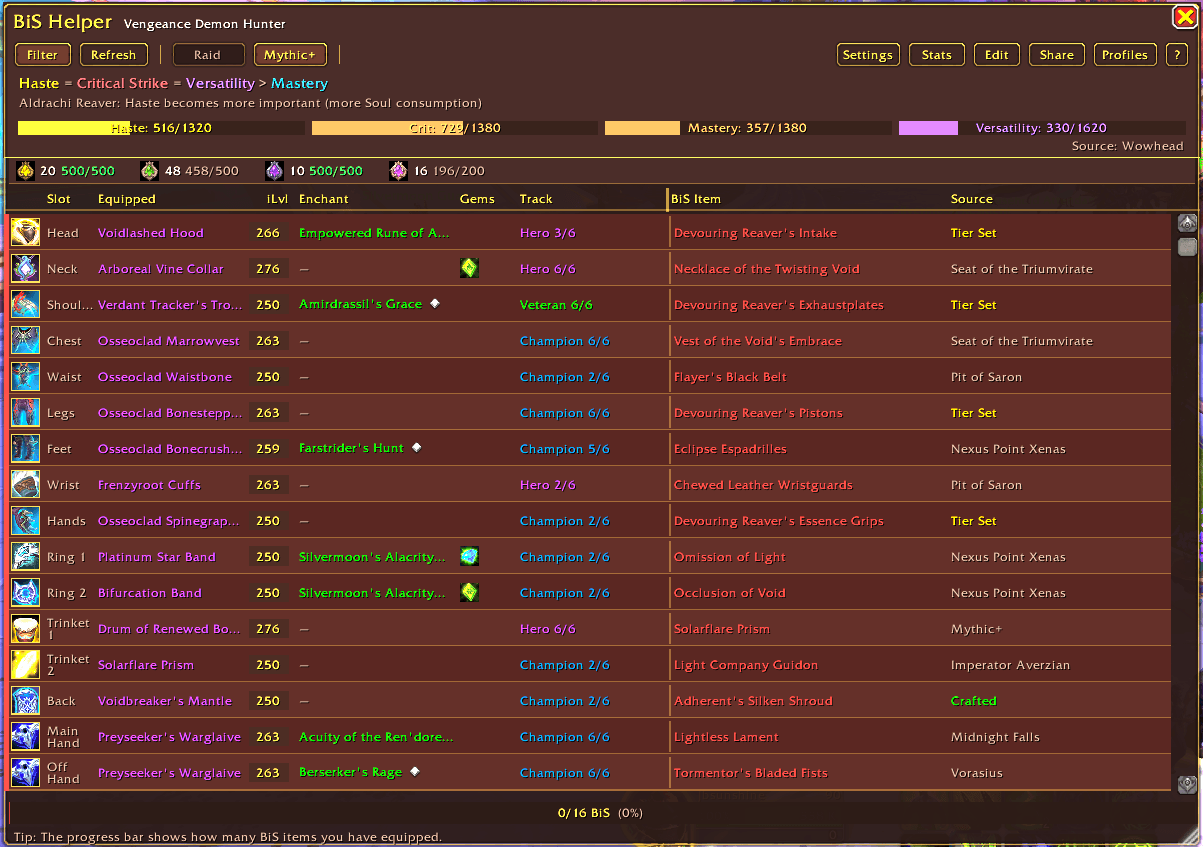
Look n feel
Description
BiS Helper
I got tired of alt-tabbing to Wowhead to check what I should be wearing, so I made this. BiS Helper shows your current gear next to your Best-in-Slot list for every slot, tells you where each piece drops, and tracks your stats.
Works for all 40 specs. Detects your class and spec automatically, updates when you respec.
/bis to open. I have it on a CTRL+C macro, but you'll need to set that up yourself.
Gear Comparison
The main window shows all 16 equipment slots: what you have equipped vs. what your BiS is (you can override any slot with your own pick).
- Green = BiS. Red = not yet.
- Shows item names, icons, ilvl, enchants, gems, and upgrade track (e.g. Hero 2/6).
- Drop source next to every BiS item, so you know where to go.
- Filter button hides the slots you've already completed.
BiS data pre-loaded for all 40 specs in Midnight Season 1 (including Devourer DH).
Stat Priorities
Stat priorities for Raid and Mythic+ come with each spec. DR cap bars show where you're at relative to Diminishing Returns thresholds.
You can edit everything: stat order, cap values, notes. If you sim differently than the defaults, just change them.
Loot Browser
178 items from the current M+ rotation (Windrunner Spire, Maisara Caverns, Magisters' Terrace, Skyreach, Pit of Saron, Seat of the Triumvirate, Nexus-Point Xenas, Algeth'ar Academy).
- Filter by slot, armor type, dungeon, or secondary stats. Or just search by name.
- My Class shows only gear your class can equip. Way better than the Dungeon Journal for quickly finding what's relevant.
- Current Season toggle hides old expansion items.
/bis loot to open (or button in UI)
Dawncrest Tracker
Bar above the gear table showing your crest progress across all 5 tiers: how many you have, how many you've earned this season, and the cap. Hover for drop source tooltips. Handy for tracking when a track hits 6/6 and the next tier upgrade becomes free.
Share
Export your profile (items + stats + DR caps) as a string. Paste it to a guildie or import someone else's setup. Useful for alts or sharing builds in Discord.
You can also override individual slots with Wowhead item IDs if you want a custom BiS.
Other Details
- No dependencies. No Ace3, no LibStub.
- Minimap button and Addon Compartment supported.
/bisfor the main window,/bis lootfor the Loot Browser.
Getting Started
/bisor click the minimap icon.- Pick Raid or Mythic+.
- Green rows are done, red rows need work.
Bug reports and suggestions welcome — just leave a comment on the addon page.
BiS Helper Team