ShotWeaver
- By
A live TBC Hunter DPS coach for Auto/Steady timing, adaptive ranged rotations, mana decisions, optional melee weaving, and private guild raid reports.

ShotWeaver-Live-Timer.png
01-shotweaver-live-statistics.png
03-shotweaver-melee-instructions.png
ShotWeaver-Instructions.png
Description
ShotWeaver: Hunter DPS Coach
ShotWeaver is an in-game timing and decision coach for Hunters playing The Burning Crusade Classic Anniversary. Its purpose is to maximize practical Hunter DPS by protecting Auto Shot throughput, fitting Steady Shot into safe windows, choosing valuable instant-shot follow-ups, and offering optional melee-weave guidance only when its expected gain exceeds the ranged damage it may displace.
ShotWeaver provides guidance only. It does not automate movement, targeting, or ability use.
Core features
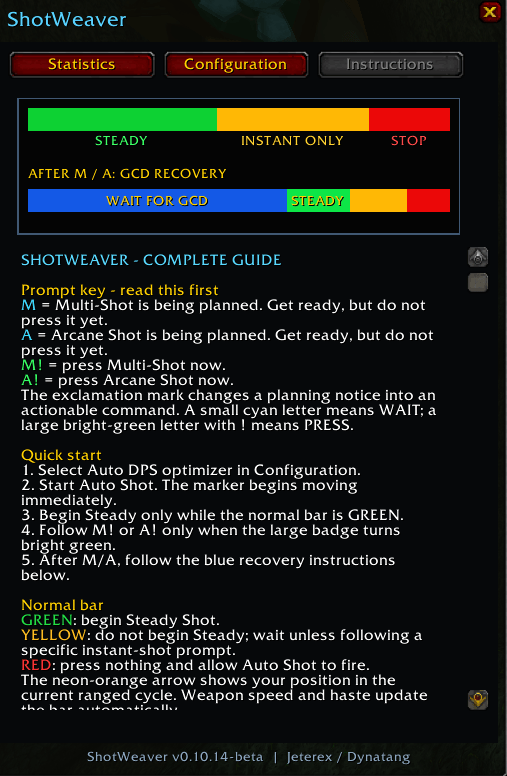
- Compact live Auto Shot cycle bar with safe, wait, recovery, and stop zones.
- Adaptive timing for ranged weapon speed, quiver effects, haste buffs, debuffs, and weapon changes.
- Auto DPS optimizer with selectable 1:1, 1:2, and 5:5:1:1 rotation modes.
- Clear M! and A! Multi-Shot and Arcane Shot follow-up cues.
- Mana-conservation, Auto-only, Aspect, and target-time-to-die guidance.
- Movable, scalable, lockable timer whose position is retained per character.
- Separate ranged and melee audio controls.
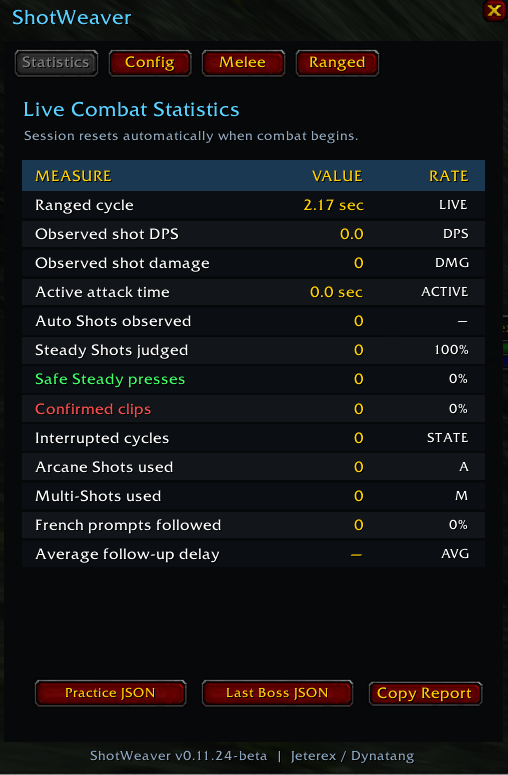
- Live combat statistics and copyable Practice JSON, Last Boss JSON, and raid-report exports for evidence-based tuning.
Optional melee-weave assistance
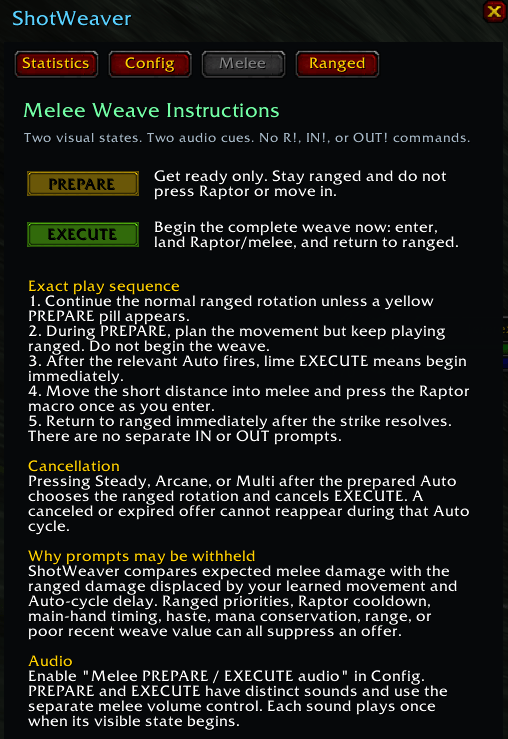
Melee Assist is deliberately opt-in and uses two simple prompts:
- PREPARE — remain at range and get ready.
- EXECUTE — begin the complete enter, strike, and return weave.
ShotWeaver estimates expected melee value against the ranged damage displaced by learned movement and Auto-cycle delay. Ranged priorities, Raptor cooldown, weapon timing, haste, mana, range, and recent weave results can suppress an offer. Fight mechanics and survival always take priority.
Guild raid collection
ShotWeaver ships as one public addon. Collector capability is dormant by default and must be deliberately enabled per character. It is invisible outside eligible guild-group use.
Only successful boss encounters are eligible for sharing. Transfers occur through World of Warcraft's addon-message channel between eligible guild members in the current group, require per-raid permission, and use checksums and acknowledgements. Wipes, trash, chat, and unrelated character information are not shared. Completed reports remain stored locally as a fallback.
Compatible protocol-3 clients can exchange raid data across ShotWeaver patch versions.
Commands
/hcaor/shotweaver— show or hide ShotWeaver./hca reset— reset current session statistics./hca on— enable coaching./hca off— disable coaching./swc on— enable guild collection for the current character./swc off— disable guild collection./swc status— show current collection readiness, detected Hunters, current-raid activity, transfer queue, and retained history.
Compatibility
ShotWeaver targets The Burning Crusade Classic Anniversary 2.5.5 using interface version 20505. It has no required addon dependencies and uses no external network service.
Installation
Install ShotWeaver through the CurseForge app, or extract it so the addon appears at:
World of Warcraft/_anniversary_/Interface/AddOns/ShotWeaver/ShotWeaver.toc
Enable ShotWeaver from the AddOns screen at character selection, then log in or reload the interface. Type /hca to open the display.
Version 0.11.24-beta is the current public beta. Fight mechanics always take priority over an optimization prompt. Feedback and reproducible bug reports should include the addon version and Practice JSON when available.
ShotWeaver Team