ShiftFocusRemake(with focus casting alert)
- By
Set your focus on mouseover units with **Shift + Left Click**, optionally applying a raid marker at the same time.
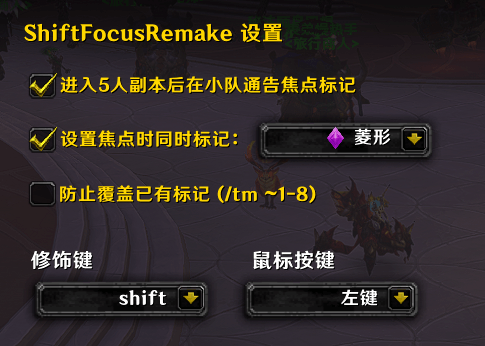
Snipaste_2026-08-25_11-34-48.png
Description
ShiftFocusRemake
Set your focus on mouseover units with Shift + Left Click, optionally applying a raid marker at the same time.
This addon is forked from ShiftFocus (by 誓小言). This Remake exists to fix bugs and add new features.
Disclaimer: This addon is built solely for the author's personal use; features and updates follow the author's own needs. Anyone may use it, but it comes with no warranty or support — use at your own risk.
Features
- Hover over any unit frame or nameplate and press your hotkey to set focus — no targeting needed
- Works with Blizzard default frames and nameplates, plus popular unit frame addons: UUF, DandersFrames, Enhance Qol, EllesmereUI
- Optionally apply a raid marker while focusing — active everywhere except raid groups (5-player dungeons, outdoor parties, even solo); includes a "don't overwrite existing markers" mode (
/tm ~) - When entering a 5-player dungeon with marking enabled, automatically announce "I'll focus {marker} and interrupt" in party chat (enabled by default, dungeons only); also announces immediately when enabling marking or changing the marker in settings
- Plays a voice alert when your focus starts casting (locale-aware audio, on by default)
- Clear your focus when pressing the hotkey with no unit under the cursor (on by default, can be turned off in settings)
- Fully customizable hotkey: modifier (Shift / Alt / Ctrl) × mouse button (left / right / middle / button 4 / button 5)
Note: This addon does not register focus actions on party/raid frames, because Blizzard's built-in Click-Cast system conflicts with custom mouse bindings on party/raid frames. Use Blizzard's default click-cast or your unit frame addon's own feature to set focus on party/raid frames.
In-Game Usage
- Default: Shift + Left Click on any unit frame or nameplate
- Options:
ESC→ Game Options → AddOns → ShiftFocusRemake
简体中文
鼠标指向的单位,按 Shift + 左键 即可设为焦点,并可选同时打上团队标记。
本插件 Fork 自 ShiftFocus(作者:誓小言),因原插件需要修复 Bug 及新增功能而制作此 Remake 版本。
声明:本插件仅用于满足作者个人自用需求,功能与更新节奏以自身需求为准。他人可自行取用,但不提供任何保证或支持,使用风险与责任自负。
功能
- 鼠标指向任意单位框体或姓名版,按组合键即可设置焦点,无需选中目标
- 支持暴雪原生框体、姓名版,以及 UUF、DandersFrames、Enhance Qol、EllesmereUI 等主流单位框体插件
- 设置焦点的同时自动施加团队标记(可选):除团队副本外都生效(5 人副本、野外小队、野外单人);支持"不覆盖已有标记"模式(
/tm ~) - 进入5人副本后,若已启用标记,自动在小队通告:"我焦点{符号}并打断"(默认启用,仅5人本生效);在设置中启用标记或切换标记时也会立即通告
- 焦点开始读条时播放语音提醒(按客户端语言选择音频,默认开启)
- 鼠标指向空白处按下组合键时清除焦点(默认开启,可在设置中关闭)
- 组合键完全可自定义:修饰键(Shift / Alt / Ctrl)× 鼠标按键(左 / 右 / 中 / 侧4 / 侧5)
注意:本插件不会在小队/团队框架上注册焦点动作,因为暴雪自带的"点击施法"系统会与小队/团队框架上的自定义鼠标绑定冲突。若需要在队友框架上快速设置焦点,请使用暴雪默认点击施法或相关单位框体插件的自带功能。
游戏内使用
- 默认操作:Shift + 左键 点击任意单位框体或姓名版
- 设置面板:
ESC→ 选项 → 插件 → ShiftFocusRemake
正體中文
滑鼠指向的單位,按 Shift + 左鍵 即可設為焦點,並可選擇同時打上團隊標記。
本插件 Fork 自 ShiftFocus(作者:誓小言),因原插件需要修復 Bug 及新增功能而製作此 Remake 版本。
聲明:本插件僅用於滿足作者個人自用需求,功能與更新節奏以自身需求為準。他人可自行取用,但不提供任何保證或支援,使用風險與責任自負。
功能
- 滑鼠指向任意單位框架或名條,按組合鍵即可設定焦點,無需選中目標
- 支援暴雪原生框架、名條,以及 UUF、DandersFrames、Enhance Qol、EllesmereUI 等主流單位框架插件
- 設定焦點的同時自動施加團隊標記(可選):除團隊副本外都生效(5 人地城、野外小隊、野外單人);支援「不覆蓋已有標記」模式(
/tm ~) - 進入5人地城後,若已啟用標記,自動在隊伍通告:「我焦點{符號}並中斷」(預設啟用,僅5人地城生效);在設定中啟用標記或切換標記時也會立即通告
- 焦點開始施法時播放語音提醒(依用戶端語言選擇音訊,預設開啟)
- 滑鼠指向空白處按下組合鍵時清除焦點(預設開啟,可在設定中關閉)
- 組合鍵完全可自訂:修飾鍵(Shift / Alt / Ctrl)× 滑鼠按鍵(左 / 右 / 中 / 側4 / 側5)
注意:本插件不會在隊伍/團隊框架上註冊焦點動作,因為暴雪自帶的「點擊施法」系統會與隊伍/團隊框架上的自訂滑鼠綁定衝突。若需要在隊友框架上快速設定焦點,請使用暴雪預設點擊施法或相關單位框架插件的自帶功能。
遊戲內使用
- 預設操作:Shift + 左鍵 點擊任意單位框架或名條
- 設定面板:
ESC→ 選項 → 插件 → ShiftFocusRemake
ShiftFocusRemake(with focus casting alert) Team