ShiftBar
- By
Druid action bar paging that keeps up with every form change, including powershifts in combat.
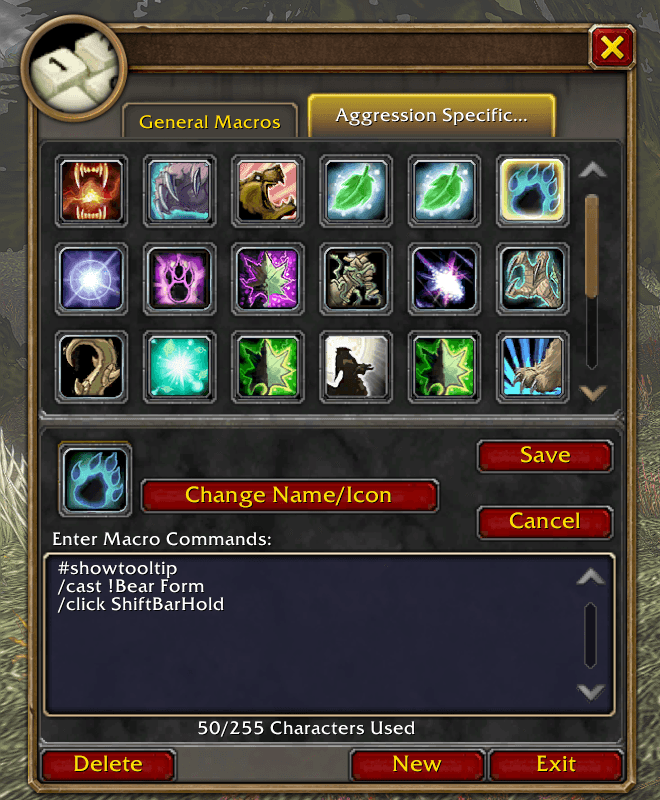
ShiftBar-1-powershift-macro.png
Description
Your druid action bar switches with every form change, even after a powershift.
On WoW Forever the main action bar sometimes doesn't follow your form. This happens most often after a powershift (/cast !Bear Form): the bar falls back to the caster page and stays there. ShiftBar takes over paging for the Blizzard main bar (ActionButton1-12). It works whether you shift by clicking, with a macro or with a ! macro, and it works in combat and out of combat.
Features
- Each form gets its own bar page: Bear, Cat, Cat + Prowl, Moonkin/Tree
- Every page can be changed, and 0 means "don't switch"
- Powershift fix: add one line to your macro and the bar keeps its page
- Uses Blizzard's own buttons, so no new bars and no extra frames
- Lightweight, with no dependencies
Default pages
| Form | Page |
|---|---|
| Bear | 9 |
| Cat | 7 |
| Cat + Prowl | 8 |
| Moonkin / Tree | 10 |
| Travel / Aquatic / caster | normal bar |
Powershift macro
The Forever client briefly reports "no form" after a powershift. Add /click ShiftBarHold to the macro:
#showtooltip
/cast !Bear Form
/click ShiftBarHold
Commands (/shiftbar or /sbar)
| Command | Effect |
|---|---|
/sbar |
Show the pages and which forms are learned |
/sbar bear 2 |
Set the page for a form (0 = no switch) |
/sbar on / off / reset |
Enable, disable, restore the defaults |
/sbar debug |
Show the bar state (handy for bug reports) |
Notes
- Disable DruidActionBarPager if you use it, because both change the same bar.
- Inspired by DruidActionBarPager by Malikor (GPLv3). ShiftBar is a separate implementation.
License: GPL-3.0-or-later
ShiftBar Team