OOMCall-1-settings.png
Description
Never run dry in silence. OOMCall does /oom for you when your mana runs low, and can tell your group too.
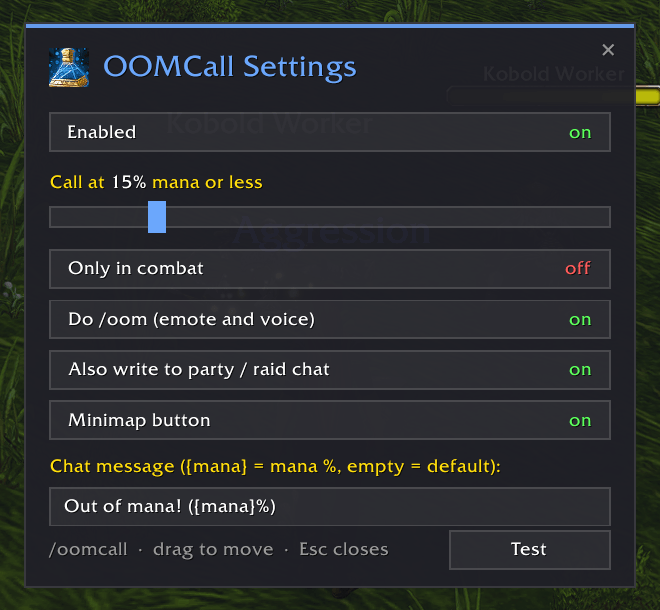
Healers and casters are busy when the mana bar empties. OOMCall watches your mana and, once it drops below the percent you set, plays the /oom emote with its voice line. If you like, it also writes a short message to party or raid chat, so your group knows to slow down.
Features
- Calls once when your mana drops to your threshold (default 15 %), then waits until you have drunk back up before it can call again
- /oom emote and voice line out of combat, plus an optional party / raid message (also in combat)
- Your own message text,
{mana}is replaced by your mana in percent - Only in combat (default) or always
- At least 30 seconds between two calls, no spam
- Silent when you have no mana bar (e.g. druid in bear or cat form, warriors, rogues) and while dead
- Settings window, test button and a minimap button
- Lightweight, with no dependencies
How to use
- Open the settings with
/oomcallor a left-click on the minimap button. - Pick your threshold with the slider (5 % to 60 %).
- Press Test to hear and see what your group will get.
- Minimap button: left-click opens the settings, right-click turns OOMCall on or off, drag moves it around the minimap.
Commands (/oomcall or /oc)
| Command | Effect |
|---|---|
/oomcall |
Open the settings window |
/oomcall on / off |
Turn OOMCall on or off |
/oomcall threshold 20 |
Call at 20 % mana or less |
/oomcall test |
Do the call now |
/oomcall minimap |
Show or hide the minimap button |
Notes
- How the mana is measured: WoW Forever does not let addons read your current mana. OOMCall measures it with the spells in your spellbook and on your action bars instead: it knows what each spell costs and sees when one can't be cast for lack of mana. The call comes when a spell that costs about your threshold or less runs out of mana. The more spells with different costs you know, the closer it gets to your exact threshold.
- The percent in the chat message is an estimate.
- The chat message is off by default. Turn it on in the settings if your group wants it.
- The game blocks emotes from addons in combat, so in combat OOMCall only sends the chat message. With "only in combat" on (the default) there is no emote at all, so turn the chat message on.
- When you are not in a group only the emote is played.
- Settings are saved per account.
License: GPL-3.0-or-later
OOMCall Team