Shaw's Decursive
- By
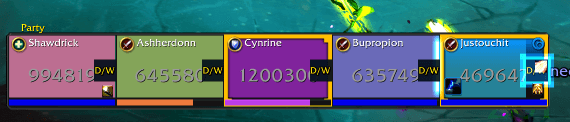
Configurable dispel and whisper buttons with range feedback on Blizzard’s default party and raid frames.

Screenshot 2026-10-18 144015.png
Screenshot 2026-10-18 145039.png
Description
Shaws Decursive adds a small Dispel / Whisper button to each player’s Blizzard party or raid frame. Keep your normal frames, targeting, and mouseover healing while placing these extra controls beside the correct player.
Default controls
Left-click: cast your learned primary dispel on that player.
Right-click: send a customizable whisper reminder.
Shift + left-click: cast Blessing of Freedom as a paladin or Cauterizing Flame as an evoker, when learned.
All three mouse-button and modifier combinations are configurable. Defaults are set up automatically—no macros or Blizzard click-casting setup required. Primary dispel selection supports all healer classes.
Dispel and range feedback
Red feedback when a player is confirmed out of range.
Blizzard dispel-type colors, prominent ready flashing, spell icons, and cooldown text.
A white paladin cue when Blizzard reports crowd control and Blessing of Freedom is ready and in range.
A visible whisper countdown to help prevent accidental repeat messages.
Party range checks use your shortest learned direct healing spell. Raid checks use Blizzard’s general unit range check. Unknown range results do not trigger a red warning.
The white Freedom cue is a reminder to assess the effect yourself. It does not guarantee that Freedom can remove it or detect every slow or root. Range checks do not establish line of sight.
Whisper protection
The default whisper timer is 30 seconds per player. Each recipient has an independent timer that survives /reload. The timer never blocks your dispel or secondary spell, and no message is sent automatically when it expires.
Customization
Adjust button width, placement, spacing, whisper text, repeat timer, mouse bindings, visual feedback, spell icons, cooldown displays, and minimap visibility. Show or hide the buttons whenever needed.
Open settings using:
Options → AddOns → Shaws Decursive
The minimap button
/sdor/shawsdecursive
Compatibility
Built for World of Warcraft Retail 12.1.5 and Blizzard’s default party and raid frames. No external addon dependency is required. Third-party replacement frames are not supported.
Spells and whispers require your click. Protected configuration changes apply after combat ends.
Support
When reporting a problem, include your class and specialization, game version, native frame style, /sd status output, and any Lua error text.
Creator links
Both the /sd options window and WoW’s AddOns settings page include creator-link buttons. Click one to display its address, press Ctrl+C, then paste it into your browser.
Shaw's Decursive Team