Shardot — Soul Shards & Combo Points
- By
Lightweight Soul Shard and Combo Point tracker for WoW Forever, with customizable icons, dots, segmented bars, colors, and fonts.
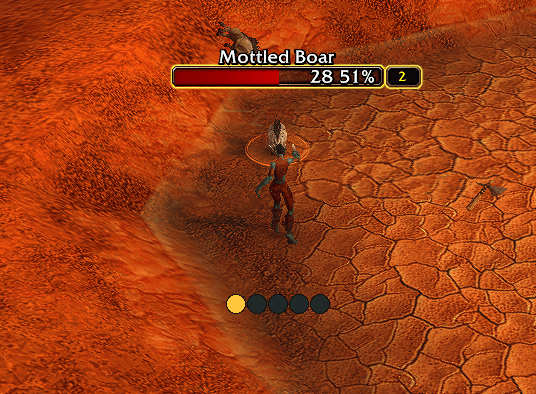
dots-1.png
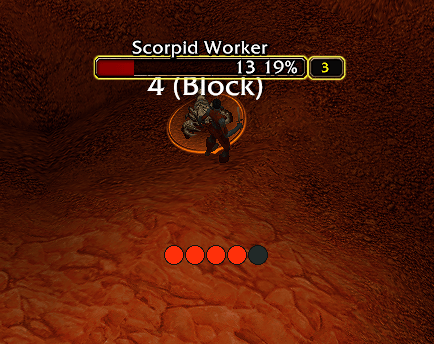
dots-2.png
Description
Shardot
Soul Shards & Combo Points for WoW Forever
Keep your resources visible with a clean, lightweight tracker that fits your UI.
Shardot tracks Soul Shards in your Warlock’s bags and Combo Points for Rogues and Druids in Cat Form.
🌐 Official Website
shardots.online — Visit the official Shardot website for more information, updates, and addon details.
Features
Soul Shards
- Counts shards carried in your bags, including soul bags.
- Excludes bank storage.
- Choose a standalone counter or an item icon with the count overlaid.
- Add an optional bar with a configurable shard goal.
- Customize the counter’s font and color independently.
Combo Points
- Five indicators that fill as you gain Combo Points.
- Choose circles or square and rectangular segments.
- Join segments together or adjust their spacing.
- Customize width, height, borders, highlights, and colors.
- Use a fixed color or a gold-to-red progression as Combo Points increase.
- Show an optional numeric counter.
- Automatically hides outside Cat Form for Druids.
Make it yours
- Drag the tracker wherever you want it.
- Adjust scale and opacity.
- Toggle the background, label, and visibility at zero.
- Preview your layout before using it in combat.
- Save settings separately for each character.
Getting started
- Install Shardot and enable it in your addon list.
- Type
/shardotor/sdto open settings. - Enable Preview to explore the appearance.
- Disable Lock position to drag the tracker.
- Lock it again when you’re happy with the placement.
The settings panel is organized into General, Design, and Colors. Changes apply immediately.
Lightweight by design
Shardot updates through game events, with no continuous polling, combat-log processing, or external libraries.
Compatibility
Designed for WoW Forever — Interface 16001.
When the client restricts resource values during combat, the gold-to-red progression uses a fixed color for each Combo Point position. Hiding at zero is only applied when the value can be read.
Updating from Forever Resources
Disable or remove Forever Resources before enabling Shardot to avoid duplicate trackers. Settings from the old addon are not imported automatically.
Feedback
Found a bug or have a suggestion? Leave a comment with your client version, character class, and steps to reproduce the issue. Include the Lua error message when available.
Support development
Enjoying Shardot? Help support future improvements with a voluntary donation.

Thank you for your support! All features remain free.
Shardot — Soul Shards & Combo Points Team