DRPulse - Diminishing Returns Tracker
- By
DRPulse
Diminishing Returns Tracker for WoW: Forever
Track crowd control. Time your next move. Stay one step ahead.
DRPulse brings clear diminishing returns tracking to your target and enemy nameplates, with reset timers, DR stages, and immunity indicators built for World of Warcraft: Forever.
Customize your display, choose what matters to your character, and configure everything from a standalone, movable settings window.
🌐 Official Website · ❤️ Support Development
⚔️ See Your Crowd-Control Window
Keep DR information close to the fight. Follow category resets and see the expected effectiveness of your next crowd-control effect.
50% duration → 25% duration → Immunity
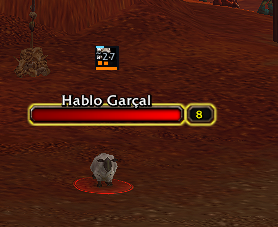
Follow Multiple Enemies
Display DR indicators directly on enemy nameplates, with configurable icon sizes and placement above or below each plate.
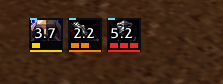
Screenshots illustrate gameplay tracking. Appearance may vary by version and settings.
✨ Built Around Your Playstyle
Clear DR Information
- Target tracking: A movable display for your current enemy target.
- Enemy nameplates: DR information beside the enemies you are watching.
- Reset timers: Track the time remaining until a category resets.
- Flexible stage indicators: Choose application pips, a count, or the expected next CC duration.
- Icon choices: Display the last CC spell or a fixed category icon.
- Timer text and cooldown swipe: Enable either or both.
What does the timer mean? It counts down to the DR reset, not the remaining duration of the crowd-control effect.
Make It Your Own
- Move and resize the target display.
- Set target and nameplate icon sizes independently.
- Adjust nameplate icon position and spacing from the plate.
- Choose Auto, Always, or Never for each DR category.
- Filter categories to crowd control your character can apply.
- Include supported CC items carried in your bags.
- Add or correct custom spell categories through settings.
- Preview your configuration before using it in combat.
🎛️ Your Settings, in Their Own Window
Type /drpulse to open the standalone settings window. Drag its title bar to move it, and close it with the close button or Escape.
Five focused sections keep everything organized:
| Section | What you can configure |
|---|---|
| General | Enable tracking, choose displays, lock the target display, and adjust filters. |
| Appearance | Category visibility, icon sizes, placement, timers, and visual style. |
| Detection | Tracking sources, DR reset timing, and Blizzard data options. |
| Tools | Custom spells, diagnostics, and maintenance actions. |
| Guide | Mouse controls and command reference. |
Open settings from the minimap button, AddOn Compartment, or the target display’s All options… shortcut.
An optional PayPal support link is available at the bottom of the window.
🛡️ Eight Supported DR Categories
Stun · Incapacitate · Disorient / Fear · Root
Silence · Disarm · Taunt · Knockback
Use per-category visibility controls to keep your display focused on the information you need.
🔍 Tracking and Data Confidence
DRPulse combines several available sources of evidence:
- Blizzard’s native diminishing returns feed.
- Readable crowd-control auras on enemies.
- Your own and your pet’s casts.
- Party and raid member crowd control.
- Immune, miss, and resist feedback.
- Optional estimates for unconfirmed casts.
WoW: Forever can restrict enemy combat information. DRPulse respects those restrictions and distinguishes confirmed observations from estimates.
Grey timers prefixed with ~ indicate estimated reset timing. An estimated cast does not confirm that the spell landed, and estimated immunity is not a guaranteed result.
Prefer to hide unconfirmed casts? Disable Show unconfirmed casts under Detection → Tracking sources.
⌨️ Slash Commands
| Command | Action |
|---|---|
/drpulse |
Open settings and print the command list. |
/drpulse options |
Open settings without printing commands. |
/drpulse help |
Print the command list. |
/drpulse unlock |
Show controls for moving and resizing the target display. |
/drpulse lock |
Lock the target display in place. |
/drpulse preview |
Show sample icons for 20 seconds. |
/drpulse reset |
Restore the target display’s default position. |
/drpulse clear |
Clear all currently tracked DR states. |
/drpulse all |
Set the global filter to all categories. |
/drpulse mine |
Set the global filter to categories you can apply. |
/drpulse status |
Print version, tracking counters, and Blizzard feed diagnostics. |
Aliases: /drpulse config opens settings, and /drpulse test starts the preview.
Individual Always/Never category settings override the global filter.
Custom spells are managed through Tools.
/drpulse resetresets the target display’s position, not your full configuration.
📦 Installation
- Download and extract the addon ZIP.
- Place the Drpulse folder inside your WoW: Forever
Interface/AddOns/directory. - Make sure the files are not nested inside a second
Drpulsefolder. - Restart World of Warcraft.
- Type
/drpulseto configure your display.
Updating? Close the game completely before replacing the addon folder.
DRPulse does not require Forever DR or any other addon to run.
🔧 Version and Compatibility
| Current version | 2.0.0-beta.5 |
| Game | World of Warcraft: Forever |
| Target game version | 1.60.1 |
| Interface | 16001 |
| Flavor | Camelot |
| Release type | Beta |
New in This Version
- Standalone settings window with a draggable title bar.
- Close-button and Escape-key support.
- Persistent donation area with a selectable PayPal link.
- Settings shortcuts open the new window directly.
- Removed the active ForeverSettings dependency.
Found an issue? Include your addon version, steps to reproduce it, and the output of /drpulse status when reporting tracking problems.
🔒 Privacy
DRPulse is self-contained:
- No telemetry or analytics.
- No advertisements.
- No collection or transmission of personal information.
- No required external addon dependencies.
❤️ Support DRPulse
DRPulse is free and will remain free.
If it helps you in PvP, an optional one-time donation supports continued development, fixes, and improvements.

You can also copy the donation link directly from the settings window.
Thank you for supporting independent addon development.
DRPulse: Track smarter. Control better.
DRPulse - Diminishing Returns Tracker Team