Shadow Casting Timeline
- By
A scrolling timeline designed to teach users how to optimize a shadow priest's rotation.
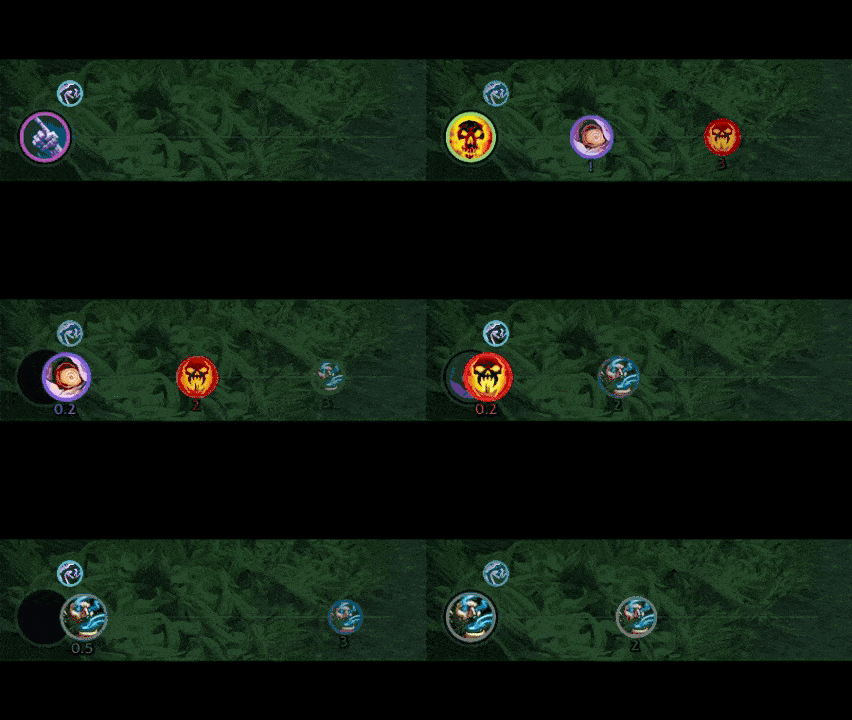
SCT-Video-Final-GIF (1).gif
Description
Shadow Casting Timeline (SCT)
A scrolling timeline of your upcoming casts and rotation.
SCT draws a guitar-hero style runway. Ability icons slide left toward a target ring, and when an icon reaches the ring you press it.
Built for TBC Shadow Priest priority casting. A modern UI, responsive, and intuitive.
Features
The rotation
Shows the upcoming actions in order with a countdown.
Mind Flay only clips cleanly. The channel is interrupted at the 2-tick mark when something outranks it, so you never lose a partial tick or have dead GCD time.
- Vampiric Touch. On by default.
- Shadow Word: Pain. On by default.
- Mind Blast. On by default.
- Shadow Word: Death (Auto Death). On by default. Gated by own health (default 60%).
- Mind Flay. Always on, final filler.
Cast feedback
The hit zone flashes when you land the charted cast. It fires on any successful cast that matches what the bar told you to press next.
Cooldown badges
Shadowfiend and Inner Focus are shown as small badges around the hit zone.
Opener
Out of combat, the bar shows Vampiric Touch as your first cast. After entering combat, the priority engine starts and the bar begins scrolling.
Everything else
- Only shows in Shadow. You can turn it on for Discipline and Holy in the options if you want.
- DoTs refresh only once they expire.
- Drag the bar anywhere.
/sct lockto freeze it.
Getting started
After installing, log in on a Shadow Priest, and the bar appears. Type /sct config or use the mini-map icon to open the options panel, where you can set visibility, priority-list entries, the Auto Death health floor, and cooldown badges.
Slash commands
| Command | Purpose |
|---|---|
/sct config |
Open the options panel |
/sct unlock /sct lock |
Move or fix the bar |
/sct fillers |
List the priority-list entries and whether they're on |
/sct filler |
Toggle one (vt, swp, mindBlast, shadowWordDeath, mindFlay) |
/sct debug |
Print the current plan, plus DoT remaining time, cooldowns, and health/mana |
Requirements
WoW Classic 2.5.x (TBC / Anniversary). Priest.
Feedback
Please send any feedback, requests or bugs by in-game mail to Allsky on Dreamscythe.
Shadow Casting Timeline Team