Retribution Twisting Timeline
- By
A scrolling timeline designed to teach users how to execute seal twists and optimize a retribution paladins rotation.
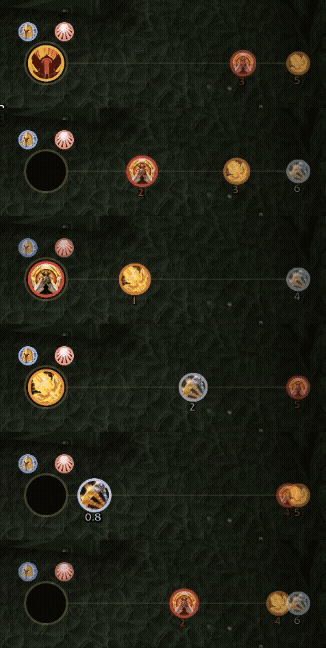
In-Combat-GIF-Compressed.gif
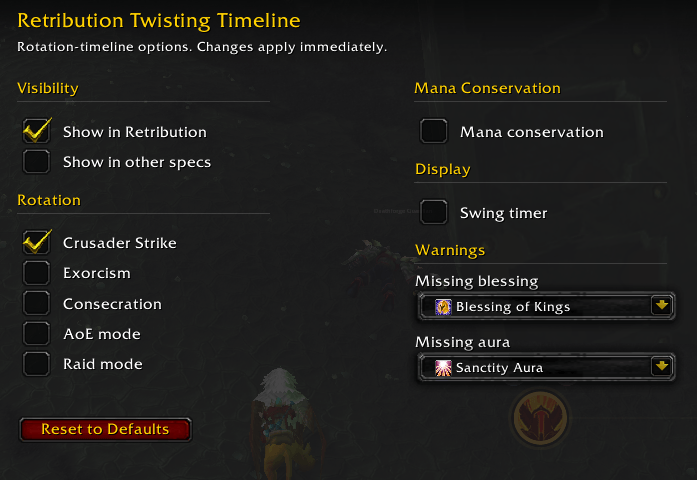
rtt config.png
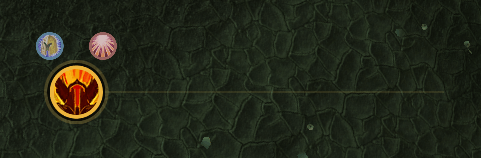
rtt-out-of-combat.png
Description
Retribution Twisting Timeline (RTT)
A scrolling timeline of your upcoming swings and rotation.
RTT draws a guitar-hero style runway. Ability icons slide left toward a target ring, and when an icon reaches the ring you press it.
Built for TBC Retribution seal twisting. A modern UI, responsive, and intuitive.
Macro
- Ensure you are using the following macro for Judgement:
#showtooltip Judgement /cast Judgement /startattack /cast Seal of Command(Rank 1)
Features
The rotation
Shows the upcoming actions in order with a countdown.
Gap fillers never clip a twist. A filler is only suggested if its GCD finishes before the twist window opens.
*   Crusader Strike. On by default.
*   Auto Exorcism. Off by default. While on only suggested against Undead and Demon targets.
*   Consecration. Off by default. Only suggested in AoE, either from the manual AoE mode toggle or when two or more enemy nameplates are up (you need enemy nameplates turned on).
Extended Twist
The twist window is normally about 400ms wide. If enabled, when you press the twist macro up to 150ms too early, it holds and releases the cast at exactly the right moment instead of landing early and wasting the twist, effectively widening your window on the early side. Pressing on time or late works the same. It will also help ensure your Judgement and SoC changes happen after your swing.
Generate the three necessary macros and enable inside of /rtt config
Latency Compensation
Seal twisting is sensitive to ping. Your cast takes time to reach the server, and the swing timer is built from events that already arrived late. RTT reads your world latency and moves the twist press earlier to match. Below roughly 250ms nothing changes. Above that it corrects itself.
Use /rtt latency if you want to enter a value by hand.
Swing timer
A marker on the runway shows when your next swing lands. This matters when a parry haste resets your swing and your whole upcoming rotation shifts. (Can be disabled in /rtt config)
Twist feedback
The hit zone flashes when you land a twist. It only fires if Seal of Command was up, you were in combat, and the cast landed inside the window.
Buff and aura warnings
Choose a blessing and an aura in the options. If it's missing, a small icon of that buff pulses next to the hit zone.
Practice Mode
Practice twisting while out of combat by using /rtt practice, or enabling it from the /rtt config menu. End practice mode by using /rtt practice, pressing the close button, or entering combat.
Openers
Default Mode - Out of combat it tells you to get Seal of Command up, then shows the twist seal as your engage.
Raid Mode - Swaps SoC for Seal of the Crusader, then Judge.
Everything else
- Only shows in Retribution. You can turn it on for Holy and Protection in the options if you want.
- Works out whether you have Seal of Blood or Seal of the Martyr.
- Reads your swing speed fresh, so haste procs, Bloodlust and weapon swaps are tracked.
- Drag the bar anywhere.
/rtt lockto freeze it. - The swing timer library is bundled.
Getting started
After installing, log in on a Retribution Paladin, and the bar appears. Type /rtt config or use the mini-map icon to open the options panel, where you can set visibility, fillers, AoE and raid mode, the swing timer, and the buff/aura warnings.
Slash commands
| Command | Purpose |
|---|---|
/rtt config |
Open the options panel |
/rtt unlock /rtt lock |
Move or fix the bar |
/rtt raid |
Toggle raid opener mode |
/rtt pratice |
Toggle practice mode |
/rtt fillers |
List the fillers and whether they're on |
/rtt filler |
Toggle one (cs, exorcism, consecration) |
/rtt latency |
Show the measured latency. /rtt latency to override, /rtt latency auto to go back |
/rtt debug |
Print the current plan, plus your latency and press timing |
Requirements
WoW Classic 2.5.x (TBC / Anniversary). Paladin.
Feedback
Please send any feedback, requests or bugs by in-game mail to Allsky on Dreamscythe.
Retribution Twisting Timeline Team