


SaveMyItems
- By
SaveMyItems lets you build and browse a personal list of items with live tooltip previews, owned counts, and price tracking - all in a compact, draggable window.
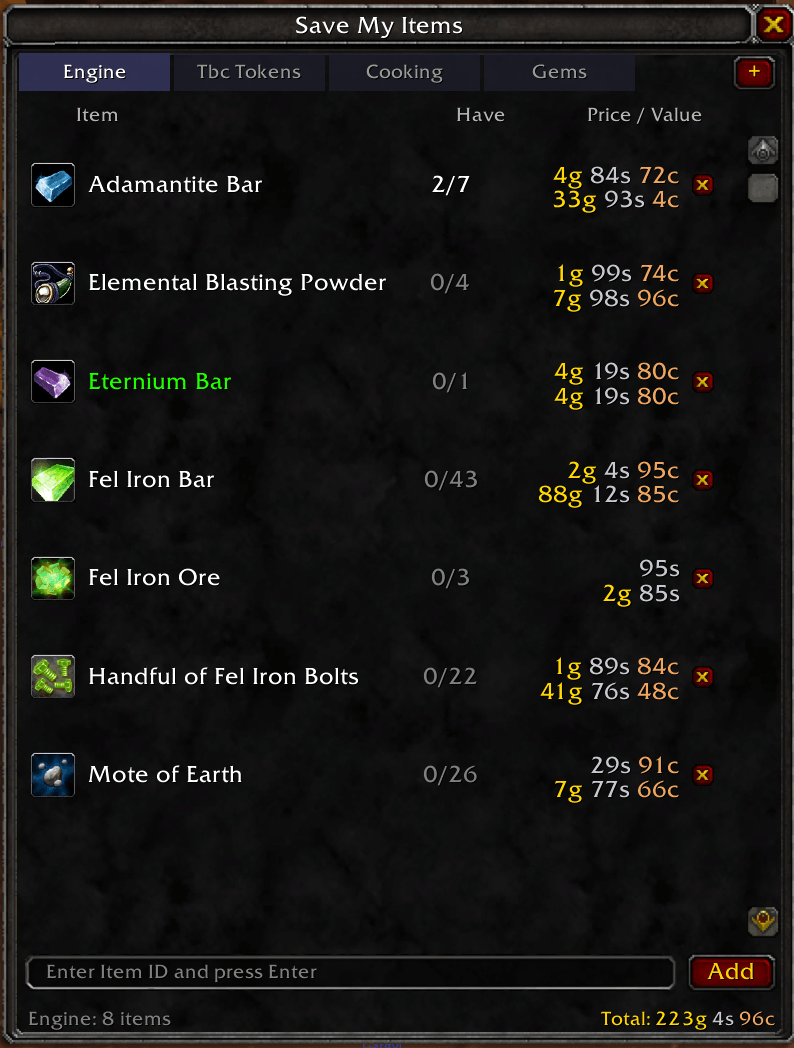
Screenshot 2026-03-22 at 23.21.54.png
Description
Save My Items
Save any item to a personal list and browse it anytime — with full tooltips, owned counts, and price tracking.
Features
- Save any item — Shift-click items while the window is open, type an Item ID, or use slash commands
- Categories — Organize your items into up to 20 custom categories with a tabbed interface; create, rename, and delete tabs via right-click or commands
- Owned count — Instantly see how many of each item you have in bags and bank
- Price tracking — Vendor sell price for Poor (gray) items; Auction House prices for everything else via Auctionator integration
- Per-item and total value — Unit price and total value per row, plus a grand total at the bottom of each category
- Full tooltips — Hover any row for the complete in-game tooltip with ownership and pricing details
- Persistent — Item lists, active category, and window position are saved between sessions
- Lightweight — Zero libraries, zero required dependencies
How to Use
- Open the window with
/smior/smi show - Shift-click any item in your bags, inventory, or elsewhere to add it to the active category
- Or type an Item ID into the input box at the bottom and press Enter
- Switch categories using the tabs at the top; right-click a tab to rename or delete it
- Click the + button to create a new category
Slash Commands
| Command | Description |
|---|---|
/smi or /smi show |
Open the window |
/smi hide |
Close the window |
/smi toggle |
Toggle the window |
/smi add <itemID> |
Add an item to the active category |
/smi remove <itemID> |
Remove an item |
/smi list |
Print items in chat |
/smi clear |
Clear all items in the active category |
/smi cat list |
List all categories |
/smi cat add <name> |
Create a new category |
/smi cat remove <name> |
Delete a category |
/smi cat rename Old | New |
Rename a category |
/smi cat <name> |
Switch to a category |
/smi help |
Show all commands |
Optional Dependencies
- Auctionator — enables Auction House price display for non-gray items
Compatibility
- World of Warcraft Classic Anniversary Edition (Interface 20505)
SaveMyItems Team
