bags.png
settings.png
Description
Rummage — List-View Bags & Bank for WoW Forever
Every item you own, in one sortable table.
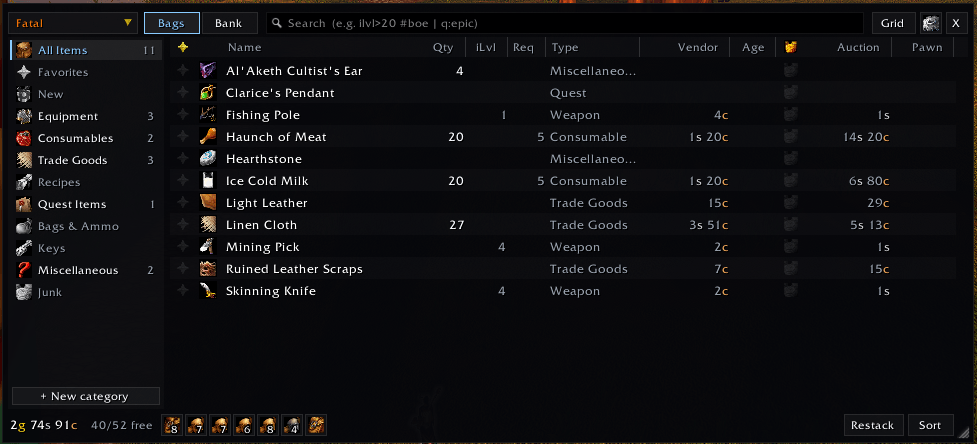
Rummage replaces the default bags and bank with a clean, fast table. Each row shows an item's full name, item level, required level, type, vendor value, auction price, upgrade status and more. Sort by any column, filter by category in one click, and search with a real query language. You can also browse the bags and bank of every character on your account from anywhere.
Rummage is built specifically for the WoW Forever client. It brings together a list-view bag addon, its Scrap / Auctionator / TradeSkillMaster / Pawn / Can I Mog It? plugins, and cross-character item tracking in one addon with no required dependencies.
✦ Highlights
- Table or grid — a configurable list view, or an icon grid with item level, stack count and status badges
- Sort by anything — name, quality, item level, required level, type, value, auction price, Pawn upgrade, age and more
- One-click categories — Equipment, Consumables, Trade Goods, Quest Items, Junk and more, with live counts and sub-filters
- Powerful search —
ilvl>20 #boe,q>=rare | #upgrade,value>5g - All your characters — bags, bank, equipped gear, mail and gold for every character, viewable from anywhere
- Upgrade alerts — loot something better than what you're wearing and equip it with one click
- One-click junk selling — with favorites protection, buyback-safe mode and auto-repair
- Matches your UI — a native WoW Forever theme by default, plus ElvUI, EllesmereUI, GW2 UI, Tukui and NDui styles
- Built for performance — memory-pooled, event-coalesced, and idle when closed
✦ The Window
- Bags and bank in one window, with Bags / Bank tabs (the keyring is included with your bags)
- List view with columns you can show, hide, reorder and resize (drag a header edge; right-click a header to toggle columns)
- Grid view with quality borders, item level, stack count, favorite, junk, upgrade, quest-starter and new-item badges
- Group by category, type, quality or bag, with collapsible group headers
- Combine stacks of identical items into a single row
- Favorites and new items can be pinned to the top of the list
- Movable, resizable, scalable and lockable, with adjustable background opacity
Available columns: Favorite · Icon · Name · Quantity · Item Level · Required Level · Type · Subtype · Equip Slot · Binding · Vendor Value · Time Since Acquired · Bag · Junk — plus integration columns for Auction price, Disenchant value, TSM price, Pawn upgrade % and transmog status.
✦ Finding Items
Categories
A sidebar with live item counts:
All Items · Favorites · New · Equipment · Consumables · Trade Goods · Recipes · Quest Items · Bags & Ammo · Keys · Miscellaneous · Junk
Rummage can remember the last category you used — the bag reopens right where you left off, even after logging out. Prefer a clean start? Turn it off and the bag always opens on All Items.
Choosing a category shows sub-filter chips for its subtypes (Cloth, Leather, Herb, Potion…). You can also create your own categories from any search query. Click + New category in the sidebar, or manage them under Settings › Categories.
Search
Type plain words, or combine fields, comparisons and keywords:
| Example | Finds |
|---|---|
linen |
Name, type, subtype or slot containing "linen" |
ilvl>20 · ilvl:10-20 · lvl<=30 |
Item level / required level |
q:rare · q>=uncommon |
Quality |
type:armor · sub:cloth · slot:head |
Type, subtype, equip slot |
count>5 · bag:2 |
Stack size, bag number |
value>1g · ah>50s · tsm>2g · pawn>5 |
Vendor value, auction value, TSM value, Pawn upgrade % |
#fav #new #junk #upgrade #boe #bop #bound #gear #consumable #quest #trade #recipe #key #usable |
Keywords |
Separate terms with a space for AND, use | for OR, and put ! in front of a term for NOT.
Example: #gear q>=uncommon !#bound finds unbound gear of uncommon quality or better.
You can also click a bag icon in the footer to show only that bag.
✦ Item Management
- Favorites — mark items with any of 8 raid-marker icons (click the favorite column, or Alt+click the item)
- New items are highlighted, and the Age column shows how long ago each item arrived
- Unusable gear (required level too high) is tinted red; quest-starter items get a badge
- Cooldown swipes and locked-item dimming, just like the default bags
- Standard item interaction works as usual: click, right-click, drag, Shift-click to link, Ctrl-click to preview
Junk & Merchants
- Grey items count as junk by default; mark or unmark anything as junk (junk column, or Alt+right-click)
- Sell Junk with one click at any merchant, or turn on automatic selling
- Favorites are never sold
- Buyback-safe mode sells at most 12 items per visit, so every sale can be bought back
- Auto-repair, using guild funds first when they're available
- Uses Scrap's junk list automatically if Scrap is installed
Moving Items
- Restack — merges partial stacks of the same item
- Sort — runs Blizzard's physical bag sort when the client provides it
- Transfer — at the bank, moves everything currently listed (after your search and filters) to the other side. Search
#trade, click To Bank, done. - Empty a bag — right-click its icon in the footer
- Drop to list — drop an item on empty list space to put it in the first free slot
- Equip bags by dropping them onto the bag bar; purchase bank bag slots from the bank bag bar
✦ Upgrade Alerts
Loot a better chest piece in the middle of a quest and you'll know right away. When you pick up, receive or are rewarded with gear that beats what you're wearing, a small popup appears with the item, why it's better and a one-click Equip button.
- Unintrusive — compact, movable and themed to match your UI. It never steals focus and fades away on its own after a configurable time, pausing while you hover it.
- Smart decisions — with Pawn installed, Pawn's stat weights decide and the popup shows the upgrade percentage. Without Pawn, Rummage compares item level against your equipped gear.
- Knows your character — skips gear you can't use (class, level, weapon proficiency) and armor below your armor type, and handles dual-wield and two-handed weapons correctly
- Right slot every time — rings and trinkets replace your weaker one, and empty slots are filled first
- Combat-aware — click Equip mid-fight and the swap happens the moment combat ends
- Several upgrades at once? They queue up one after another, with a counter
- Hover the icon for the full item tooltip; right-click the X to never suggest that item again
- Bind-on-equip items still ask for Blizzard's usual confirmation before binding
- Preview and move the popup with
/rum upgrade
✦ Every Character, Everywhere
- Bags, bank, equipped gear, mailbox and gold are cached for every character you log in
- Switch characters from the name button to browse their bags or bank from anywhere, at any time
- Hover the gold display to see every character's gold and your account total
- Item tooltips show how many of that item each character has (bags / bank / equipped / mail), with an optional same-realm-only filter
- Remove old characters with one click
- Supports both classic bank bags and modern bank tabs
✦ Themes
Rummage is designed to look at home in your interface:
| Theme | Style |
|---|---|
| Forever (Blizzard) (default) | Uses the client's own modern Blizzard frame border and stone background with gold accents — matches the WoW Forever UI |
| ElvUI | Flat pixel borders; adopts your live ElvUI backdrop, border and value colors and font when ElvUI is loaded |
| EllesmereUI | Dark translucent panels with hairline borders |
| GW2 UI | Warm dark panels with gold accents |
| Tukui | Flat grey with a class-colored accent |
| NDui | Translucent black with a class-colored accent |
| Minimal Dark · Parchment · Classic Tooltip | Extra styles |
The default Auto setting picks the matching theme when one of these UI suites is installed. Fonts can be the theme default, any built-in WoW font, or any LibSharedMedia font. A class-colored accent is optional.
✦ Integrations
All integrations are optional and detected automatically — no plugins to install.
| Addon | What Rummage adds |
|---|---|
| Auctionator | Auction price and disenchant value columns; ah> search |
| TradeSkillMaster | Price column for any TSM custom price source (default DBMarket); tsm> search |
| Pawn | Upgrade arrows, an upgrade-percentage column, #upgrade and pawn> search, and Pawn-powered upgrade alerts |
| Can I Mog It? | Transmog status column |
| Scrap | Shared junk list for marking and selling |
| Syndicator | Rummage's tooltip counts step aside to avoid duplicates (configurable) |
| LibSharedMedia | Extra fonts |
| LibDataBroker / LibDBIcon | Launcher for Titan Panel, ElvUI datatexts and other broker displays; standard minimap button |
✦ Seamless Replacement
- Replaces the default bags and bank (including one-bag mode)
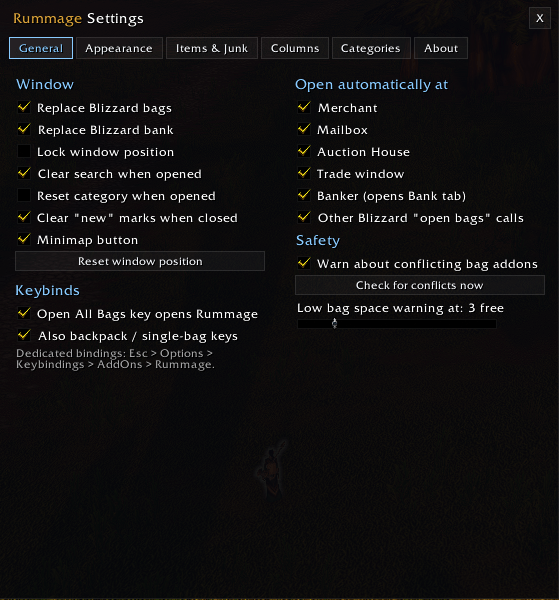
- Your "Open All Bags" key opens Rummage. You can optionally route your Backpack and Bag 1–5 keys too. This uses override bindings, so your saved keybinds are never changed.
- Dedicated keybinds under Keybindings › AddOns › Rummage: toggle bags, toggle bank, open and focus search
- Choose where it opens automatically: merchant, mailbox, auction house, trade window and banker are each toggled separately
- Minimap button and a settings entry in the Blizzard AddOns options
Conflict Protection
Running two bag addons causes missing items, duplicate windows and errors. On login, Rummage detects other bag addons and warns you in chat. It then offers Disable & Reload to fix it in one click. Detected addons include Baganator, Bagnon, ArkInventory, AdiBags, BetterBags, Combuctor, Sorted, LiteBag, cargBags, Inventorian, BaudBag and others, plus the ElvUI and NDui bag modules. Syndicator and BagSync are not bag replacements and are left alone.
✦ Performance
Rummage is built to stay out of your frame time:
- Does nothing while the window is closed, apart from keeping your item cache current
- Only the visible rows are drawn, however many items you own
- List entries and display rows are memory-pooled and reused between updates instead of being reallocated
- Burst events (looting, cooldowns, lock changes) are coalesced into a single update per frame, with refreshes capped at about 12 per second
- Item data is requested asynchronously and only the items Rummage asked for trigger an update
- Combat-safe: anything restricted in combat is deferred until combat ends — no taint, no blocked actions
- Built-in diagnostics:
/fdebugshows memory, frame time, event rates and timings live
✦ Commands
| Command | Action |
|---|---|
/rum or /rummage |
Toggle bags |
/rum bank |
Toggle bank (live at a banker, cached elsewhere) |
/rum search <text> |
Open bags with a search |
/rum config |
Settings |
/rum restack |
Combine partial stacks |
/rum sell |
Sell junk (at a merchant) |
/rum conflicts |
Check for conflicting bag addons |
/rum keys |
Show which keys open Rummage |
/rum upgrade |
Preview the upgrade popup (drag it where you like) |
/rum reset |
Reset window position |
/fdebug or /rum debug |
Diagnostics overlay (report, reset) |
Mouse shortcuts
- Alt+click an item — cycle its favorite marker
- Alt+right-click an item — toggle junk
- Click a bag icon — show only that bag · Right-click — empty it
- Shift or middle-click the minimap button — open the bank · Right-click — settings
✦ FAQ
Do I need any other addons? No. Every integration is optional.
Can I keep using Baganator or Bagnon alongside Rummage? Running two bag replacements at once isn't supported. Rummage will warn you and offer to disable the other one. Syndicator can stay installed.
How does Rummage decide what's an upgrade? If Pawn is installed, Pawn's scales decide. Otherwise Rummage compares item level with the item you're wearing in that slot, ignoring gear you can't use and armor below your armor type. You can turn off the item-level fallback, or the popup entirely, under Settings › Items & Junk.
Will it change my keybinds? No. Rummage uses temporary override bindings. Turn the option off and your original bindings work exactly as before.
Can I see my bank when I'm not at a banker? Yes. Once you've visited a banker on a character, its bank stays viewable from anywhere, read-only.
What about guild bank and equipment sets? WoW Forever doesn't have them, so they aren't shown.
I use EllesmereUI's Bags module. Turn off either that module or Rummage's bag replacement. Rummage can't detect that module automatically.
Something went wrong — how do I report it?
Enable Lua errors with /console scriptErrors 1. Then post the error, your client build and a /fdebug report in the comments or issue tracker.
✦ Installation
- Install with the CurseForge app, or download and extract the
Rummagefolder intoWorld of Warcraft\_classic_beta_\Interface\AddOns\ - Restart the game or type
/reload - Press your bag key
✦ License
Rummage is free and open source software, released under the GNU General Public License v3.0.
Author: Malikor
Rummage List-View Bags & Bank Team